6.3 Lab 3, Simulation of crank-piston system
6.3.2 Animation
6.3.3 Part 1
6.3.4 Part 2
6.3.5 Part 3
6.3.6 Appendix, source code
6.3.1 Problem description
6.3.2 Animation
The GUI based simulation was written in Matlab 2011a. A number of animated GIF files were made. In the table below, clicking on any image will start a gif animation in your browser.
These are relatively large animation GIF files and might take 1-2 seconds to load depending on network bandwidth. To run them locally, they can be downloaded as well.
|
Using low spring stiffness to reach 5000 RPM in one second. (5 MB) |
Using low spring stiffness, disk is heavier than above, was not able to reach 5000 RPM in 1 second. (600 KB) |
Same as above, but the torque was removed at 500 RPM. |

6.3.3 Part 1
The Lagrangian energy method was used to derive the equations of motion. The physical model used to represent the connection between the piston and the crank arm uses the method of Knarnopp-Margolis. This method uses a virtual spring and virtual damper for the connection between the piston and the crank arm instead of a rigid connection. This leads to a simpler mathematical model.
The equation of motion will now be derived based on this method.
Let \(f(\theta )\) be the distance which is shown in the diagram above as \(x^{\prime }\), The kinematic constraint is the following
The system is a 2 DOF, with generalized coordinates \(\theta ,x\).
Let \(I=\frac {MR^{2}}{2}\) be the moment of inertia of the disk (called \(J_{fw}\) in the above diagram) around an axis through the disk center, where \(M\) is the mass of the disk (called \(m_{fw}\) in the diagram). Let \(m\) be the mass of the cylinder (called \(m_{p}\) in the problem diagram).
The kinetic energy of the system is
Therefore the Lagrangian is
For \(\theta \) we find
and
Therefore the EQM for \(\theta \) is
Hence from the above we see that
Substituting the above back into Eq. (2) gives
Now to find the EQM for \(x\)
and
6.3.4 Part 2
Now Eqs. (7) and (9) above will be cast into first order form.
6.3.5 Part 3
The system was simulated on the computer. The first order equations above were solved using ode numerical solver. A GUI program was written to make it easier to do the simulation and observe the results. The following describes the simulation program user interface
Crank to 5000 RPM
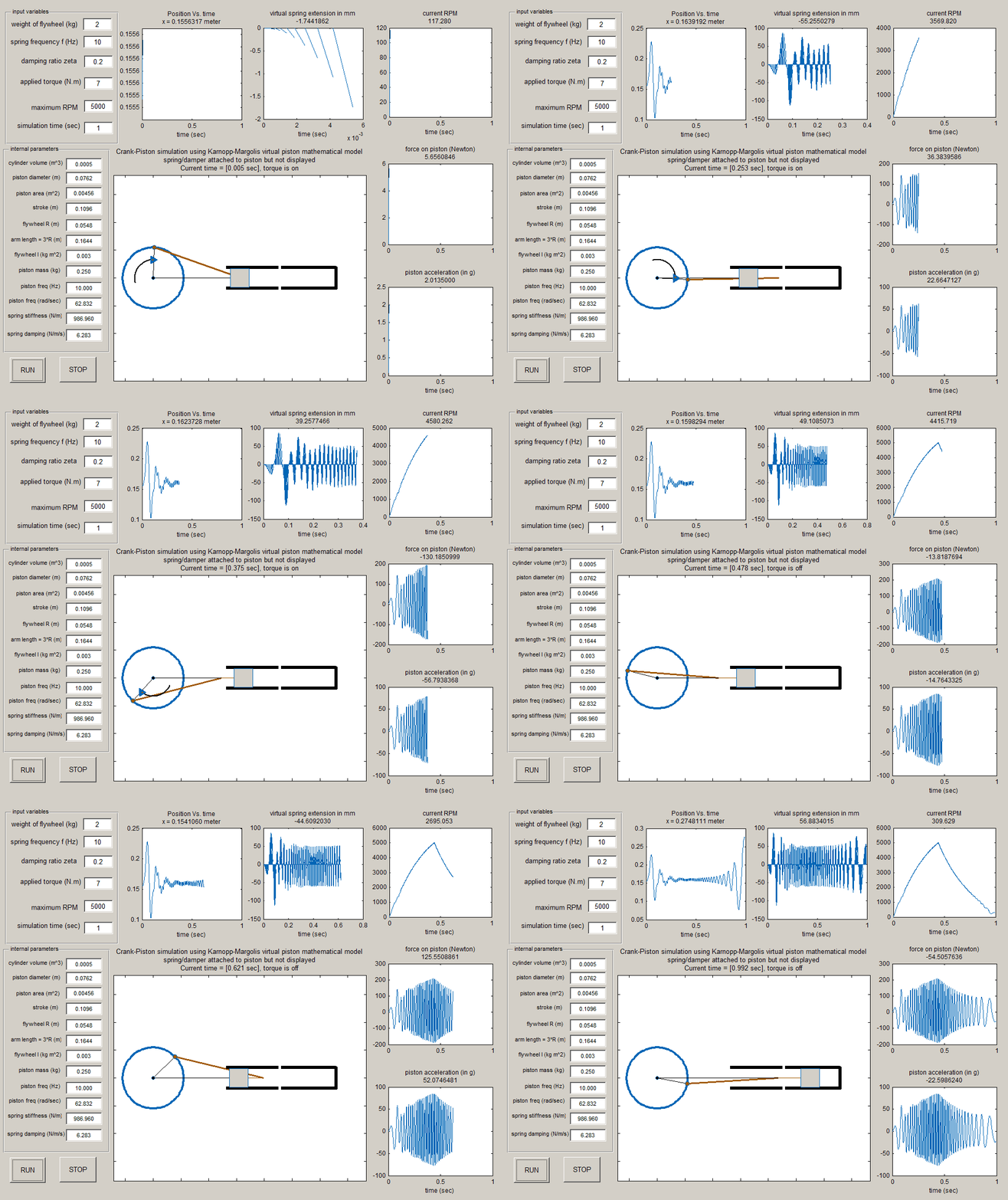
We are asked to find the torque needed to reach \(5000\) RPM in one second. By trial and error, a torque of \(\tau =7\) \(NM\) was found to meet this condition, with \(f=10Hz\), and damping ratio \(\xi =0.2\), and using the same other parameters shown in the problem table. Using this torque, the \(5000\) RPM was reached at about \(0.5\) seconds. The force on the piston started to become lower after the torque was removed, as well as the piston acceleration.
The following diagram shows the final plots at the end of the one second run.
Simulation to keep spring deflection below fraction of mm
We are also asked to find the parameters which will cause the spring deflection to remain below fraction of a millimeter. It was found that the spring \(k\) must be made very large to simulate the effect of a rigid connection between the piston and the crank arm in order to keep the deflection very small. But when this was done, the simulation started to take very long time. Simulating \(1\) second on my computer would more than one hour.
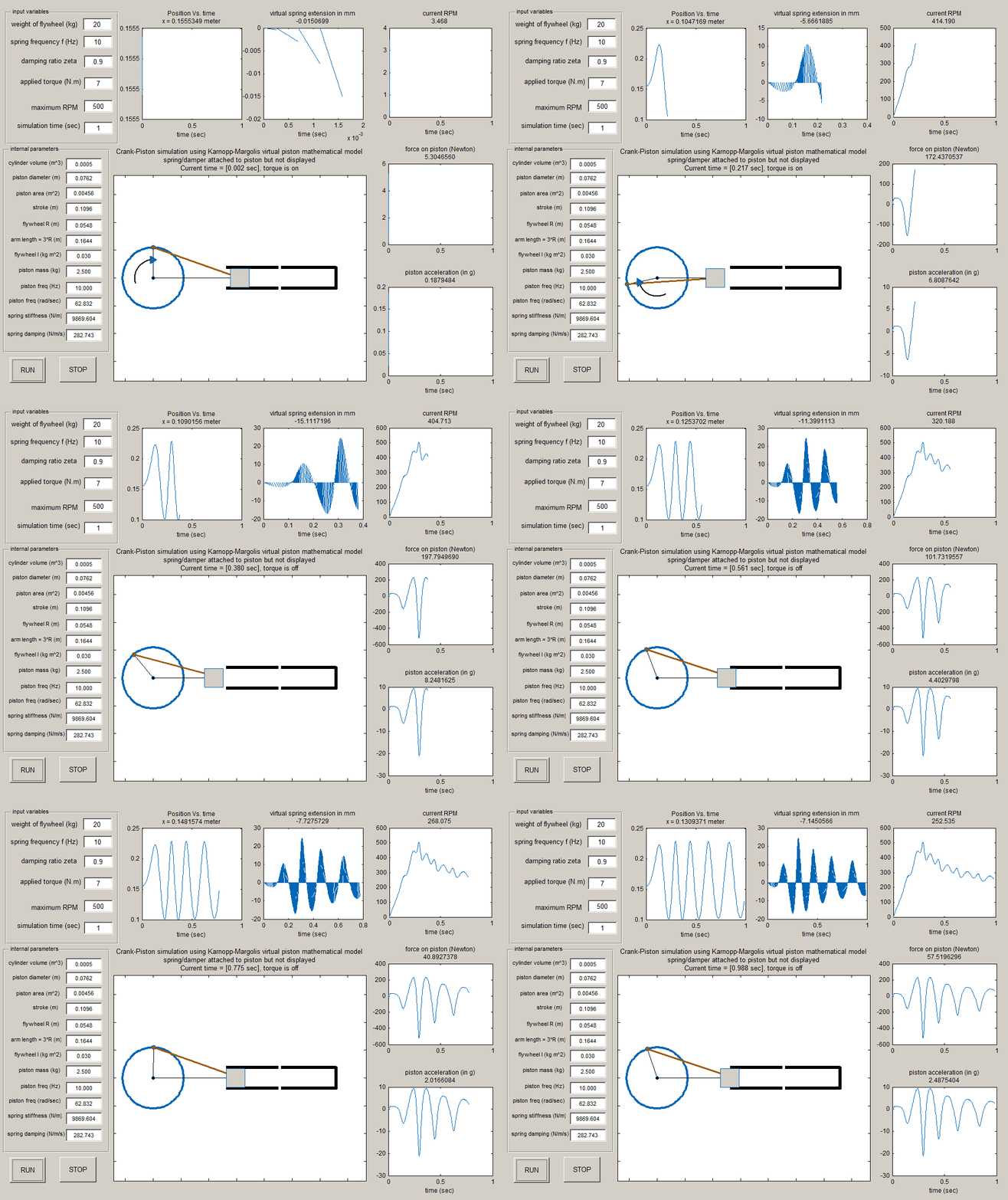
To reduce vibration, the damping coefficient \(\xi \) was made larger than the \(0.2\) value in the table. But even when making \(\xi \) close to one, the simulation still took very long time to reach one second due to the large number of steps taken by the numerical solver. The spring stiffness was increased all the way to \(10^{7}\) N/m, and the force on the piston reached \(1.5MPa\) at one point. The value of \(f\) (spring frequency) to achieve this high spring stiffness was \(1000\) \(Hz.\) The damping ratio \(\xi \) was set to \(0.9\). The following is a plot of the simulation using the above parameters, showing that the deflection remained below half millimeter.
Force and acceleration on piston
The acceleration on the piston was found numerically at each step by dividing the difference of the current speed of piston from the last time step speed, and dividing that over the difference in time as follows
The force on the piston depended on the torque used and the amount of spring stiffness and damping used. For example, in the first test case above when the spring was made very stiff, the largest force on the piston reached was \(1.5\times 10^{6}N\) and an acceleration of almost \(1000g\) was seen. After the torque was removed, the acceleration gradually dropped to \(500g\). The longer the simulation was run, these values became smaller. The simulation program updates both the acceleration and the force on the piston as the simulation is running.
General observation
The Knarnopp-Margolis model of the crank/piston connection was used to simulate the motion. This model is simpler mathematically than the rigid connection model. But it was hard to find the right parameters to approximate a rigid connection since making the spring stiffness large, causes the simulation to become very slow. When the spring stiffness was made very large to better approximate a rigid connection, and when the damping was made larger, the simulation would take about \(1\) hour for \(1\) second simulation time. Even when using a stiff ode solver such as ode15s the simulation was taking too long. Using a compiled language would eliminate this problem as it will be much faster, but this simulation was done using Matlab
The main advantage of the Knarnopp-Margolis model is that the implementation was simpler since the mathematical model was simpler. But more trial and error are needed to find optimal values for all the parameters of the problem which will cause the simulation time to become more reasonable, while approximating the rigid connection.
6.3.6 Appendix, source code
This ZIP file contains the fig file and all other m files needed to run this which are listed below.
function varargout = nma_lab3_eme_121_fig(varargin)
% NMA_LAB3_EME_121_FIG MATLAB code for nma_lab3_eme_121_fig.fig
%      NMA_LAB3_EME_121_FIG, by itself, creates a new NMA_LAB3_EME_121_FIG or raises the existing
%      singleton*.
%
%      H = NMA_LAB3_EME_121_FIG returns the handle to a new NMA_LAB3_EME_121_FIG or the handle to
%      the existing singleton*.
%
%      NMA_LAB3_EME_121_FIG('CALLBACK',hObject,eventData,handles,...) calls the local
%      function named CALLBACK in NMA_LAB3_EME_121_FIG.M with the given input arguments.
%
%      NMA_LAB3_EME_121_FIG('Property','Value',...) creates a new NMA_LAB3_EME_121_FIG or raises the
%      existing singleton*.  Starting from the left, property value pairs are
%      applied to the GUI before nma_lab3_eme_121_fig_OpeningFcn gets called.  An
%      unrecognized property name or invalid value makes property application
%      stop.  All inputs are passed to nma_lab3_eme_121_fig_OpeningFcn via varargin.
%
%      *See GUI Options on GUIDE's Tools menu.  Choose "GUI allows only one
%      instance to run (singleton)".
%
% this is the GUI main line for EME 121 lab 3
% by Nasser M. Abbasi
% See also: GUIDE, GUIDATA, GUIHANDLES

% Edit the above text to modify the response to help nma_lab3_eme_121_fig

% Last Modified by GUIDE v2.5 07-May-2011 17:21:06

% Begin initialization code - DO NOT EDIT
gui_Singleton = 1;
gui_State = struct('gui_Name',       mfilename, ...
                   'gui_Singleton',  gui_Singleton, ...
                   'gui_OpeningFcn', @nma_lab3_eme_121_fig_OpeningFcn, ...
                   'gui_OutputFcn',  @nma_lab3_eme_121_fig_OutputFcn, ...
                   'gui_LayoutFcn',  [] , ...
                   'gui_Callback',   []);
if nargin && ischar(varargin{1})
    gui_State.gui_Callback = str2func(varargin{1});
end

if nargout
    [varargout{1:nargout}] = gui_mainfcn(gui_State, varargin{:});
else
    gui_mainfcn(gui_State, varargin{:});
end
% End initialization code - DO NOT EDIT


% --- Executes just before nma_lab3_eme_121_fig is made visible.
function nma_lab3_eme_121_fig_OpeningFcn(hObject, eventdata, handles, varargin)
% This function has no output args, see OutputFcn.
% hObject    handle to figure
% eventdata  reserved - to be defined in a future version of MATLAB
% handles    structure with handles and user data (see GUIDATA)
% varargin   command line arguments to nma_lab3_eme_121_fig (see VARARGIN)

% Choose default command line output for nma_lab3_eme_121_fig
handles.output = hObject;

set(handles.figure1, 'UserData',[]);
set(handles.figure1,'Name','UC Davis, EME 121 lab#3, by Nasser M. Abbasi');

userData.stop = false;
set(handles.figure1, 'UserData',userData);


% Update handles structure
guidata(hObject, handles);

% UIWAIT makes nma_lab3_eme_121_fig wait for user response (see UIRESUME)
% uiwait(handles.figure1);


% --- Outputs from this function are returned to the command line.
function varargout = nma_lab3_eme_121_fig_OutputFcn(hObject, eventdata, handles)
% varargout  cell array for returning output args (see VARARGOUT);
% hObject    handle to figure
% eventdata  reserved - to be defined in a future version of MATLAB
% handles    structure with handles and user data (see GUIDATA)

% Get default command line output from handles structure
varargout{1} = handles.output;


function mfwTag_Callback(hObject, eventdata, handles)
% hObject    handle to mfwTag (see GCBO)
% eventdata  reserved - to be defined in a future version of MATLAB
% handles    structure with handles and user data (see GUIDATA)

% Hints: get(hObject,'String') returns contents of mfwTag as text
%        str2double(get(hObject,'String')) returns contents of mfwTag as a double


% --- Executes during object creation, after setting all properties.
function mfwTag_CreateFcn(hObject, eventdata, handles)
% hObject    handle to mfwTag (see GCBO)
% eventdata  reserved - to be defined in a future version of MATLAB
% handles    empty - handles not created until after all CreateFcns called

% Hint: edit controls usually have a white background on Windows.
%       See ISPC and COMPUTER.
if ispc && isequal(get(hObject,'BackgroundColor'), get(0,'defaultUicontrolBackgroundColor'))
    set(hObject,'BackgroundColor','white');
end


function fTag_Callback(hObject, eventdata, handles)
% hObject    handle to fTag (see GCBO)
% eventdata  reserved - to be defined in a future version of MATLAB
% handles    structure with handles and user data (see GUIDATA)

% Hints: get(hObject,'String') returns contents of fTag as text
%        str2double(get(hObject,'String')) returns contents of fTag as a double


% --- Executes during object creation, after setting all properties.
function fTag_CreateFcn(hObject, eventdata, handles)
% hObject    handle to fTag (see GCBO)
% eventdata  reserved - to be defined in a future version of MATLAB
% handles    empty - handles not created until after all CreateFcns called

% Hint: edit controls usually have a white background on Windows.
%       See ISPC and COMPUTER.
if ispc && isequal(get(hObject,'BackgroundColor'), get(0,'defaultUicontrolBackgroundColor'))
    set(hObject,'BackgroundColor','white');
end


function zetaTag_Callback(hObject, eventdata, handles)
% hObject    handle to zetaTag (see GCBO)
% eventdata  reserved - to be defined in a future version of MATLAB
% handles    structure with handles and user data (see GUIDATA)

% Hints: get(hObject,'String') returns contents of zetaTag as text
%        str2double(get(hObject,'String')) returns contents of zetaTag as a double


% --- Executes during object creation, after setting all properties.
function zetaTag_CreateFcn(hObject, eventdata, handles)
% hObject    handle to zetaTag (see GCBO)
% eventdata  reserved - to be defined in a future version of MATLAB
% handles    empty - handles not created until after all CreateFcns called

% Hint: edit controls usually have a white background on Windows.
%       See ISPC and COMPUTER.
if ispc && isequal(get(hObject,'BackgroundColor'), get(0,'defaultUicontrolBackgroundColor'))
    set(hObject,'BackgroundColor','white');
end


function torqueTag_Callback(hObject, eventdata, handles)
% hObject    handle to torqueTag (see GCBO)
% eventdata  reserved - to be defined in a future version of MATLAB
% handles    structure with handles and user data (see GUIDATA)

% Hints: get(hObject,'String') returns contents of torqueTag as text
%        str2double(get(hObject,'String')) returns contents of torqueTag as a double


% --- Executes during object creation, after setting all properties.
function torqueTag_CreateFcn(hObject, eventdata, handles)
% hObject    handle to torqueTag (see GCBO)
% eventdata  reserved - to be defined in a future version of MATLAB
% handles    empty - handles not created until after all CreateFcns called

% Hint: edit controls usually have a white background on Windows.
%       See ISPC and COMPUTER.
if ispc && isequal(get(hObject,'BackgroundColor'), get(0,'defaultUicontrolBackgroundColor'))
    set(hObject,'BackgroundColor','white');
end


function rpmTag_Callback(hObject, eventdata, handles)
% hObject    handle to rpmTag (see GCBO)
% eventdata  reserved - to be defined in a future version of MATLAB
% handles    structure with handles and user data (see GUIDATA)

% Hints: get(hObject,'String') returns contents of rpmTag as text
%        str2double(get(hObject,'String')) returns contents of rpmTag as a double


% --- Executes during object creation, after setting all properties.
function rpmTag_CreateFcn(hObject, eventdata, handles)
% hObject    handle to rpmTag (see GCBO)
% eventdata  reserved - to be defined in a future version of MATLAB
% handles    empty - handles not created until after all CreateFcns called

% Hint: edit controls usually have a white background on Windows.
%       See ISPC and COMPUTER.
if ispc && isequal(get(hObject,'BackgroundColor'), get(0,'defaultUicontrolBackgroundColor'))
    set(hObject,'BackgroundColor','white');
end


% --- Executes on button press in runBtn.
function runBtn_Callback(hObject, eventdata, handles)
% hObject    handle to runBtn (see GCBO)
% eventdata  reserved - to be defined in a future version of MATLAB
% handles    structure with handles and user data (see GUIDATA)

userData = get(handles.figure1, 'UserData');
userData.stop = false;
set(handles.figure1, 'UserData',userData);

data.angleInitial=(pi/2)/180;
data.angleSpeedInitial=0;

data.M=str2num(get(handles.mfwTag,'String'));
data.volumeOfCylinder=500*0.000001 ; %convery cc to m^3
data.Dp=3*.0254;
data.Ap=(pi/4)*data.Dp^2;
data.stroke=data.volumeOfCylinder/data.Ap;
data.R=data.stroke/2;
data.L=3*data.R;
data.I=data.M*data.R^2/2;
set(handles.Itag,'String',sprintf('%3.3f',data.I));

data.m=0.25*data.I/data.R^2;
set(handles.pistonMassTag,'String',sprintf('%3.3f',data.m));

data.f=str2num(get(handles.fTag,'String'));
set(handles.pistonFreqTag,'String',sprintf('%3.3f',data.f));

data.omega=2*pi*data.f;
set(handles.pistonWnTag,'String',sprintf('%3.3f',data.omega));


data.dampingRatio=str2num(get(handles.zetaTag,'String'));


data.k=data.m*data.omega^2;
set(handles.kTag,'String',sprintf('%3.3f',data.k));

data.b=2*data.dampingRatio*data.omega*data.m;
set(handles.bTag,'String',sprintf('%3.3f',data.b));

data.torque = str2num(get(handles.torqueTag,'String'));
data.maxRPM=str2num(get(handles.rpmTag,'String'));
data.maxSimulationTime=str2num(get(handles.simTimeTag,'String'));
data.handles=handles;
data.currentAngle=data.angleInitial;
data.minY=0;
data.maxY=4;


[g_msg,g_status]=nma_lab3_eme_121(data);


% --- Executes on button press in stopTag.
function stopTag_Callback(hObject, eventdata, handles)
% hObject    handle to stopTag (see GCBO)
% eventdata  reserved - to be defined in a future version of MATLAB
% handles    structure with handles and user data (see GUIDATA)

userData = get(handles.figure1, 'UserData');
userData.stop = true;
set(handles.figure1, 'UserData',userData);
%enable_all(handles,'on');


function simTimeTag_Callback(hObject, eventdata, handles)
% hObject    handle to simTimeTag (see GCBO)
% eventdata  reserved - to be defined in a future version of MATLAB
% handles    structure with handles and user data (see GUIDATA)

% Hints: get(hObject,'String') returns contents of simTimeTag as text
%        str2double(get(hObject,'String')) returns contents of simTimeTag as a double


% --- Executes during object creation, after setting all properties.
function simTimeTag_CreateFcn(hObject, eventdata, handles)
% hObject    handle to simTimeTag (see GCBO)
% eventdata  reserved - to be defined in a future version of MATLAB
% handles    empty - handles not created until after all CreateFcns called

% Hint: edit controls usually have a white background on Windows.
%       See ISPC and COMPUTER.
if ispc && isequal(get(hObject,'BackgroundColor'), get(0,'defaultUicontrolBackgroundColor'))
    set(hObject,'BackgroundColor','white');
end


function edit7_Callback(hObject, eventdata, handles)
% hObject    handle to edit7 (see GCBO)
% eventdata  reserved - to be defined in a future version of MATLAB
% handles    structure with handles and user data (see GUIDATA)

% Hints: get(hObject,'String') returns contents of edit7 as text
%        str2double(get(hObject,'String')) returns contents of edit7 as a double


% --- Executes during object creation, after setting all properties.
function edit7_CreateFcn(hObject, eventdata, handles)
% hObject    handle to edit7 (see GCBO)
% eventdata  reserved - to be defined in a future version of MATLAB
% handles    empty - handles not created until after all CreateFcns called

% Hint: edit controls usually have a white background on Windows.
%       See ISPC and COMPUTER.
if ispc && isequal(get(hObject,'BackgroundColor'), get(0,'defaultUicontrolBackgroundColor'))
    set(hObject,'BackgroundColor','white');
end


function edit8_Callback(hObject, eventdata, handles)
% hObject    handle to edit8 (see GCBO)
% eventdata  reserved - to be defined in a future version of MATLAB
% handles    structure with handles and user data (see GUIDATA)

% Hints: get(hObject,'String') returns contents of edit8 as text
%        str2double(get(hObject,'String')) returns contents of edit8 as a double


% --- Executes during object creation, after setting all properties.
function edit8_CreateFcn(hObject, eventdata, handles)
% hObject    handle to edit8 (see GCBO)
% eventdata  reserved - to be defined in a future version of MATLAB
% handles    empty - handles not created until after all CreateFcns called

% Hint: edit controls usually have a white background on Windows.
%       See ISPC and COMPUTER.
if ispc && isequal(get(hObject,'BackgroundColor'), get(0,'defaultUicontrolBackgroundColor'))
    set(hObject,'BackgroundColor','white');
end


function edit9_Callback(hObject, eventdata, handles)
% hObject    handle to edit9 (see GCBO)
% eventdata  reserved - to be defined in a future version of MATLAB
% handles    structure with handles and user data (see GUIDATA)

% Hints: get(hObject,'String') returns contents of edit9 as text
%        str2double(get(hObject,'String')) returns contents of edit9 as a double


% --- Executes during object creation, after setting all properties.
function edit9_CreateFcn(hObject, eventdata, handles)
% hObject    handle to edit9 (see GCBO)
% eventdata  reserved - to be defined in a future version of MATLAB
% handles    empty - handles not created until after all CreateFcns called

% Hint: edit controls usually have a white background on Windows.
%       See ISPC and COMPUTER.
if ispc && isequal(get(hObject,'BackgroundColor'), get(0,'defaultUicontrolBackgroundColor'))
    set(hObject,'BackgroundColor','white');
end


function edit10_Callback(hObject, eventdata, handles)
% hObject    handle to edit10 (see GCBO)
% eventdata  reserved - to be defined in a future version of MATLAB
% handles    structure with handles and user data (see GUIDATA)

% Hints: get(hObject,'String') returns contents of edit10 as text
%        str2double(get(hObject,'String')) returns contents of edit10 as a double


% --- Executes during object creation, after setting all properties.
function edit10_CreateFcn(hObject, eventdata, handles)
% hObject    handle to edit10 (see GCBO)
% eventdata  reserved - to be defined in a future version of MATLAB
% handles    empty - handles not created until after all CreateFcns called

% Hint: edit controls usually have a white background on Windows.
%       See ISPC and COMPUTER.
if ispc && isequal(get(hObject,'BackgroundColor'), get(0,'defaultUicontrolBackgroundColor'))
    set(hObject,'BackgroundColor','white');
end


function edit11_Callback(hObject, eventdata, handles)
% hObject    handle to edit11 (see GCBO)
% eventdata  reserved - to be defined in a future version of MATLAB
% handles    structure with handles and user data (see GUIDATA)

% Hints: get(hObject,'String') returns contents of edit11 as text
%        str2double(get(hObject,'String')) returns contents of edit11 as a double


% --- Executes during object creation, after setting all properties.
function edit11_CreateFcn(hObject, eventdata, handles)
% hObject    handle to edit11 (see GCBO)
% eventdata  reserved - to be defined in a future version of MATLAB
% handles    empty - handles not created until after all CreateFcns called

% Hint: edit controls usually have a white background on Windows.
%       See ISPC and COMPUTER.
if ispc && isequal(get(hObject,'BackgroundColor'), get(0,'defaultUicontrolBackgroundColor'))
    set(hObject,'BackgroundColor','white');
end


function edit12_Callback(hObject, eventdata, handles)
% hObject    handle to edit12 (see GCBO)
% eventdata  reserved - to be defined in a future version of MATLAB
% handles    structure with handles and user data (see GUIDATA)

% Hints: get(hObject,'String') returns contents of edit12 as text
%        str2double(get(hObject,'String')) returns contents of edit12 as a double


% --- Executes during object creation, after setting all properties.
function edit12_CreateFcn(hObject, eventdata, handles)
% hObject    handle to edit12 (see GCBO)
% eventdata  reserved - to be defined in a future version of MATLAB
% handles    empty - handles not created until after all CreateFcns called

% Hint: edit controls usually have a white background on Windows.
%       See ISPC and COMPUTER.
if ispc && isequal(get(hObject,'BackgroundColor'), get(0,'defaultUicontrolBackgroundColor'))
    set(hObject,'BackgroundColor','white');
end


function Itag_Callback(hObject, eventdata, handles)
% hObject    handle to Itag (see GCBO)
% eventdata  reserved - to be defined in a future version of MATLAB
% handles    structure with handles and user data (see GUIDATA)

% Hints: get(hObject,'String') returns contents of Itag as text
%        str2double(get(hObject,'String')) returns contents of Itag as a double


% --- Executes during object creation, after setting all properties.
function Itag_CreateFcn(hObject, eventdata, handles)
% hObject    handle to Itag (see GCBO)
% eventdata  reserved - to be defined in a future version of MATLAB
% handles    empty - handles not created until after all CreateFcns called

% Hint: edit controls usually have a white background on Windows.
%       See ISPC and COMPUTER.
if ispc && isequal(get(hObject,'BackgroundColor'), get(0,'defaultUicontrolBackgroundColor'))
    set(hObject,'BackgroundColor','white');
end


function pistonMassTag_Callback(hObject, eventdata, handles)
% hObject    handle to pistonMassTag (see GCBO)
% eventdata  reserved - to be defined in a future version of MATLAB
% handles    structure with handles and user data (see GUIDATA)

% Hints: get(hObject,'String') returns contents of pistonMassTag as text
%        str2double(get(hObject,'String')) returns contents of pistonMassTag as a double


% --- Executes during object creation, after setting all properties.
function pistonMassTag_CreateFcn(hObject, eventdata, handles)
% hObject    handle to pistonMassTag (see GCBO)
% eventdata  reserved - to be defined in a future version of MATLAB
% handles    empty - handles not created until after all CreateFcns called

% Hint: edit controls usually have a white background on Windows.
%       See ISPC and COMPUTER.
if ispc && isequal(get(hObject,'BackgroundColor'), get(0,'defaultUicontrolBackgroundColor'))
    set(hObject,'BackgroundColor','white');
end


function pistonFreqTag_Callback(hObject, eventdata, handles)
% hObject    handle to pistonFreqTag (see GCBO)
% eventdata  reserved - to be defined in a future version of MATLAB
% handles    structure with handles and user data (see GUIDATA)

% Hints: get(hObject,'String') returns contents of pistonFreqTag as text
%        str2double(get(hObject,'String')) returns contents of pistonFreqTag as a double


% --- Executes during object creation, after setting all properties.
function pistonFreqTag_CreateFcn(hObject, eventdata, handles)
% hObject    handle to pistonFreqTag (see GCBO)
% eventdata  reserved - to be defined in a future version of MATLAB
% handles    empty - handles not created until after all CreateFcns called

% Hint: edit controls usually have a white background on Windows.
%       See ISPC and COMPUTER.
if ispc && isequal(get(hObject,'BackgroundColor'), get(0,'defaultUicontrolBackgroundColor'))
    set(hObject,'BackgroundColor','white');
end


function pistonWnTag_Callback(hObject, eventdata, handles)
% hObject    handle to pistonWnTag (see GCBO)
% eventdata  reserved - to be defined in a future version of MATLAB
% handles    structure with handles and user data (see GUIDATA)

% Hints: get(hObject,'String') returns contents of pistonWnTag as text
%        str2double(get(hObject,'String')) returns contents of pistonWnTag as a double


% --- Executes during object creation, after setting all properties.
function pistonWnTag_CreateFcn(hObject, eventdata, handles)
% hObject    handle to pistonWnTag (see GCBO)
% eventdata  reserved - to be defined in a future version of MATLAB
% handles    empty - handles not created until after all CreateFcns called

% Hint: edit controls usually have a white background on Windows.
%       See ISPC and COMPUTER.
if ispc && isequal(get(hObject,'BackgroundColor'), get(0,'defaultUicontrolBackgroundColor'))
    set(hObject,'BackgroundColor','white');
end


function kTag_Callback(hObject, eventdata, handles)
% hObject    handle to kTag (see GCBO)
% eventdata  reserved - to be defined in a future version of MATLAB
% handles    structure with handles and user data (see GUIDATA)

% Hints: get(hObject,'String') returns contents of kTag as text
%        str2double(get(hObject,'String')) returns contents of kTag as a double


% --- Executes during object creation, after setting all properties.
function kTag_CreateFcn(hObject, eventdata, handles)
% hObject    handle to kTag (see GCBO)
% eventdata  reserved - to be defined in a future version of MATLAB
% handles    empty - handles not created until after all CreateFcns called

% Hint: edit controls usually have a white background on Windows.
%       See ISPC and COMPUTER.
if ispc && isequal(get(hObject,'BackgroundColor'), get(0,'defaultUicontrolBackgroundColor'))
    set(hObject,'BackgroundColor','white');
end


function bTag_Callback(hObject, eventdata, handles)
% hObject    handle to bTag (see GCBO)
% eventdata  reserved - to be defined in a future version of MATLAB
% handles    structure with handles and user data (see GUIDATA)

% Hints: get(hObject,'String') returns contents of bTag as text
%        str2double(get(hObject,'String')) returns contents of bTag as a double


% --- Executes during object creation, after setting all properties.
function bTag_CreateFcn(hObject, eventdata, handles)
% hObject    handle to bTag (see GCBO)
% eventdata  reserved - to be defined in a future version of MATLAB
% handles    empty - handles not created until after all CreateFcns called

% Hint: edit controls usually have a white background on Windows.
%       See ISPC and COMPUTER.
if ispc && isequal(get(hObject,'BackgroundColor'), get(0,'defaultUicontrolBackgroundColor'))
    set(hObject,'BackgroundColor','white');
end
function [g_msg,g_status]=nma_lab3_eme_121(data)
%
% process function called from GUI driver code to
% plot simulation result
%
% EME 121, spring 2011
%
% by Nasser M. Abbasi, Matlab 2011
% April 2011
%

[xInitial,~]=f(data.L,data.R,data.angleInitial);
data.xInitial=xInitial;
data.xSpeedInitial=0;

data.timeStep=0;
data.solver='ode15s';

g_status = true;
g_msg='';

set(0,'CurrentFigure',data.handles.figure1);
cla(data.handles.xAxesTag,'reset');
cla(data.handles.angleAxesTag,'reset');
cla(data.handles.rpmAxesTag,'reset');
cla(data.handles.mainAxes,'reset');

cla(data.handles.forceAxes,'reset');
cla(data.handles.accAxes,'reset');

IC = [data.angleInitial;data.xInitial;...
    data.angleSpeedInitial;data.xSpeedInitial];
options = odeset('OutputFcn',@output);

%Check if using auto step size of an explicit step size. see
%GUI for input choice.
if data.timeStep==0
    timeSpan=[0 data.maxSimulationTime];
else
    timeSpan=0:data.timeStep:data.maxSimulationTime;
end

%call  the solver

SCREEN_CAPTURE=false;  %set to zero for animation capture

currentIter=0;

if SCREEN_CAPTURE
    frameNumber = 0;
    actualFrameNumber = 0;
    theFrame=getframe(gcf);
    [im,MAP]=rgb2ind(theFrame.cdata,32,'nodither');
    %MAP=colormap(gray);
end
[t,x] = feval(data.solver,@rhs,timeSpan,IC,options);

if SCREEN_CAPTURE
    imwrite(im,MAP,'demo.gif','DelayTime',0,'LoopCount',inf,...
        'WriteMode','overwrite');
end

%-----------------------------------
% ODE solver function
%-----------------------------------
    function dx=rhs(t,x)
        %the ode45 function

        k=data.k;
        R=data.R;
        L=data.L;
        I=data.I;
        b=data.b;
        m=data.m;
        tao=data.torque;

        [d,ext]=f(L,R,x(1));
        y=sqrt(L^2-R^2*(cos(x(1)))^2);
        if x(3)/(2*pi)*60>data.maxRPM
            data.torque=0;
        end

        %fprintf('angle=%3.3f\t x(2)=%3.3f\t f(theta)=%3.3f\n',mod(x(1)*180/pi,360),x(2),d);

        dx=[x(3);
            x(4);

            tao/I + (k*R/I)*cos(x(1)) * ( 1+R*sin(x(1))/y )* ...
            (-y-R*sin(x(1)) + x(2) ) + ...
            b*R/I * cos(x(1)) * ( 1 + (R*sin(x(1))/y) ) *...
            ( x(4) - R*cos(x(1)) * (1 + (R*sin(x(1))/y) ) * x(3) );

            k*y/m + k*R*sin(x(1))/m - k*x(2)/m - b*x(4)/m ...
            + b*R*x(3)*cos(x(1))/m + b*x(3)*R^2*cos(x(1))*sin(x(1))/(m*y)
            ];

    end
%-----------------------------------
%  ODE output function
%-----------------------------------
    function status= output(t,x,~)
        %called by ode45 after each step. Plot the current
        %pendulum position for simulation

        userData = get(data.handles.figure1, 'UserData');
        if userData.stop
            status=true;
            g_status =true;
            return;
        end

        if isempty(t)
            status = true;
        else

            currentIter=currentIter+1;
            if currentIter==1
                status = false;
                return;
            end

            [D,ext]=f(data.L,data.R,x(1,1)) ;

            data.currentAngle=x(1);
            % plot angle vs time

            if currentIter>2
                % position vs. time
                set(0,'CurrentFigure',data.handles.figure1);
                set(data.handles.figure1, 'CurrentAxes',...
                    data.handles.xAxesTag);
                plot([data.lastTime t], [data.lastPosition x(2)],'-');
                xlim([0 data.maxSimulationTime]);
                %                 if abs(data.minY-data.maxY)>10*eps
                %                     ylim([data.minY data.maxY]);
                %                 end
                xlabel('time (sec)');
                title({'Position Vs. time';sprintf('x = %3.7f meter',x(2))});
                hold on;
                set(gca,'FontSize',7);
                drawnow;

                %plot vibration
                set(0,'CurrentFigure',data.handles.figure1);
                set(data.handles.figure1, 'CurrentAxes',...
                    data.handles.angleAxesTag);
                currentSpringExtensionIn_mm = 1000*(x(2)-D);

                plot([data.lastTime t],...
                [data.lastSpringExtension currentSpringExtensionIn_mm],'-');

                %ylabel('mm');
                xlabel('time (sec)');
                title({'virtual spring extension in mm';...
                    sprintf('%3.7f',currentSpringExtensionIn_mm)});
                hold on;
                set(gca,'FontSize',7);
                %xlim([0 data.maxSimulationTime]);
                drawnow;

                % RPMangular speed vs. time plot
                set(data.handles.figure1, 'CurrentAxes',...
                    data.handles.rpmAxesTag);

                plot([data.lastTime t],[data.lastRPM x(3)/(2*pi)*60],'-');
                title({'current RPM';sprintf('%3.3f ',x(3)/(2*pi)*60)});
                xlim([0 data.maxSimulationTime]);
                xlabel('time (sec)');
                hold on;
                set(gca,'FontSize',7);
                drawnow;

                %force on piston plot
                set(0,'CurrentFigure',data.handles.figure1);
                set(data.handles.figure1,'CurrentAxes',data.handles.forceAxes);
                currentFd = currentDampingForce(x,data.L,data.R,data.b);
                currentFs =  data.k*(x(2)-D);

                % if sign(currentFd) ~= sign(currentFs)
                %     fprintf('spring force=%3.6f, damping force=%3.6f\n',...
                %     currentFs,currentFd);
                % end

                forceOnPiston = - (currentFs +currentFd);

                plot([data.lastTime t], [data.lastTotalForceOnPiston...
                    forceOnPiston],'-');

                data.lastTotalForceOnPiston=forceOnPiston;

                set(gca,'FontSize',7);
                title({'force on piston (Newton)';...
                    sprintf('%3.7f',forceOnPiston)});
                hold on;
                xlim([0 data.maxSimulationTime]);
                drawnow;

                % acc in g
                set(data.handles.figure1, 'CurrentAxes',...
                    data.handles.accAxes);

                currentAcc=(x(4)-data.lastXspeed)/(t-data.lastTime);
                currentAcc=currentAcc/9.8;
                plot([data.lastTime t],[data.lastAcc currentAcc],'-');
                title({'piston acceleration (in g)';...
                    sprintf('%3.7f',currentAcc)});

                xlim([0 data.maxSimulationTime]);
                xlabel('time (sec)');

                if currentIter>3
                    hold on;
                end
                set(gca,'FontSize',7);
                drawnow;

                data.lastTime=t;
                data.lastPosition=x(2);
                data.lastRPM=x(3)/(2*pi)*60;
                data.lastAngle=mod(x(1)*180/pi,360);
                data.lastSringExtension=1000*(x(2)-D);
                data.lastXspeed=x(4);
                data.lastAcc=currentAcc;
            else
                data.lastAngle=x(1);
                data.lastPosition=x(2);
                data.lastTime=t;
                data.lastRPM=x(3)/(2*pi)*60;
                data.lastTotalForceOnPiston = - ( data.k*(x(2)-D)+...
                    currentDampingForce(x,data.L,data.R,data.b) );
                data.lastSpringExtension=1000*(x(2)-D);
                data.lastXspeed=x(4);
                data.lastAcc=0;
            end

            %---------------- central simulation now added
            set(data.handles.figure1, 'CurrentAxes',data.handles.mainAxes);

            %
            %             %plot circle
            z=-1:.01:1;
            plot(data.R*sin(2*pi*z),data.R*cos(2*pi*z),'LineWidth',3);

            axis equal;
            hold on;
            theta = pi/2-x(1);
            %
            %
            %plot R line

            plot([0 data.R*cos( theta) D],[0 data.R*sin( theta) 0],'k-');
            axis equal;
            plot([data.R*cos(theta) D],[data.R*sin(theta) 0],'r-',...
                'LineWidth',2);
            plot([0 D],[0 0],'k-');   axis equal;

            %plot piston housing
            plot([0.8*data.L 1.37*data.L],...
                [data.R/3 data.R/3 ],'-','LineWidth',4,'color','k');

            %plot piston housing
            plot([1.4*data.L 2*data.L 2*data.L 1.4*data.L],...
                [data.R/3 data.R/3 -data.R/3 -data.R/3],'-',...
                'LineWidth',4,'color','k');

            %plot piston housing
            plot([0.8*data.L 1.37*data.L],...
                [-data.R/3 -data.R/3 ],'-','LineWidth',4,'color','k');


            plot([D x(2,1)],[0 0],'r');   axis equal;
            %lengthOfSpring = abs(x(2,1)-D);
            %if (x(2,1)-D)<0
            %    fprintf('WARNING, solution x is smaller than f(theta)\n');
            %end

            plot(data.R*cos( theta),data.R*sin( theta),'o','MarkerSize',6,...
                'MarkerFaceColor','r');   axis equal;
            plot(0,0,'o','MarkerSize',4,...
                'MarkerFaceColor','k');   axis equal;

            %spring removed for now.
            %plot spring
            %[xSpring,ySpring]=nma_spring.makeV2(lengthOfSpring,5,data.R/4);
            %
            %A = [cos(-pi/2) -sin(-pi/2);sin(-pi/2) cos(-pi/2)];
            %newSpringCoordinates=arrayfun(@(i) A*[xSpring(i);ySpring(i)],...
            %        1:length(xSpring),'UniformOutput',false);
            %        newSpringCoordinates= [newSpringCoordinates{:}]';
            %
            %        xSpring=newSpringCoordinates(:,1);
            %        ySpring=newSpringCoordinates(:,2);
            %        xSpring=xSpring+(x(2,1)-lengthOfSpring);
            %        line(xSpring,ySpring);

            %make box
            %plot the box
            plot(x(2),0,'s','MarkerSize',28,...
                'MarkerFaceColor','m');

            set(gca,'XTickLabel',[]);
            set(gca,'YTickLabel',[]);
            if data.torque>0
                textToShow='torque is on';
            else
                textToShow='torque is off';
            end

            title({'Crank-Piston simulation using Karnopp-Margolis virtual piston mathematical model';...
                'spring/damper attached to piston but not displayed';
                sprintf('Current time = [%4.3f sec], %s',t(1),textToShow)},...
                'FontSize',8);
            axis equal;

            xlim([-1.3*data.R data.R+2*data.L]);

            %draw torque if needed
            %plot torque as arc around center.
            if abs(data.torque)>10*eps
                n = 100; % The number of points in the arc
                x0=0;y0=0; x1=data.R*.6; y1=0; x2=-data.R*.6; y2=.1;

                P0 = [x0;y0];
                P1 = [x1;y1];
                P2 = [x2;y2];
                v1 = P1-P0;
                v2 = P2-P0;
                c  = det([v1,v2]);
                a  = linspace(0,atan2(abs(c),dot(v1,v2)),n); % Angle range
                v3 = [0,-c;c,0]*v1;
                v  = v1*cos(a)+((norm(v1)/norm(v3))*v3)*sin(a);
                A = [cos(theta) -sin(theta);sin(theta) cos(theta)];
                xy_1=A*[v(1,:)+x0;v(2,:)+y0];
                line(xy_1(1,6:end),xy_1(2,6:end),...
                    'LineWidth',1.5,'LineStyle','-',...
                    'color','black');

                line(xy_1(1,1:5),xy_1(2,1:5),'LineWidth',2,...
                    'LineStyle','none',...
                    'Marker','>','MarkerFaceColor','red');
                %text('Interpreter','latex','String','$$\tau$$',...
                %    'Position',[xy_1(1,end),xy_1(2,end)],...
                %    'Fontsize',16);

                hold on;
                axis equal
            end

            axis equal;

            drawnow;
            hold off;
            status = false;
            if SCREEN_CAPTURE
                frameNumber = frameNumber+1;
                if mod(frameNumber,5)==0
                    theFrame = getframe(gcf);
                    actualFrameNumber = actualFrameNumber +1;
                    im(:,:,1,actualFrameNumber ) = ...
                        rgb2ind(theFrame.cdata,MAP,'nodither');
                    %im=rgb2ind(theFrame.cdata,MAP,'nodither');
                    %imwrite(im,MAP,[num2str(actualFrameNumber) '.gif'],'gif');
                end
            end
            %pause(.001);
        end
    end
end
%--------------------------------
% This is the f(theta) function in the textbook
%-------------------------------
function [d,ext]=f(L,R,theta)

ext=R*sin(theta);
d=sqrt(L^2-R^2*cos(theta)^2);
d=d+ext;
end
%------------------
function fd=currentDampingForce(x,L,R,b)
%see equation 6 in report
a=x(1);

fd=b*(x(4)-(R*cos(a)+ R^2*cos(a)*sin(a)/sqrt(L^2-R^2*cos(a)^2))*x(3));

end
classdef nma_spring
    %
    %static class to make spring for plotting animations
    %by Nasser M. Abbasi


    properties
    end

    methods(Static)

        %---------------------------
        %
        %---------------------------
        function [x,y] = make(r,theta,N)
            %r: total length of spring
            %theta: in radians, anticlock wise is positive,
            %       theta zero is position x-axis
            %N: number of twists in spring
            %
            %OUTPUT:
            % x,y coordinates of line to use to plot spring
            len = (4/6)*r;
            p = zeros(N,2);
            delr = len/N;

            r0     = (1/6)*r;
            p(2,1) = r0;
            p(2,2) = theta;

            for n=3:N-2
                p(n,1)=r0+delr*n;
                z=atan(2*delr/p(n,1));
                p(n,2)=theta+(-1)^n*z;
            end
            p(end-1,1)=(5/6)*r; p(end-1,2)=theta;
            p(end,1)=r; p(end,2)=theta;

            [x,y] = pol2cart(p(:,2),p(:,1));
        end

        %----------------------------------------
        function [x,y] = makeBox(w,h)
            x = zeros(5,1);
            y = zeros(5,1);
            x(1)= w/2; y(1)=0;
            x(2)= w/2; y(2)=h/2;
            x(3)= -w/2; y(3)=h/2;
            x(4)=-w/2;  y(4)=0;
            x(5)=x(1); y(5)=y(1);

        end
        %---------------------------
        %
        %---------------------------
        function [x,y] = makeV2(len,N,w)
            %len: total length of spring
            %N: number of twists in spring
            %
            %OUTPUT:
            % x,y coordinates of line to use to plot spring

            nCoordinates = 2*N+4;
            p = zeros(nCoordinates,2);
            h = (1/6)*len;
            del=(len-2*h)/(N+1);
            done = false;
            n = 1;
            while not(done)

                if n==1
                   p(1,1)=0;
                   p(1,2)=0;
                   n = n + 1;
                elseif n==2
                   p(2,1)=0;
                   p(2,2)=h;
                   n = n + 1;
                elseif n<nCoordinates-2
                   p(n,1)=w;
                   p(n,2)=p(n-1,2)+del;
                   n = n  + 1;
                   p(n,1)=-w;
                   p(n,2)=p(n-1,2);
                   n = n + 1;
                elseif n==nCoordinates-1
                   p(n,1) = 0;
                   p(n,2)=p(n-1,2)+del;
                   n = n + 1;
                else
                   p(n,1) = 0;
                   p(n,2)=p(n-1,2)+h;
                   done = true;
                end
            end
            x=p(:,1);
            y=p(:,2);

        end


        %------------------------
        %
        %------------------------
        function test(theta)

            close all;

            theta = theta*pi/180;
            figure;
            set(gcf,'Units','normalized');
            delr=0.3;
            for r=1:.1:3
                cla;
                [x,y] = nma_spring.make(r,theta,30);
                line(x,y);
                hold on;

                %baseX = [2*delr*cos((pi/2)-theta) -2*delr*sin(theta)];
                %baseY = [-2*delr*sin((pi/2)-theta) 2*delr*cos(theta)];

                baseX = [-2*delr*sin(abs(theta)) 2*delr*sin(abs(theta))];
                baseY = [-2*delr*cos(theta)      2*delr*cos(theta)];
                line(baseX,baseY);

                triX=[baseX(1) ...
                    baseX(1) ...
                    30*delr*cos(theta)-abs(baseX(1))...
                    baseX(1)];

                triY=[baseY(1) ...
                    -(30*delr*sin(abs(theta))+abs(baseY(1)))...
                    -(30*delr*sin(abs(theta))+abs(baseY(1)))...
                    baseY(1)];

                line(triX,triY);

                L=sqrt(x(end)^2+y(end)^2);
                xx0=L*cos(theta);
                yy0=-L*sin(abs(theta));
                massX=[xx0 ...
                    xx0+2*delr*sin(abs(theta)) ...
                    xx0+2*delr*sin(abs(theta))+4*delr*cos(theta) ...
                    xx0+2*delr*sin(abs(theta))+4*delr*cos(theta)-4*delr*sin(abs(theta))...
                    xx0+2*delr*sin(abs(theta))+4*delr*cos(theta)-4*delr*sin(abs(theta))-4*delr*cos(theta)...
                    xx0];

                massY=[ yy0 ...
                    yy0+2*delr*cos(theta) ...
                    yy0+2*delr*cos(theta)-4*delr*sin(abs(theta)) ...
                    yy0+2*delr*cos(theta)-4*delr*sin(abs(theta))-4*delr*cos(theta)...
                    yy0+2*delr*cos(theta)-4*delr*sin(abs(theta))-4*delr*cos(theta)+4*delr*sin(abs(theta))...
                    yy0];

                line(massX,massY);

                xlim([-3,10]); ylim([-10,3]);

                set(gca,'DataAspectRatioMode','manual','DataAspectRatio',[1 1 1]);
                drawnow;
                pause(.1);
            end

        end

        %-------------------------------
        %
        %-------------------------------
        function testV2(len)

            close all;

            theta = 0;
            figure;
            set(gcf,'Units','normalized');
            delr=0.3;
            for r=1:len/3:len
                cla;
                [x,y] = nma_spring.makeV2(r,10,1);
                line(x,y);
                hold on;

                %baseX = [2*delr*cos((pi/2)-theta) -2*delr*sin(theta)];
                %baseY = [-2*delr*sin((pi/2)-theta) 2*delr*cos(theta)];

                baseX = [-2*delr*sin(abs(theta)) 2*delr*sin(abs(theta))];
                baseY = [-2*delr*cos(theta)      2*delr*cos(theta)];
                line(baseX,baseY);

                triX=[baseX(1) ...
                    baseX(1) ...
                    30*delr*cos(theta)-abs(baseX(1))...
                    baseX(1)];

                triY=[baseY(1) ...
                    -(30*delr*sin(abs(theta))+abs(baseY(1)))...
                    -(30*delr*sin(abs(theta))+abs(baseY(1)))...
                    baseY(1)];

                line(triX,triY);

                L=sqrt(x(end)^2+y(end)^2);
                xx0=L*cos(theta);
                yy0=-L*sin(abs(theta));
                massX=[xx0 ...
                    xx0+2*delr*sin(abs(theta)) ...
                    xx0+2*delr*sin(abs(theta))+4*delr*cos(theta) ...
                    xx0+2*delr*sin(abs(theta))+4*delr*cos(theta)-4*delr*sin(abs(theta))...
                    xx0+2*delr*sin(abs(theta))+4*delr*cos(theta)-4*delr*sin(abs(theta))-4*delr*cos(theta)...
                    xx0];

                massY=[ yy0 ...
                    yy0+2*delr*cos(theta) ...
                    yy0+2*delr*cos(theta)-4*delr*sin(abs(theta)) ...
                    yy0+2*delr*cos(theta)-4*delr*sin(abs(theta))-4*delr*cos(theta)...
                    yy0+2*delr*cos(theta)-4*delr*sin(abs(theta))-4*delr*cos(theta)+4*delr*sin(abs(theta))...
                    yy0];

                line(massX,massY);

                xlim([-3,10]); ylim([-10,3]);

                set(gca,'DataAspectRatioMode','manual','DataAspectRatio',[1 1 1]);
                drawnow;
                pause(.3);
            end

        end

    end
end