6.4 Lab 4, Simulation of half car, stability
6.4.2 Derivation of equations of motion
6.4.3 Results of simulation
6.4.4 Discussion of simulation results
6.4.5 Appendix
6.4.1 Animation
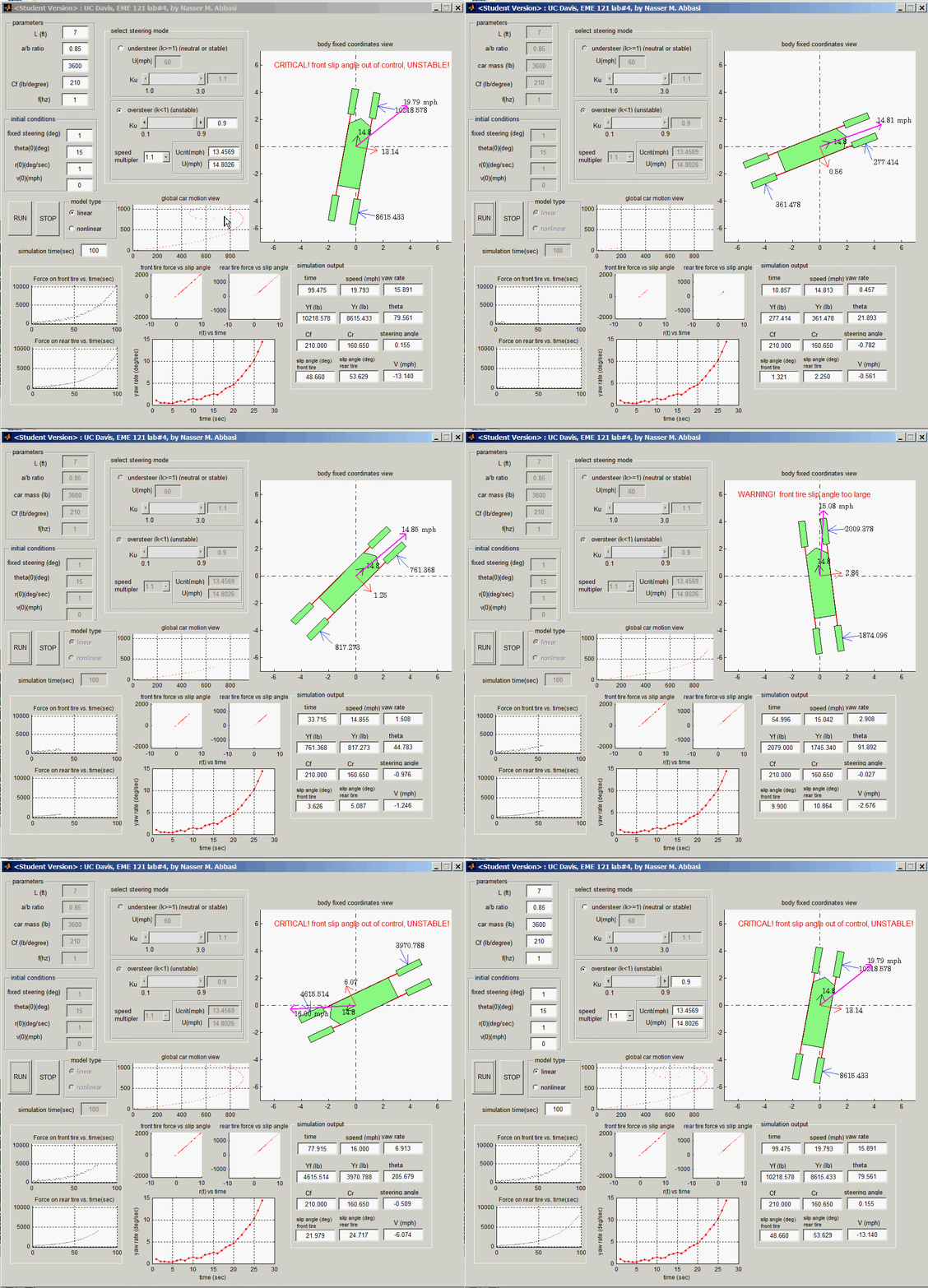
The GUI based simulation was written in Matlab 2011a. A number of animated GIF files were made. In the table below, clicking on any image will start a gif animation in your browser. The animation will only run once. To run it again, please reload the web page using the reload button on the browser.
These are relatively large animation GIF files and might take 1-2 seconds to load depending on network bandwidth. To run them locally, they can be downloaded as well.
|
Showing unstable dynamics (3 MB) |
showing another example of oversteer(2 MB) |
|
oversteer with steering angle example (5 MB) |
under-steer example (3 MB)
|

6.4.2 Derivation of equations of motion
The following is the overall diagram of the half car model showing the body fixed speeds and coordinates in relation to the inertial frame of reference \(X,Y\).
The half car simulation mathematical model equations of motion will now be derived from first principles. The first step is to obtain an expression for the slip angle in terms of the speed of the center of mass of the car in body fixed coordinates. Once the slip angles expression are obtain, then forces are expressed in terms of these angles using the cornering coefficient.
Once the force on each tire is found, then \(F=ma\) is applied and hence the equation of motion of the center of mass of the car is obtained.
The slip angle is defined such that it opposes the force from the ground on the tire. Here we have the forces as positive in the vertical direction. Hence the slip angles will grow in the clockwise direction as shown below.
The following diagram shows the derivation of the expressions for slip angles \(\alpha _{f}\) and \(\alpha _{r}\) for the front and rear tires
Hence from the above diagram we have the following 2 equations
Now, we apply the cornering formula. This formula relates the force on the tire to the slip angles. Hence
The formula \(Y=C\alpha \) is similar to the relation between the force and displacement in the spring \(F=k\Delta \). Hence \(C_{r}\) and \(C_{f}\) are like stiffness parameters for the tire. The larger these parameters are, the larger the force on the tire will have to be to generate the same slip angle. The units of \(C_{r}\) and \(C_{f}\) are \(N/rad.\)
Now we apply \(F=ma\) to the lateral direction only, since we assume speed \(U\) is constant and hence no force in the longitudinal direction. We also apply moment equation around the c.g. of the car.
This results in the following 2 equations
Finally, to obtain the trajectory of the car, we transform back to inertial coordinates using the following 2 equations
The above equations are solved and the result displayed during simulation as described below
Description of parameters used in the equations of motion
This table below is a description of each term in the above equations and all other parameters and variables used in the simulation
| term |
meaning |
| \(\alpha _{f}(t) \) |
slip angle at the front tire |
| \(\alpha _{r}(t) \) |
slip angle at the rear tire |
| \(Y_{f}(t) \) |
Lateral force at the front tire |
| \(Y_{r}(t) \) |
Lateral force at the front tire |
|
\(\delta (t) \) |
steering angle \(\delta (t) =\delta _{0}\sin \left ( 2\pi ft\right ) \) |
| \(f\) |
steering angle frequency used in finding \(\delta (t) \) in Hz (user input) |
| \(\delta _{0}\) |
amplitude of \(\delta (t) \) in radians (user input) |
|
\(U\) |
forward speed on center of car. Constant. (user input when understeer else \(U=\lambda U_{crit}\)) |
|
\(\lambda \) |
speed multiplier to multiply \(U_{ciritial}\) with for the case when oversteer mode. (user input \(0.9,1,1.1\)) |
| \(r(t) \) |
yaw rate |
| \(\theta (t) \) | angle car makes with inertial X axis. \(r=\frac {d\theta }{dt}\) |
| \(X(t) \) | global X coordinate of center of car |
| \(Y(t) \) |
global Y coordinate of center of car |
| \(C_{f}\) |
Corner coefficient of front tire (user input) |
| \(C_{r}\) |
Corner coefficient of rear tire \(C_{r}=k_{u}\frac {a}{b}C_{f}\) |
| \(m\) |
mass of car (user input) |
| \(a\) |
distance from c.g. of car to front tire (user input) |
| \(b\) |
distance from c.g. of car to the rear tire. (user input) |
|
\(k_{u}\) |
steering mode parameter. \(k_{u}>1\) means understeer, else oversteer (user input \(1.1,1,0.9\)) |
|
\(U_{critical}\) |
Critical speed over which car becomes unstable in oversteer mode. \(U_{crit}^{2}=\frac {\left ( a+b\right ) ^{2}C_{f}C_{r}}{m\left ( aC_{f}-bC_{r}\right ) }\) |
| \(I_{z}\) |
moment of inertia of car around axis through its c.g. \(I_{z}=\frac {mab}{2}\) |
Linear equations of motion
The following is the list of the linear equations that represent the dynamics of the car
Non-linear equations of motion
The following is the list of nonlinear equations that represent the dynamics of the car. Both the linear and non-linear equations are valid for small angles, but the equations below produces a more accurate result for small angles.
6.4.3 Results of simulation
Unstable \(ku=0.9\) results
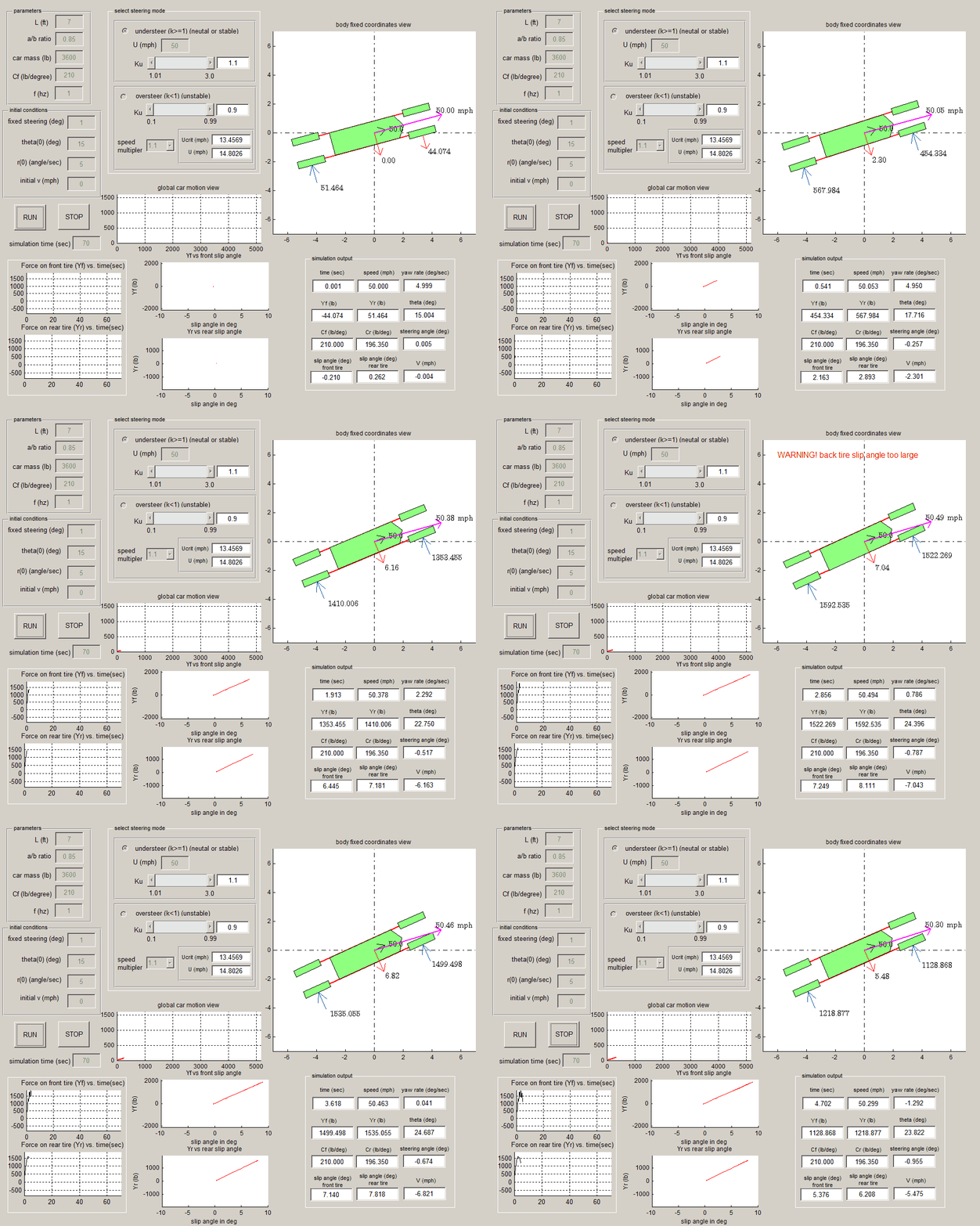
Critical speed below car speed (multiplier = 0.9)
Critical speed the same as car speed (multiplier = 1)
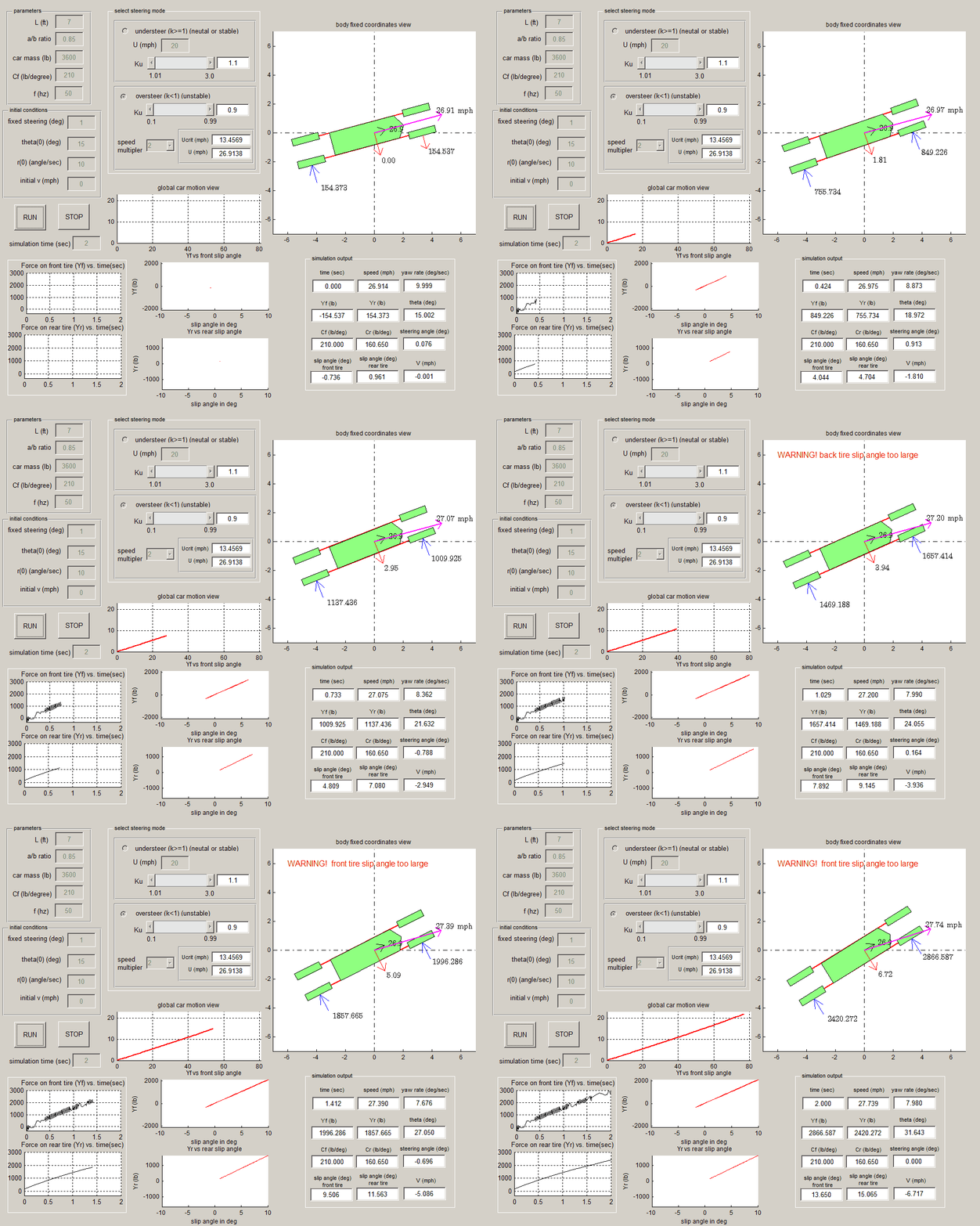
Critical speed larger than speed (multiplier = 1.1)
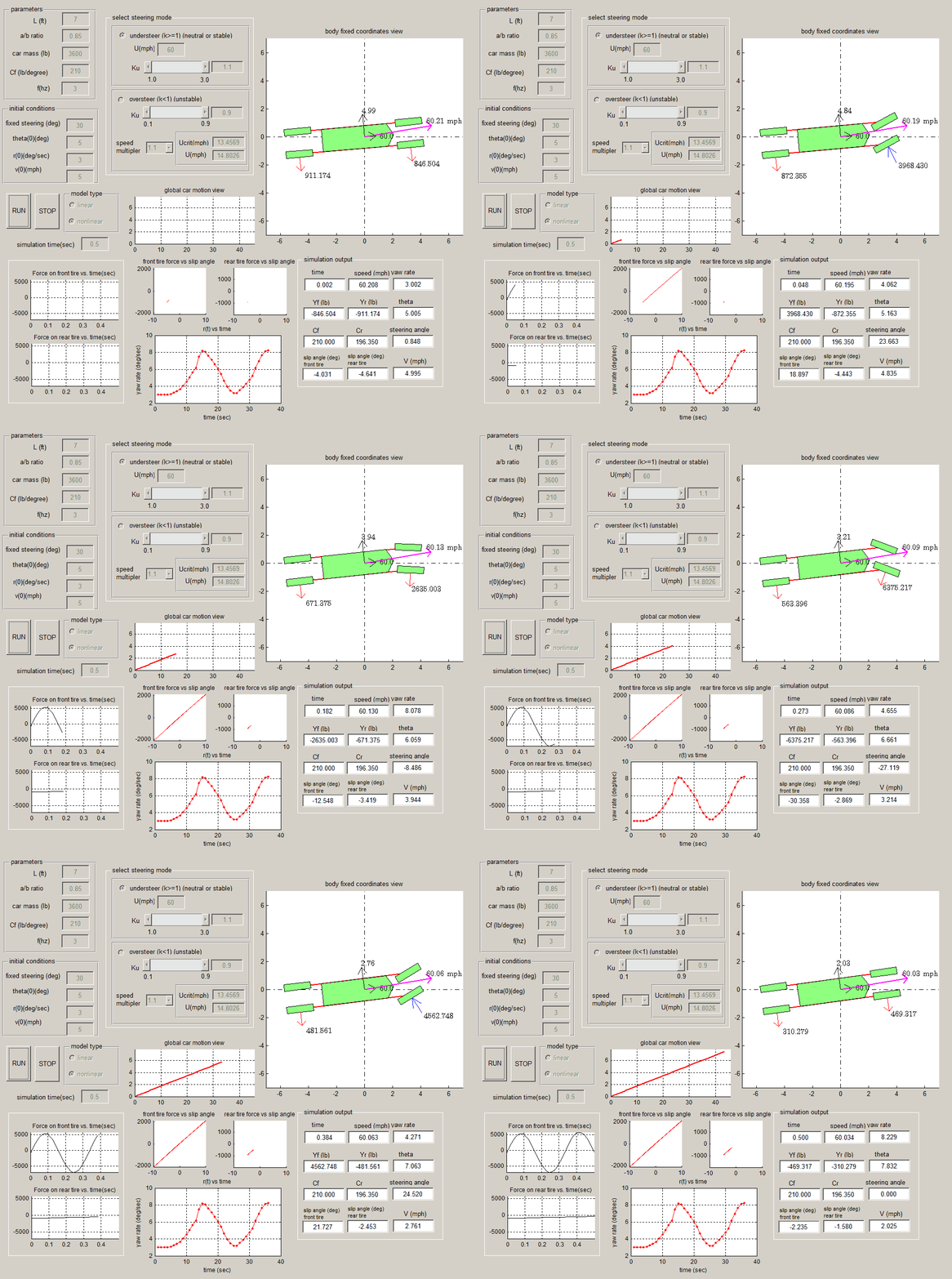
Neutral \(ku=1\) results (60 Mph)
Stable \(K_{u}=1.1\) results
6.4.4 Discussion of simulation results
The following summarizes the results observed from the simulation.
\(ku=0.9\) Unstable (oversteer)
- critical speed below \(U\) (0.9): Even though \(ku\) used was unstable, the car did not become unstable since the speed remained below critical speed. The car remained in an almost straight line, and the yaw rate \(r\) did not grow.
- critical speed the same as \(U\) (1.0): The car also remained stable, the yaw rate did not grow, the trajectory has a little more curvature than the first case but pretty much remained almost straight.
- critical speed larger than speed \(U\) (1.1): The car became unstable. As now an eigenvalue is on the right side of the complex plane. The yaw rate was seen to grow with time, and the car trajectory shows that the car went into cycles with increasing speed.
\(Ku=1.0\) (Neutral) understeer
The car speed used was \(60\)m.p.h. The car remained stable and the yaw rate was sinusoidal but did not grow up in magnitude. The trajectory shows the car remained in an almost straight line.
\(Ku=1.1\) understeer
The car speed used was \(60\)m.p.h. Also in this case the car remained stable and the yaw rate did not grow up in magnitude. The trajectory shows the car remained in exactly straight line during all the simulation time.
Conclusion
The mathematical model used predicted that when the car speed used is larger than a critical speed value, an eigenvalue will become unstable when \(k_{u}<1\). Hence the car would become unstable. The above result confirmed.
The model also predicted that when \(k_{u}\geq 1\), then the car will remain stable for any \(U\). And this was also confirmed by showing that the car was stable for \(k_{u}=1\) and \(k_{u}=1.1\) for different speed. This report shows the case for \(U=60mph\), but all other speeds tried generated similar results and the car remained stable as long as \(k_{u}\geq 1\).
6.4.5 Appendix
Description of user interface used for simulation
Source code
function varargout = lab4(varargin)
% LAB4 MATLAB code for lab4.fig
%      LAB4, by itself, creates a new LAB4 or raises the existing
%      singleton*.
%
%      H = LAB4 returns the handle to a new LAB4 or the handle to
%      the existing singleton*.
%
%      LAB4('CALLBACK',hObject,eventData,handles,...) calls the local
%      function named CALLBACK in LAB4.M with the given input arguments.
%
%      LAB4('Property','Value',...) creates a new LAB4 or raises the
%      existing singleton*.  Starting from the left, property value pairs are
%      applied to the GUI before lab4_OpeningFcn gets called.  An
%      unrecognized property name or invalid value makes property application
%      stop.  All inputs are passed to lab4_OpeningFcn via varargin.
%
%      *See GUI Options on GUIDE's Tools menu.  Choose "GUI allows only one
%      instance to run (singleton)".
%
% GUI file for my lab4 assignment, UC davis, spring 2011 EME121
% by Nasser M. Abbasi
% See also: GUIDE, GUIDATA, GUIHANDLES

% Edit the above text to modify the response to help lab4

% Last Modified by GUIDE v2.5 17-May-2011 02:51:30

% Begin initialization code - DO NOT EDIT
gui_Singleton = 1;
gui_State = struct('gui_Name',       mfilename, ...
                   'gui_Singleton',  gui_Singleton, ...
                   'gui_OpeningFcn', @lab4_OpeningFcn, ...
                   'gui_OutputFcn',  @lab4_OutputFcn, ...
                   'gui_LayoutFcn',  [] , ...
                   'gui_Callback',   []);
if nargin && ischar(varargin{1})
    gui_State.gui_Callback = str2func(varargin{1});
end

if nargout
    [varargout{1:nargout}] = gui_mainfcn(gui_State, varargin{:});
else
    gui_mainfcn(gui_State, varargin{:});
end
% End initialization code - DO NOT EDIT


% --- Executes just before lab4 is made visible.
function lab4_OpeningFcn(hObject, eventdata, handles, varargin)
% This function has no output args, see OutputFcn.
% hObject    handle to figure
% eventdata  reserved - to be defined in a future version of MATLAB
% handles    structure with handles and user data (see GUIDATA)
% varargin   command line arguments to lab4 (see VARARGIN)

% Choose default command line output for lab4
handles.output = hObject;

%nma_set_figure_position(handles.figure1,0.1,0.1,.75,.79);

set(handles.figure1, 'UserData',[]);
set(handles.figure1,'Name','UC Davis, EME 121 lab#4, by Nasser M. Abbasi');

userData.stop = false;
set(handles.figure1, 'UserData',userData);

contents = cellstr(get(handles.criticalMultiplierTag,'String'));
criticalMultipler=str2num(contents{get(handles.criticalMultiplierTag,...
    'Value')});
updateUnstable(criticalMultipler,handles);

% Update handles structure
guidata(hObject, handles);

% UIWAIT makes lab4 wait for user response (see UIRESUME)
% uiwait(handles.figure1);


% --- Outputs from this function are returned to the command line.
function varargout = lab4_OutputFcn(hObject, eventdata, handles)
% varargout  cell array for returning output args (see VARARGOUT);
% hObject    handle to figure
% eventdata  reserved - to be defined in a future version of MATLAB
% handles    structure with handles and user data (see GUIDATA)

% Get default command line output from handles structure
varargout{1} = handles.output;


function lenTag_Callback(hObject, eventdata, handles)
% hObject    handle to lenTag (see GCBO)
% eventdata  reserved - to be defined in a future version of MATLAB
% handles    structure with handles and user data (see GUIDATA)

% Hints: get(hObject,'String') returns contents of lenTag as text
%        str2double(get(hObject,'String')) returns contents of lenTag as a double


% --- Executes during object creation, after setting all properties.
function lenTag_CreateFcn(hObject, eventdata, handles)
% hObject    handle to lenTag (see GCBO)
% eventdata  reserved - to be defined in a future version of MATLAB
% handles    empty - handles not created until after all CreateFcns called

% Hint: edit controls usually have a white background on Windows.
%       See ISPC and COMPUTER.
if ispc && isequal(get(hObject,'BackgroundColor'), ...
        get(0,'defaultUicontrolBackgroundColor'))
    set(hObject,'BackgroundColor','white');
end


function abRatioTag_Callback(hObject, eventdata, handles)
% hObject    handle to abRatioTag (see GCBO)
% eventdata  reserved - to be defined in a future version of MATLAB
% handles    structure with handles and user data (see GUIDATA)

% Hints: get(hObject,'String') returns contents of abRatioTag as text
%        str2double(get(hObject,'String')) returns contents of abRatioTag as a double


% --- Executes during object creation, after setting all properties.
function abRatioTag_CreateFcn(hObject, eventdata, handles)
% hObject    handle to abRatioTag (see GCBO)
% eventdata  reserved - to be defined in a future version of MATLAB
% handles    empty - handles not created until after all CreateFcns called

% Hint: edit controls usually have a white background on Windows.
%       See ISPC and COMPUTER.
if ispc && isequal(get(hObject,'BackgroundColor'), ...
        get(0,'defaultUicontrolBackgroundColor'))
    set(hObject,'BackgroundColor','white');
end


function mTag_Callback(hObject, eventdata, handles)
% hObject    handle to mTag (see GCBO)
% eventdata  reserved - to be defined in a future version of MATLAB
% handles    structure with handles and user data (see GUIDATA)

% Hints: get(hObject,'String') returns contents of mTag as text
%        str2double(get(hObject,'String')) returns contents of mTag as a double


% --- Executes during object creation, after setting all properties.
function mTag_CreateFcn(hObject, eventdata, handles)
% hObject    handle to mTag (see GCBO)
% eventdata  reserved - to be defined in a future version of MATLAB
% handles    empty - handles not created until after all CreateFcns called

% Hint: edit controls usually have a white background on Windows.
%       See ISPC and COMPUTER.
if ispc && isequal(get(hObject,'BackgroundColor'), ...
        get(0,'defaultUicontrolBackgroundColor'))
    set(hObject,'BackgroundColor','white');
end


function CFTag_Callback(hObject, eventdata, handles)
% hObject    handle to CFTag (see GCBO)
% eventdata  reserved - to be defined in a future version of MATLAB
% handles    structure with handles and user data (see GUIDATA)

% Hints: get(hObject,'String') returns contents of CFTag as text
%        str2double(get(hObject,'String')) returns contents of CFTag as a double


% --- Executes during object creation, after setting all properties.
function CFTag_CreateFcn(hObject, eventdata, handles)
% hObject    handle to CFTag (see GCBO)
% eventdata  reserved - to be defined in a future version of MATLAB
% handles    empty - handles not created until after all CreateFcns called

% Hint: edit controls usually have a white background on Windows.
%       See ISPC and COMPUTER.
if ispc && isequal(get(hObject,'BackgroundColor'), ...
        get(0,'defaultUicontrolBackgroundColor'))
    set(hObject,'BackgroundColor','white');
end


function kTag_Callback(hObject, eventdata, handles)
% hObject    handle to kTag (see GCBO)
% eventdata  reserved - to be defined in a future version of MATLAB
% handles    structure with handles and user data (see GUIDATA)

% Hints: get(hObject,'String') returns contents of kTag as text
%        str2double(get(hObject,'String')) returns contents of kTag as a double


% --- Executes during object creation, after setting all properties.
function kTag_CreateFcn(hObject, eventdata, handles)
% hObject    handle to kTag (see GCBO)
% eventdata  reserved - to be defined in a future version of MATLAB
% handles    empty - handles not created until after all CreateFcns called

% Hint: edit controls usually have a white background on Windows.
%       See ISPC and COMPUTER.
if ispc && isequal(get(hObject,'BackgroundColor'), ...
        get(0,'defaultUicontrolBackgroundColor'))
    set(hObject,'BackgroundColor','white');
end


function fTag_Callback(hObject, eventdata, handles)
% hObject    handle to fTag (see GCBO)
% eventdata  reserved - to be defined in a future version of MATLAB
% handles    structure with handles and user data (see GUIDATA)

% Hints: get(hObject,'String') returns contents of fTag as text
%        str2double(get(hObject,'String')) returns contents of fTag as a double


% --- Executes during object creation, after setting all properties.
function fTag_CreateFcn(hObject, eventdata, handles)
% hObject    handle to fTag (see GCBO)
% eventdata  reserved - to be defined in a future version of MATLAB
% handles    empty - handles not created until after all CreateFcns called

% Hint: edit controls usually have a white background on Windows.
%       See ISPC and COMPUTER.
if ispc && isequal(get(hObject,'BackgroundColor'), ...
        get(0,'defaultUicontrolBackgroundColor'))
    set(hObject,'BackgroundColor','white');
end


function UTag_Callback(hObject, eventdata, handles)
% hObject    handle to UTag (see GCBO)
% eventdata  reserved - to be defined in a future version of MATLAB
% handles    structure with handles and user data (see GUIDATA)

% Hints: get(hObject,'String') returns contents of UTag as text
%        str2double(get(hObject,'String')) returns contents of UTag as a double


% --- Executes during object creation, after setting all properties.
function UTag_CreateFcn(hObject, eventdata, handles)
% hObject    handle to UTag (see GCBO)
% eventdata  reserved - to be defined in a future version of MATLAB
% handles    empty - handles not created until after all CreateFcns called

% Hint: edit controls usually have a white background on Windows.
%       See ISPC and COMPUTER.
if ispc && isequal(get(hObject,'BackgroundColor'), ...
        get(0,'defaultUicontrolBackgroundColor'))
    set(hObject,'BackgroundColor','white');
end


function deltaZeroTag_Callback(hObject, eventdata, handles)
% hObject    handle to deltaZeroTag (see GCBO)
% eventdata  reserved - to be defined in a future version of MATLAB
% handles    structure with handles and user data (see GUIDATA)

% Hints: get(hObject,'String') returns contents of deltaZeroTag as text
%        str2double(get(hObject,'String')) returns contents of deltaZeroTag as a double


% --- Executes during object creation, after setting all properties.
function deltaZeroTag_CreateFcn(hObject, eventdata, handles)
% hObject    handle to deltaZeroTag (see GCBO)
% eventdata  reserved - to be defined in a future version of MATLAB
% handles    empty - handles not created until after all CreateFcns called

% Hint: edit controls usually have a white background on Windows.
%       See ISPC and COMPUTER.
if ispc && isequal(get(hObject,'BackgroundColor'), ...
        get(0,'defaultUicontrolBackgroundColor'))
    set(hObject,'BackgroundColor','white');
end


function thetaZeroTag_Callback(hObject, eventdata, handles)
% hObject    handle to thetaZeroTag (see GCBO)
% eventdata  reserved - to be defined in a future version of MATLAB
% handles    structure with handles and user data (see GUIDATA)

% Hints: get(hObject,'String') returns contents of thetaZeroTag as text
%        str2double(get(hObject,'String')) returns contents of thetaZeroTag as a double


% --- Executes during object creation, after setting all properties.
function thetaZeroTag_CreateFcn(hObject, eventdata, handles)
% hObject    handle to thetaZeroTag (see GCBO)
% eventdata  reserved - to be defined in a future version of MATLAB
% handles    empty - handles not created until after all CreateFcns called

% Hint: edit controls usually have a white background on Windows.
%       See ISPC and COMPUTER.
if ispc && isequal(get(hObject,'BackgroundColor'), ...
        get(0,'defaultUicontrolBackgroundColor'))
    set(hObject,'BackgroundColor','white');
end


function rZeroTag_Callback(hObject, eventdata, handles)
% hObject    handle to rZeroTag (see GCBO)
% eventdata  reserved - to be defined in a future version of MATLAB
% handles    structure with handles and user data (see GUIDATA)

% Hints: get(hObject,'String') returns contents of rZeroTag as text
%        str2double(get(hObject,'String')) returns contents of rZeroTag as a double


% --- Executes during object creation, after setting all properties.
function rZeroTag_CreateFcn(hObject, eventdata, handles)
% hObject    handle to rZeroTag (see GCBO)
% eventdata  reserved - to be defined in a future version of MATLAB
% handles    empty - handles not created until after all CreateFcns called

% Hint: edit controls usually have a white background on Windows.
%       See ISPC and COMPUTER.
if ispc && isequal(get(hObject,'BackgroundColor'), ...
        get(0,'defaultUicontrolBackgroundColor'))
    set(hObject,'BackgroundColor','white');
end


function vZeroTag_Callback(hObject, eventdata, handles)
% hObject    handle to vZeroTag (see GCBO)
% eventdata  reserved - to be defined in a future version of MATLAB
% handles    structure with handles and user data (see GUIDATA)

% Hints: get(hObject,'String') returns contents of vZeroTag as text
%        str2double(get(hObject,'String')) returns contents of vZeroTag as a double


% --- Executes during object creation, after setting all properties.
function vZeroTag_CreateFcn(hObject, eventdata, handles)
% hObject    handle to vZeroTag (see GCBO)
% eventdata  reserved - to be defined in a future version of MATLAB
% handles    empty - handles not created until after all CreateFcns called

% Hint: edit controls usually have a white background on Windows.
%       See ISPC and COMPUTER.
if ispc && isequal(get(hObject,'BackgroundColor'), ...
        get(0,'defaultUicontrolBackgroundColor'))
    set(hObject,'BackgroundColor','white');
end


function maxtTag_Callback(hObject, eventdata, handles)
% hObject    handle to maxtTag (see GCBO)
% eventdata  reserved - to be defined in a future version of MATLAB
% handles    structure with handles and user data (see GUIDATA)

% Hints: get(hObject,'String') returns contents of maxtTag as text
%        str2double(get(hObject,'String')) returns contents of maxtTag as a double


% --- Executes during object creation, after setting all properties.
function maxtTag_CreateFcn(hObject, eventdata, handles)
% hObject    handle to maxtTag (see GCBO)
% eventdata  reserved - to be defined in a future version of MATLAB
% handles    empty - handles not created until after all CreateFcns called

% Hint: edit controls usually have a white background on Windows.
%       See ISPC and COMPUTER.
if ispc && isequal(get(hObject,'BackgroundColor'), ...
        get(0,'defaultUicontrolBackgroundColor'))
    set(hObject,'BackgroundColor','white');
end


% --- Executes on button press in runTag.
function runTag_Callback(hObject, eventdata, handles)
% hObject    handle to runTag (see GCBO)
% eventdata  reserved - to be defined in a future version of MATLAB
% handles    structure with handles and user data (see GUIDATA)

userData = get(handles.figure1, 'UserData');
userData.stop = false;
set(handles.figure1, 'UserData',userData);

data.L=str2num(get(handles.lenTag,'String'));
data.abRatio=str2num(get(handles.abRatioTag,'String'));
data.m=str2num(get(handles.mTag,'String'));
data.Cf=str2num(get(handles.CFTag,'String'));
data.Cf=data.Cf*180/pi; %read as lb/degree, convert to lb/radian

data.f=str2num(get(handles.fTag,'String'));

data.b= data.L/(1+data.abRatio);
data.a= data.L-data.b;
data.Ic = data.m*data.a*data.b/2;

contents = cellstr(get(handles.criticalMultiplierTag,'String'));
data.criticalMultipler=str2num(contents{get(...
    handles.criticalMultiplierTag,'Value')});

MPH=(60*60)/5280;
FTS=1/MPH;
if get(handles.underSteerBtn,'Value')==1
   data.ku=get(handles.kuStableTag,'Value');
   data.U=str2num(get(handles.UTag,'String'));
   data.U=data.U*FTS;  %ft/sec
   data.Cr = data.ku*(data.a/data.b)*data.Cf;

else
   data.ku=get(handles.unstableKuTag,'Value');
   data.Cr = data.ku*(data.a/data.b)*data.Cf;
   data.Ucrit = sqrt( (data.a+data.b)^2*...
       (data.Cf*data.Cr)/(data.m*(data.a*data.Cf-data.b*data.Cr)));
   data.U=data.criticalMultipler*data.Ucrit ;
   set(handles.calculatedUcritTag,'String', data.Ucrit*MPH);
   set(handles.calcuatedUTag,'String', data.U*MPH);
end

data.deltaZero=str2num(get(handles.deltaZeroTag,'String'));
data.deltaZero=data.deltaZero*pi/180;

data.thetaZero=str2num(get(handles.thetaZeroTag,'String'));
data.thetaZero=data.thetaZero*pi/180;

data.rZero=str2num(get(handles.rZeroTag,'String'));
data.rZero=data.rZero*pi/180;

data.vZero=str2num(get(handles.vZeroTag,'String'));
data.vZero=data.vZero*FTS;

data.maxt=str2num(get(handles.maxtTag,'String'));

data.handles=handles;

enableAll(handles,'off')
[g_msg,g_status]=lab4Main(data);
enableAll(handles,'on');

% --- Executes on button press in stopTag.
function stopTag_Callback(hObject, eventdata, handles)
% hObject    handle to stopTag (see GCBO)
% eventdata  reserved - to be defined in a future version of MATLAB
% handles    structure with handles and user data (see GUIDATA)

userData = get(handles.figure1, 'UserData');
userData.stop = true;
set(handles.figure1, 'UserData',userData);


% --- If Enable == 'on', executes on mouse press in 5 pixel border.
% --- Otherwise, executes on mouse press in 5 pixel border or over underSteerBtn.
function underSteerBtn_ButtonDownFcn(hObject, eventdata, handles)
% hObject    handle to underSteerBtn (see GCBO)
% eventdata  reserved - to be defined in a future version of MATLAB
% handles    structure with handles and user data (see GUIDATA)
i=1;

% --- If Enable == 'on', executes on mouse press in 5 pixel border.
% --- Otherwise, executes on mouse press in 5 pixel border or over overSteerBtn.
function overSteerBtn_ButtonDownFcn(hObject, eventdata, handles)
% hObject    handle to overSteerBtn (see GCBO)
% eventdata  reserved - to be defined in a future version of MATLAB
% handles    structure with handles and user data (see GUIDATA)
i=1;


% --- Executes when selected object is changed in steeringModePanel.
function steeringModePanel_SelectionChangeFcn(hObject, eventdata, handles)
% hObject    handle to the selected object in steeringModePanel
% eventdata  structure with the following fields (see UIBUTTONGROUP)
%       EventName: string 'SelectionChanged' (read only)
%       OldValue: handle of the previously selected object or empty if none was selected
%       NewValue: handle of the currently selected object
% handles    structure with handles and user data (see GUIDATA)
switch get(hObject,'Tag')
    case 'underSteerBtn'
          set(handles.unstableKuTag,'Enable','off');
          set(handles.criticalMultiplierTag,'Enable','off');
          set(handles.unstableKuValueTag,'Enable','off');
          set(handles.calculatedUcritTag,'Enable','off');
          set(handles.calcuatedUTag,'Enable','off');

          set(handles.kuStableTag,'Enable','on');
          set(handles.UTag,'Enable','on');
          set(handles.stableKuValueTag,'Enable','inactive');

    case 'overSteerBtn'
 set(handles.unstableKuTag,'Enable','inactive');

          set(handles.unstableKuValueTag,'Enable','inactive');
          set(handles.calculatedUcritTag,'Enable','inactive');
          set(handles.calcuatedUTag,'Enable','inactive');

          set(handles.unstableKuTag,'Enable','on');
          set(handles.criticalMultiplierTag,'Enable','on');

          set(handles.kuStableTag,'Enable','off');
          set(handles.UTag,'Enable','off');
          set(handles.stableKuValueTag,'Enable','off');
end

% --------------------------------------------------------------------
function steeringModePanel_ButtonDownFcn(hObject, eventdata, handles)
% hObject    handle to steeringModePanel (see GCBO)
% eventdata  reserved - to be defined in a future version of MATLAB
% handles    structure with handles and user data (see GUIDATA)


% --- Executes on selection change in criticalMultiplierTag.
function criticalMultiplierTag_Callback(hObject, eventdata, handles)
% hObject    handle to criticalMultiplierTag (see GCBO)
% eventdata  reserved - to be defined in a future version of MATLAB
% handles    structure with handles and user data (see GUIDATA)

% Hints: contents = cellstr(get(hObject,'String')) returns criticalMultiplierTag contents as cell array
%     contents{get(hObject,'Value')} returns selected item from criticalMultiplierTag

contents = cellstr(get(hObject,'String'));
criticalMultipler=str2num(contents{get(hObject,'Value')});

updateUnstable(criticalMultipler,handles);


% --- Executes during object creation, after setting all properties.
function criticalMultiplierTag_CreateFcn(hObject, eventdata, handles)
% hObject    handle to criticalMultiplierTag (see GCBO)
% eventdata  reserved - to be defined in a future version of MATLAB
% handles    empty - handles not created until after all CreateFcns called

% Hint: popupmenu controls usually have a white background on Windows.
%       See ISPC and COMPUTER.
if ispc && isequal(get(hObject,'BackgroundColor'), ...
        get(0,'defaultUicontrolBackgroundColor'))
    set(hObject,'BackgroundColor','white');
end


% --- Executes on slider movement.
function stableKuSliderTag_Callback(hObject, eventdata, handles)
% hObject    handle to stableKuSliderTag (see GCBO)
% eventdata  reserved - to be defined in a future version of MATLAB
% handles    structure with handles and user data (see GUIDATA)

% Hints: get(hObject,'Value') returns position of slider
%        get(hObject,'Min') and get(hObject,'Max') to determine range of slider


% --- Executes during object creation, after setting all properties.
function stableKuSliderTag_CreateFcn(hObject, eventdata, handles)
% hObject    handle to stableKuSliderTag (see GCBO)
% eventdata  reserved - to be defined in a future version of MATLAB
% handles    empty - handles not created until after all CreateFcns called

% Hint: slider controls usually have a light gray background.
if isequal(get(hObject,'BackgroundColor'), ...
        get(0,'defaultUicontrolBackgroundColor'))
    set(hObject,'BackgroundColor',[.9 .9 .9]);
end


% --- Executes on slider movement.
function kuStableTag_Callback(hObject, eventdata, handles)
% hObject    handle to kuStableTag (see GCBO)
% eventdata  reserved - to be defined in a future version of MATLAB
% handles    structure with handles and user data (see GUIDATA)

% Hints: get(hObject,'Value') returns position of slider
%        get(hObject,'Min') and get(hObject,'Max') to determine range of slider

v=get(hObject,'Value');
set(handles.stableKuValueTag,'String',v);


% --- Executes during object creation, after setting all properties.
function kuStableTag_CreateFcn(hObject, eventdata, handles)
% hObject    handle to kuStableTag (see GCBO)
% eventdata  reserved - to be defined in a future version of MATLAB
% handles    empty - handles not created until after all CreateFcns called

% Hint: slider controls usually have a light gray background.
if isequal(get(hObject,'BackgroundColor'), ...
        get(0,'defaultUicontrolBackgroundColor'))
    set(hObject,'BackgroundColor',[.9 .9 .9]);
end


% --- Executes on slider movement.
function unstableKuTag_Callback(hObject, eventdata, handles)
% hObject    handle to unstableKuTag (see GCBO)
% eventdata  reserved - to be defined in a future version of MATLAB
% handles    structure with handles and user data (see GUIDATA)

% Hints: get(hObject,'Value') returns position of slider
%        get(hObject,'Min') and get(hObject,'Max') to determine range of slider

v=get(hObject,'Value');
set(handles.unstableKuValueTag,'String',v);

contents = cellstr(get(handles.criticalMultiplierTag,'String'));
criticalMultipler=...
    str2num(contents{get(handles.criticalMultiplierTag,'Value')});
updateUnstable(criticalMultipler,handles);

% --- Executes during object creation, after setting all properties.
function unstableKuTag_CreateFcn(hObject, eventdata, handles)
% hObject    handle to unstableKuTag (see GCBO)
% eventdata  reserved - to be defined in a future version of MATLAB
% handles    empty - handles not created until after all CreateFcns called

% Hint: slider controls usually have a light gray background.
if isequal(get(hObject,'BackgroundColor'), ...
        get(0,'defaultUicontrolBackgroundColor'))
    set(hObject,'BackgroundColor',[.9 .9 .9]);
end


function stableKuValueTag_Callback(hObject, eventdata, handles)
% hObject    handle to stableKuValueTag (see GCBO)
% eventdata  reserved - to be defined in a future version of MATLAB
% handles    structure with handles and user data (see GUIDATA)

% Hints: get(hObject,'String') returns contents of stableKuValueTag as text
%        str2double(get(hObject,'String')) returns contents of stableKuValueTag as a double


% --- Executes during object creation, after setting all properties.
function stableKuValueTag_CreateFcn(hObject, eventdata, handles)
% hObject    handle to stableKuValueTag (see GCBO)
% eventdata  reserved - to be defined in a future version of MATLAB
% handles    empty - handles not created until after all CreateFcns called

% Hint: edit controls usually have a white background on Windows.
%       See ISPC and COMPUTER.
if ispc && isequal(get(hObject,'BackgroundColor'), ...
        get(0,'defaultUicontrolBackgroundColor'))
    set(hObject,'BackgroundColor','white');
end


function unstableKuValueTag_Callback(hObject, eventdata, handles)
% hObject    handle to unstableKuValueTag (see GCBO)
% eventdata  reserved - to be defined in a future version of MATLAB
% handles    structure with handles and user data (see GUIDATA)

% Hints: get(hObject,'String') returns contents of unstableKuValueTag as text
%        str2double(get(hObject,'String')) returns contents of unstableKuValueTag as a double


% --- Executes during object creation, after setting all properties.
function unstableKuValueTag_CreateFcn(hObject, eventdata, handles)
% hObject    handle to unstableKuValueTag (see GCBO)
% eventdata  reserved - to be defined in a future version of MATLAB
% handles    empty - handles not created until after all CreateFcns called

% Hint: edit controls usually have a white background on Windows.
%       See ISPC and COMPUTER.
if ispc && isequal(get(hObject,'BackgroundColor'), ...
        get(0,'defaultUicontrolBackgroundColor'))
    set(hObject,'BackgroundColor','white');
end


function calculatedUcritTag_Callback(hObject, eventdata, handles)
% hObject    handle to calculatedUcritTag (see GCBO)
% eventdata  reserved - to be defined in a future version of MATLAB
% handles    structure with handles and user data (see GUIDATA)

% Hints: get(hObject,'String') returns contents of calculatedUcritTag as text
%        str2double(get(hObject,'String')) returns contents of calculatedUcritTag as a double


% --- Executes during object creation, after setting all properties.
function calculatedUcritTag_CreateFcn(hObject, eventdata, handles)
% hObject    handle to calculatedUcritTag (see GCBO)
% eventdata  reserved - to be defined in a future version of MATLAB
% handles    empty - handles not created until after all CreateFcns called

% Hint: edit controls usually have a white background on Windows.
%       See ISPC and COMPUTER.
if ispc && isequal(get(hObject,'BackgroundColor'), ...
        get(0,'defaultUicontrolBackgroundColor'))
    set(hObject,'BackgroundColor','white');
end


function calcuatedUTag_Callback(hObject, eventdata, handles)
% hObject    handle to calcuatedUTag (see GCBO)
% eventdata  reserved - to be defined in a future version of MATLAB
% handles    structure with handles and user data (see GUIDATA)

% Hints: get(hObject,'String') returns contents of calcuatedUTag as text
%        str2double(get(hObject,'String')) returns contents of calcuatedUTag as a double


% --- Executes during object creation, after setting all properties.
function calcuatedUTag_CreateFcn(hObject, eventdata, handles)
% hObject    handle to calcuatedUTag (see GCBO)
% eventdata  reserved - to be defined in a future version of MATLAB
% handles    empty - handles not created until after all CreateFcns called

% Hint: edit controls usually have a white background on Windows.
%       See ISPC and COMPUTER.
if ispc && isequal(get(hObject,'BackgroundColor'), ...
        get(0,'defaultUicontrolBackgroundColor'))
    set(hObject,'BackgroundColor','white');
end

function updateUnstable(criticalMultipler,handles)

MPH=(60*60)/5280;
FTS=1/MPH;

L       = str2num(get(handles.lenTag,'String'));
abRatio = str2num(get(handles.abRatioTag,'String'));
m       = str2num(get(handles.mTag,'String'));
Cf      = str2num(get(handles.CFTag,'String'));
Cf      = Cf*180/pi;

b       = L/(1+abRatio);
a       = L-b;

ku      = get(handles.unstableKuTag,'Value');

Cr      = ku*(a/b)*Cf;

Ucrit   = sqrt( (a+b)^2*(Cf*Cr)/(m*(a*Cf-b*Cr)));
U       = criticalMultipler*Ucrit ;

set(handles.calculatedUcritTag,'String',Ucrit*MPH);
set(handles.calcuatedUTag,'String', U*MPH);

function timeValueTag_Callback(hObject, eventdata, handles)
% hObject    handle to timeValueTag (see GCBO)
% eventdata  reserved - to be defined in a future version of MATLAB
% handles    structure with handles and user data (see GUIDATA)

% Hints: get(hObject,'String') returns contents of timeValueTag as text
%        str2double(get(hObject,'String')) returns contents of timeValueTag as a double


% --- Executes during object creation, after setting all properties.
function timeValueTag_CreateFcn(hObject, eventdata, handles)
% hObject    handle to timeValueTag (see GCBO)
% eventdata  reserved - to be defined in a future version of MATLAB
% handles    empty - handles not created until after all CreateFcns called

% Hint: edit controls usually have a white background on Windows.
%       See ISPC and COMPUTER.
if ispc && isequal(get(hObject,'BackgroundColor'),...
        get(0,'defaultUicontrolBackgroundColor'))
    set(hObject,'BackgroundColor','white');
end

function speedValueTag_Callback(hObject, eventdata, handles)
% hObject    handle to speedValueTag (see GCBO)
% eventdata  reserved - to be defined in a future version of MATLAB
% handles    structure with handles and user data (see GUIDATA)

% Hints: get(hObject,'String') returns contents of speedValueTag as text
%        str2double(get(hObject,'String')) returns contents of speedValueTag as a double


% --- Executes during object creation, after setting all properties.
function speedValueTag_CreateFcn(hObject, eventdata, handles)
% hObject    handle to speedValueTag (see GCBO)
% eventdata  reserved - to be defined in a future version of MATLAB
% handles    empty - handles not created until after all CreateFcns called

% Hint: edit controls usually have a white background on Windows.
%       See ISPC and COMPUTER.
if ispc && isequal(get(hObject,'BackgroundColor'), ...
        get(0,'defaultUicontrolBackgroundColor'))
    set(hObject,'BackgroundColor','white');
end


function yawRateValueTag_Callback(hObject, eventdata, handles)
% hObject    handle to yawRateValueTag (see GCBO)
% eventdata  reserved - to be defined in a future version of MATLAB
% handles    structure with handles and user data (see GUIDATA)

% Hints: get(hObject,'String') returns contents of yawRateValueTag as text
%        str2double(get(hObject,'String')) returns contents of yawRateValueTag as a double


% --- Executes during object creation, after setting all properties.
function yawRateValueTag_CreateFcn(hObject, eventdata, handles)
% hObject    handle to yawRateValueTag (see GCBO)
% eventdata  reserved - to be defined in a future version of MATLAB
% handles    empty - handles not created until after all CreateFcns called

% Hint: edit controls usually have a white background on Windows.
%       See ISPC and COMPUTER.
if ispc && isequal(get(hObject,'BackgroundColor'), ...
        get(0,'defaultUicontrolBackgroundColor'))
    set(hObject,'BackgroundColor','white');
end


function YfValueTag_Callback(hObject, eventdata, handles)
% hObject    handle to YfValueTag (see GCBO)
% eventdata  reserved - to be defined in a future version of MATLAB
% handles    structure with handles and user data (see GUIDATA)

% Hints: get(hObject,'String') returns contents of YfValueTag as text
%        str2double(get(hObject,'String')) returns contents of YfValueTag as a double


% --- Executes during object creation, after setting all properties.
function YfValueTag_CreateFcn(hObject, eventdata, handles)
% hObject    handle to YfValueTag (see GCBO)
% eventdata  reserved - to be defined in a future version of MATLAB
% handles    empty - handles not created until after all CreateFcns called

% Hint: edit controls usually have a white background on Windows.
%       See ISPC and COMPUTER.
if ispc && isequal(get(hObject,'BackgroundColor'),...
        get(0,'defaultUicontrolBackgroundColor'))
    set(hObject,'BackgroundColor','white');
end


function YrValueTag_Callback(hObject, eventdata, handles)
% hObject    handle to YrValueTag (see GCBO)
% eventdata  reserved - to be defined in a future version of MATLAB
% handles    structure with handles and user data (see GUIDATA)

% Hints: get(hObject,'String') returns contents of YrValueTag as text
%        str2double(get(hObject,'String')) returns contents of YrValueTag as a double


% --- Executes during object creation, after setting all properties.
function YrValueTag_CreateFcn(hObject, eventdata, handles)
% hObject    handle to YrValueTag (see GCBO)
% eventdata  reserved - to be defined in a future version of MATLAB
% handles    empty - handles not created until after all CreateFcns called

% Hint: edit controls usually have a white background on Windows.
%       See ISPC and COMPUTER.
if ispc && isequal(get(hObject,'BackgroundColor'), ...
        get(0,'defaultUicontrolBackgroundColor'))
    set(hObject,'BackgroundColor','white');
end


function thetaValueTag_Callback(hObject, eventdata, handles)
% hObject    handle to thetaValueTag (see GCBO)
% eventdata  reserved - to be defined in a future version of MATLAB
% handles    structure with handles and user data (see GUIDATA)

% Hints: get(hObject,'String') returns contents of thetaValueTag as text
%        str2double(get(hObject,'String')) returns contents of thetaValueTag as a double


% --- Executes during object creation, after setting all properties.
function thetaValueTag_CreateFcn(hObject, eventdata, handles)
% hObject    handle to thetaValueTag (see GCBO)
% eventdata  reserved - to be defined in a future version of MATLAB
% handles    empty - handles not created until after all CreateFcns called

% Hint: edit controls usually have a white background on Windows.
%       See ISPC and COMPUTER.
if ispc && isequal(get(hObject,'BackgroundColor'),...
        get(0,'defaultUicontrolBackgroundColor'))
    set(hObject,'BackgroundColor','white');
end


function CfValueTag_Callback(hObject, eventdata, handles)
% hObject    handle to CfValueTag (see GCBO)
% eventdata  reserved - to be defined in a future version of MATLAB
% handles    structure with handles and user data (see GUIDATA)

% Hints: get(hObject,'String') returns contents of CfValueTag as text
%        str2double(get(hObject,'String')) returns contents of CfValueTag as a double


% --- Executes during object creation, after setting all properties.
function CfValueTag_CreateFcn(hObject, eventdata, handles)
% hObject    handle to CfValueTag (see GCBO)
% eventdata  reserved - to be defined in a future version of MATLAB
% handles    empty - handles not created until after all CreateFcns called

% Hint: edit controls usually have a white background on Windows.
%       See ISPC and COMPUTER.
if ispc && isequal(get(hObject,'BackgroundColor'), ...
        get(0,'defaultUicontrolBackgroundColor'))
    set(hObject,'BackgroundColor','white');
end


function CrValueTag_Callback(hObject, eventdata, handles)
% hObject    handle to CrValueTag (see GCBO)
% eventdata  reserved - to be defined in a future version of MATLAB
% handles    structure with handles and user data (see GUIDATA)

% Hints: get(hObject,'String') returns contents of CrValueTag as text
%        str2double(get(hObject,'String')) returns contents of CrValueTag as a double


% --- Executes during object creation, after setting all properties.
function CrValueTag_CreateFcn(hObject, eventdata, handles)
% hObject    handle to CrValueTag (see GCBO)
% eventdata  reserved - to be defined in a future version of MATLAB
% handles    empty - handles not created until after all CreateFcns called

% Hint: edit controls usually have a white background on Windows.
%       See ISPC and COMPUTER.
if ispc && isequal(get(hObject,'BackgroundColor'), ...
        get(0,'defaultUicontrolBackgroundColor'))
    set(hObject,'BackgroundColor','white');
end


function steerAngleValueTag_Callback(hObject, eventdata, handles)
% hObject    handle to steerAngleValueTag (see GCBO)
% eventdata  reserved - to be defined in a future version of MATLAB
% handles    structure with handles and user data (see GUIDATA)

% Hints: get(hObject,'String') returns contents of steerAngleValueTag as text
%        str2double(get(hObject,'String')) returns contents of steerAngleValueTag as a double


% --- Executes during object creation, after setting all properties.
function steerAngleValueTag_CreateFcn(hObject, eventdata, handles)
% hObject    handle to steerAngleValueTag (see GCBO)
% eventdata  reserved - to be defined in a future version of MATLAB
% handles    empty - handles not created until after all CreateFcns called

% Hint: edit controls usually have a white background on Windows.
%       See ISPC and COMPUTER.
if ispc && isequal(get(hObject,'BackgroundColor'), ...
        get(0,'defaultUicontrolBackgroundColor'))
    set(hObject,'BackgroundColor','white');
end


function alpha_r_valueTag_Callback(hObject, eventdata, handles)
% hObject    handle to alpha_r_valueTag (see GCBO)
% eventdata  reserved - to be defined in a future version of MATLAB
% handles    structure with handles and user data (see GUIDATA)

% Hints: get(hObject,'String') returns contents of alpha_r_valueTag as text
%        str2double(get(hObject,'String')) returns contents of alpha_r_valueTag as a double


% --- Executes during object creation, after setting all properties.
function alpha_r_valueTag_CreateFcn(hObject, eventdata, handles)
% hObject    handle to alpha_r_valueTag (see GCBO)
% eventdata  reserved - to be defined in a future version of MATLAB
% handles    empty - handles not created until after all CreateFcns called

% Hint: edit controls usually have a white background on Windows.
%       See ISPC and COMPUTER.
if ispc && isequal(get(hObject,'BackgroundColor'), ...
        get(0,'defaultUicontrolBackgroundColor'))
    set(hObject,'BackgroundColor','white');
end


function alpha_f_valueTag_Callback(hObject, eventdata, handles)
% hObject    handle to alpha_f_valueTag (see GCBO)
% eventdata  reserved - to be defined in a future version of MATLAB
% handles    structure with handles and user data (see GUIDATA)

% Hints: get(hObject,'String') returns contents of alpha_f_valueTag as text
%        str2double(get(hObject,'String')) returns contents of alpha_f_valueTag as a double


% --- Executes during object creation, after setting all properties.
function alpha_f_valueTag_CreateFcn(hObject, eventdata, handles)
% hObject    handle to alpha_f_valueTag (see GCBO)
% eventdata  reserved - to be defined in a future version of MATLAB
% handles    empty - handles not created until after all CreateFcns called

% Hint: edit controls usually have a white background on Windows.
%       See ISPC and COMPUTER.
if ispc && isequal(get(hObject,'BackgroundColor'), ...
        get(0,'defaultUicontrolBackgroundColor'))
    set(hObject,'BackgroundColor','white');
end


function V_valueTag_Callback(hObject, eventdata, handles)
% hObject    handle to V_valueTag (see GCBO)
% eventdata  reserved - to be defined in a future version of MATLAB
% handles    structure with handles and user data (see GUIDATA)

% Hints: get(hObject,'String') returns contents of V_valueTag as text
%        str2double(get(hObject,'String')) returns contents of V_valueTag as a double


% --- Executes during object creation, after setting all properties.
function V_valueTag_CreateFcn(hObject, eventdata, handles)
% hObject    handle to V_valueTag (see GCBO)
% eventdata  reserved - to be defined in a future version of MATLAB
% handles    empty - handles not created until after all CreateFcns called

% Hint: edit controls usually have a white background on Windows.
%       See ISPC and COMPUTER.
if ispc && isequal(get(hObject,'BackgroundColor'), ...
        get(0,'defaultUicontrolBackgroundColor'))
    set(hObject,'BackgroundColor','white');
end


function enableAll(handles,to)

set(handles.lenTag,'Enable',to);
set(handles.abRatioTag,'Enable',to);
set(handles.mTag,'Enable',to);
set(handles.CFTag,'Enable',to);
set(handles.fTag,'Enable',to);
set(handles.deltaZeroTag,'Enable',to);
set(handles.thetaZeroTag,'Enable',to);
set(handles.rZeroTag,'Enable',to);
set(handles.vZeroTag,'Enable',to);
set(handles.maxtTag,'Enable',to);
set(handles.underSteerBtn,'Enable',to);

if strcmp(to,'on')
    if get(handles.underSteerBtn,'Value')==1
        set(handles.kuStableTag,'Enable',to);
        set(handles.UTag,'Enable',to);
        set(handles.stableKuValueTag,'Enable','inactive');
    end
else
   set(handles.kuStableTag,'Enable',to);
   set(handles.UTag,'Enable',to);
   set(handles.stableKuValueTag,'Enable','off');
end

set(handles.overSteerBtn,'Enable',to);
if strcmp(to,'on')
    if get(handles.overSteerBtn,'Value')==1
       set(handles.unstableKuTag,'Enable',to);
       set(handles.criticalMultiplierTag,'Enable',to);
       set(handles.unstableKuValueTag,'Enable','inactive');
       set(handles.calculatedUcritTag,'Enable','inactive');
       set(handles.calcuatedUTag,'Enable','inactive');
    end
else
   set(handles.unstableKuTag,'Enable',to);
   set(handles.criticalMultiplierTag,'Enable',to);
   set(handles.unstableKuValueTag,'Enable',to);
   set(handles.calculatedUcritTag,'Enable',to);
   set(handles.calcuatedUTag,'Enable',to);
end

set(handles.lenTag,'Enable',to);
set(handles.lenTag,'Enable',to);
set(handles.lenTag,'Enable',to);
set(handles.lenTag,'Enable',to);
set(handles.lenTag,'Enable',to);
set(handles.lenTag,'Enable',to);
set(handles.lenTag,'Enable',to);
set(handles.lenTag,'Enable',to);
set(handles.lenTag,'Enable',to);
set(handles.lenTag,'Enable',to);
set(handles.lenTag,'Enable',to);
set(handles.lenTag,'Enable',to);

set(handles.linearModelBtn,'Enable',to);
set(handles.nonlinearModelBtn,'Enable',to);


function nma_set_figure_position(the_handle,x,y,w,h)
%utility function, called to create a figure
%in middle of window
%
%by Nasser M. Abbasi
%

sz    = get(0,'ScreenSize');
wid   = sz(3);
hight = sz(4);
set(the_handle,'Units','pixels');
set(the_handle,'Position',[x*wid y*hight w*wid h*hight]);
lab4Main.m
function [g_msg,g_status]=lab4Main(data)
%called by GUI to implement the numerical solution for Lab4
%UC davis, spring 2011
%see lab4.m for the main GUI file which calls this function

%by Nasser M. Abbasi

g_msg    = '';
g_status =1;

%set up the initial conditions
IC = [data.vZero;        % v(0)
    data.rZero;        % r(0)
    data.thetaZero;    % theta(0)
    0;                 % X(0)
    0];                % Y(0)

t = [0 data.maxt];      % simulation time

if get(data.handles.nonlinearModelBtn,'Value')==1
    [t,sol]  = ode15s(@rhsNONLINEAR,t,IC'); % numerically solve the system
else
    [t,sol]  = ode15s(@rhsLINEAR,t,IC'); % numerically solve the system
end
generatePlots(t,sol,data);     % plot the solution

% DONE that is all.

%------------
% Numerical solver, non-linear equations of motion
% This solver solves the set of equations of motion for the car
% dynamic model using the non-linear version of the equations.
% see report for the equations description
%------------
    function dy=rhsNONLINEAR(t,y)
        %order is  V,r,theta,X,Y

        theta    = y(3);
        r        = y(2);
        v        = y(1);
        steering = data.deltaZero*sin(2*pi*data.f*t);

        alphaf   = steering-atan ( (v+data.a*r) / data.U  );
        alphar   = atan ( (data.b*r-v) / data.U );
        Yf       = data.Cf*alphaf;
        Yr       = data.Cr*alphar;

        dy       = zeros(5,1);

        dy(1)    = (Yf/data.m)*cos(steering)+Yr/data.m-data.U * r;      %V
        dy(2)    = (data.a*Yf/data.Ic)*cos(steering)-data.b*Yr/data.Ic; %r
        dy(3)    = r;                                               %theta
        dy(4)    = data.U*cos(theta)-v*sin(theta);                      %X
        dy(5)    = data.U*sin(theta)+v*cos(theta);                      %Y
    end

%------------
% Numerical solver, linear equations of motion
% This solver solves the set of equations of motion for the car
% dynamic model using the linear version of the equations.
% see report for the equations description
%------------
    function dy=rhsLINEAR(t,y)
        %order is  V,r,theta,X,Y

        alphaf=data.deltaZero*sin(2*pi*data.f*t)-...
            (y(1)+data.a*y(2))/data.U ;

        alphar=(data.b*y(2)-y(1))/data.U;

        Yf = data.Cf*alphaf;
        Yr= data.Cr*alphar;

        dy=zeros(5,1);

        dy(1)=Yf/data.m + Yr/data.m - data.U * y(2);  %V
        dy(2)=data.a*Yf/data.Ic - data.b*Yr/data.Ic;  %r
        dy(3)=y(2);                                   %theta
        dy(4)=data.U*cos(y(3))-y(1)*sin(y(3));        %X
        dy(5)=data.U*sin(y(3))+y(1)*cos(y(3));        %Y
    end
end

%--------------------------------
% This function is called after the solver is completed
% to generate the simulation and plots to the GUI
%--------------------------------
function generatePlots(t,sol,data)

%read the solutions from the sol matrix

v=sol(:,1);
r=sol(:,2);
maxR=max(r);
minR=min(r);
if abs(maxR-minR)<2*eps
    maxR=1;
    minR=-1;
end

theta=sol(:,3);
X=sol(:,4);
Y=sol(:,5);

MPH=(60*60)/5280;
SCREEN_CAPTURE=false;  %set to zero for animation capture

if SCREEN_CAPTURE
    frameNumber = 0;
    actualFrameNumber = 0;
    theFrame=getframe(gcf);
    [im,MAP]=rgb2ind(theFrame.cdata,32,'nodither');
end

b=data.b;
a=data.a;
L=data.L;

%------- plot global trajectory, reset plots
set(0,'CurrentFigure',data.handles.figure1);
cla(data.handles.mainAxes,'reset');
cla(data.handles.fixedBodyAxes,'reset');
cla(data.handles.tireForceAxes,'reset');
cla(data.handles.YrAxes,'reset');
cla(data.handles.slipAngleAxes,'reset');
cla(data.handles.slipAngleRAxes,'reset');
cla(data.handles.rVsTimeAxes,'reset');

maxX=max(X);
minX=min(X);
maxY=max(Y);
minY=min(Y);

maxX=maxX+0.05*abs(maxX);
minX=min(X)-0.05*abs(minX);
if minX==maxX
    minX=-1;
    maxX=1;
end

maxY=max(Y)+0.05*abs(maxY);
minY=min(Y)-0.05*abs(minY);
if minY==maxY
    minY=-1;
    maxY=1;
end

tireWidth=b/8;
tireLength=b/2;

leftTireX=[-b -b-tireLength -b-tireLength -b];
leftTireY=[tireWidth/2 tireWidth/2 -tireWidth/2 -tireWidth/2];

frontLeftTireX=[-tireLength/2 -tireLength/2 tireLength/2 tireLength/2];
frontLeftTireY=[-tireWidth/2 tireWidth/2 tireWidth/2 -tireWidth/2];

C=.5*ones(1,length(leftTireY));
carWidth=a/2;

bodyFrameX=[-.8*b -.8*b .5*a .65*a .5*a];
bodyFrameY=[-carWidth/2 carWidth/2 carWidth/2 0 -carWidth/2];

set(data.handles.figure1, 'CurrentAxes',data.handles.mainAxes);
xlim([minX maxX]);
ylim([minY maxY]);
grid;

%graphics layout
uLine=[0 0.25*a 0.1*a 0.25*a  0.1*a; ...
    0 0      0.1*a  0      -0.1*a];

vLinePositive=[0 0      -0.1*a    0      0.1*a; ...
    0 0.5*a   0.35*a   0.5*a  0.35*a];

vLineNegative=[0 0      -0.1*a    0        0.1*a; ...
    0 -0.5*a -0.35*a   -0.5*a  -0.35*a];

[Yf,Yr,maxYY,minYY,alphaF,alphaR]=getTireForces(t,v,r,data);
max_Yf=max(abs(Yf));
max_Yr=max(abs(Yr));
%normalized_Yf=Yf/max_Yf;
%normalized_Yr=Yr/max_Yr;

set(data.handles.figure1, 'CurrentAxes',data.handles.tireForceAxes);
xlim([0 t(end)]);
ylim([minYY maxYY]);
grid;

set(data.handles.figure1, 'CurrentAxes',data.handles.YrAxes);
xlim([0 t(end)]);
ylim([minYY maxYY]);
grid;

%update r vs time plot, do this here before start the animation
set(data.handles.figure1, 'CurrentAxes',data.handles.rVsTimeAxes);
plot(r(1:50:end)*180/pi,'r.-','LineWidth',1);
%plot(r*180/pi,'r.-','LineWidth',1);
title('r(t) vs time');
xlabel('time (sec)');
ylabel('yaw rate (deg/sec)');
hold on;
grid on;

%set(gca,'XTickLabel',[0 20 40 60 80 100]);
%xlim([0 t(end)]);
%ylim([minR-(abs(0.1*minR)) maxR+abs(0.1*maxR)]);
set(gca,'FontSize',7);


%set up various coordinates for the arrows to draw on the car as simulation
%is running.  Then use transformation to draw them
%negative is down, color red
negativeForceArrowOnBackWheel=...
    [-b-tireLength/2     -b-tireLength/2   -b-tireLength/2-a/10  ...
    -b-tireLength/2     -b-tireLength/2+a/10;

    -tireWidth/2        -tireWidth/2-0.3*a   -tireWidth/2-0.2*a  ...
    -tireWidth/2-0.3*a   -tireWidth/2-0.2*a];

positiveForceArrowOnBackWheel=...
    [-b-tireLength/2-a/10  -b-tireLength/2   -b-tireLength/2+a/10 ...
    -b-tireLength/2  -b-tireLength/2;

    -tireWidth/2-0.2*a    -tireWidth/2      -tireWidth/2-0.2*a  ...
    -tireWidth/2  -tireWidth/2-0.4*a];

%front force arrows
negativeForceArrowOnFrontWheel=...
    [0                    0                     -a/10       ...
    0                    a/10;

    -tireWidth/2        -tireWidth/2-0.3*a   -tireWidth/2-0.2*a ...
    -tireWidth/2-0.3*a   -tireWidth/2-0.2*a];

positiveForceArrowOnFrontWheel=...
    [-a/10                  0                     a/10      ...
    0                    0;

    -tireWidth/2-0.2*a    -tireWidth/2      -tireWidth/2-0.2*a  ...
    -tireWidth/2  -tireWidth/2-0.4*a];

%Now process the solution we allready have, and update plots and
%gui for each time step
for i=2:length(t)

    %plot global trajectory
    set(data.handles.figure1, 'CurrentAxes',data.handles.mainAxes);
    hold on;
    line(X(i-1:i),Y(i-1:i),'LineWidth',1.5,'LineStyle','-',...
        'color','red');
    title('global car motion view');
    %ylabel('Y'); xlabel('X');
    set(gca,'FontSize',7);

    set(data.handles.figure1, 'CurrentAxes',...
        data.handles.fixedBodyAxes);
    cla;
    line([-b*cos(theta(i))-carWidth/2*sin(theta(i)), ...
        a*cos(theta(i))-carWidth/2*sin(theta(i))],...
        [-b*sin(theta(i))+carWidth/2*cos(theta(i)),...
        a*sin(theta(i))+carWidth/2*cos(theta(i))],...
        'LineWidth',1.5,'LineStyle','-',...
        'color','red');

    line([-b*cos(theta(i))+carWidth/2*sin(theta(i)), ...
        a*cos(theta(i))+carWidth/2*sin(theta(i))],...
        [-b*sin(theta(i))-carWidth/2*cos(theta(i)),...
        a*sin(theta(i))-carWidth/2*cos(theta(i))],...
        'LineWidth',1.5,'LineStyle','-',...
        'color','red');

    line([-L L ],...
        [0 0 ],...
        'LineWidth',0.5,'LineStyle','-.',...
        'color','black');

    line([0 0],...
        [-L L],...
        'LineWidth',0.5,'LineStyle','-.',...
        'color','black');

    %Now do back wheel
    %rotate back wheel at orgin
    A = [cos(theta(i)) -sin(theta(i));sin(theta(i)) cos(theta(i))];
    rotatedCoordinates=A*[ leftTireX;leftTireY];

    %move from  0,0 to left back
    rotatedCoordinates(2,:)=rotatedCoordinates(2,:)+...
        carWidth/2*cos(theta(i));

    rotatedCoordinates(1,:)=rotatedCoordinates(1,:)-...
        carWidth/2*sin(theta(i));

    patch(rotatedCoordinates(1,:),rotatedCoordinates(2,:),C);

    %move from  0,0 to right back
    rotatedCoordinates(2,:)=rotatedCoordinates(2,:)-carWidth*cos(theta(i));
    rotatedCoordinates(1,:)=rotatedCoordinates(1,:)+carWidth*sin(theta(i));
    patch(rotatedCoordinates(1,:),rotatedCoordinates(2,:),C);

    %add force arrow to left wheel
    if Yr(i)<0 %CHECK
        forceArrow=negativeForceArrowOnBackWheel;
        lineColor='red';
    else
        forceArrow=positiveForceArrowOnBackWheel;
        lineColor='blue';
    end

    %move for force arrow to right back tire only
    rotatedCoordinates=A*[ forceArrow(1,:);forceArrow(2,:)];
    rotatedCoordinates(2,:)=rotatedCoordinates(2,:)-...
        carWidth/2*cos(theta(i));

    rotatedCoordinates(1,:)=rotatedCoordinates(1,:)+...
        carWidth/2*sin(theta(i));

    line(rotatedCoordinates(1,:),rotatedCoordinates(2,:),...
        'color',lineColor);

    %put text on the end of the arrow of the force amount
    if Yr(i)<0 %CHECK
        text(rotatedCoordinates(1,2)+0.1*a*cos(theta(i)),...
            rotatedCoordinates(2,2)-0.1*a*cos(theta(i)),...
            sprintf('%3.3f',abs(Yr(i))),'interpreter','latex');
    else
        text(rotatedCoordinates(1,5)+0.1*a*cos(theta(i)),...
            rotatedCoordinates(2,5)-0.1*a*cos(theta(i)),...
            sprintf('%3.3f',abs(Yr(i))),'interpreter','latex');
    end

    %do front    wheels
    steeringAngle= data.deltaZero*sin(2*pi*t(i)*data.f);
    B = [cos(theta(i)+ steeringAngle) -sin(theta(i)+ steeringAngle);...
        sin(theta(i)+ steeringAngle) cos(theta(i)+ steeringAngle)];

    rotatedCoordinates=B*[  frontLeftTireX; frontLeftTireY];
    %move the tire to the right front
    rotatedCoordinates(1,:)=rotatedCoordinates(1,:)+a*cos(theta(i));
    rotatedCoordinates(2,:)=rotatedCoordinates(2,:)+a*sin(theta(i));

    %move the tire to the left front
    rotatedCoordinates(2,:)=rotatedCoordinates(2,:)+...
        carWidth/2*cos(theta(i));

    rotatedCoordinates(1,:)=rotatedCoordinates(1,:)-...
        carWidth/2*sin(theta(i));

    patch(rotatedCoordinates(1,:),rotatedCoordinates(2,:),C);

    %right front
    rotatedCoordinates(2,:)=rotatedCoordinates(2,:)-carWidth*cos(theta(i));
    rotatedCoordinates(1,:)=rotatedCoordinates(1,:)+carWidth*sin(theta(i));
    patch(rotatedCoordinates(1,:),rotatedCoordinates(2,:),C);

    %add force arrow to right front wheel
    if Yf(i)<0  %%CHECK
        forceArrow=negativeForceArrowOnFrontWheel;
        lineColor='red';
    else
        forceArrow=positiveForceArrowOnFrontWheel;
        lineColor='blue';
    end

    %move for force arrow to right front tire only
    rotatedCoordinates=B*[ forceArrow(1,:);forceArrow(2,:)];
    rotatedCoordinates(2,:)=rotatedCoordinates(2,:)+a*sin(theta(i));
    rotatedCoordinates(1,:)=rotatedCoordinates(1,:)+a*cos(theta(i));

    rotatedCoordinates(2,:)=rotatedCoordinates(2,:)-carWidth/2*cos(theta(i));
    rotatedCoordinates(1,:)=rotatedCoordinates(1,:)+carWidth/2*sin(theta(i));

    line(rotatedCoordinates(1,:),rotatedCoordinates(2,:),'color',lineColor);

    %put text on the end of the arrow of force amount
    if Yf(i)<0 %CHECK
        text(rotatedCoordinates(1,2)+0.05*a*cos(theta(i)),...
            rotatedCoordinates(2,2)-0.05*a*cos(theta(i)),...
            sprintf('%3.3f',abs(Yf(i))),'interpreter','latex');
    else
        text(rotatedCoordinates(1,5)+0.05*a*cos(theta(i)),...
            rotatedCoordinates(2,5)-0.05*a*cos(theta(i)),...
            sprintf('%3.3f',abs(Yf(i))),'interpreter','latex');
    end

    %do centered frame U , V arrow lines
    rotatedCoordinates=A*[  bodyFrameX; bodyFrameY];
    patch(rotatedCoordinates(1,:),rotatedCoordinates(2,:),...
        0.5*ones(1,length( bodyFrameX)));

    rotatedCoordinates=A*uLine;
    line(rotatedCoordinates(1,:),rotatedCoordinates(2,:),'color','black');
    %add value of U on top of arrow
    text(rotatedCoordinates(1,2)+0.1*a*cos(theta(i)),...
        rotatedCoordinates(2,2)+0.1*a*sin(theta(i)),...
        sprintf('%3.1f',data.U*MPH),'interpreter','latex');

    %check if velocity (lateral) on the car is positive or negative
    if v(i)<=0
        rotatedCoordinates=A*vLineNegative;
        lineColor='red';
        delX=0.1*a*sin(theta(i));
        delY=-0.1*a*cos(theta(i));
    else
        rotatedCoordinates=A*vLinePositive;
        lineColor='black';
        delX=-0.1*a*sin(theta(i));
        delY=0.1*a*cos(theta(i));
    end

    line(rotatedCoordinates(1,:),rotatedCoordinates(2,:),'color',lineColor);
    %add value of V on top of arrow
    text(rotatedCoordinates(1,2)+delX,rotatedCoordinates(2,2)+delY,...
        sprintf('%3.2f',abs(v(i))*MPH),'interpreter','latex');

    title('body fixed coordinates view');
    if get(data.handles.overSteerBtn,'Value')==1
        if abs(alphaF(i))*180/pi > 8
            if abs(alphaF(i))*180/pi > 15
                text(-6,6,...
                    'CRITICAL! front slip angle out of control, UNSTABLE!',...
                    'FontSize',10,'Color','red')
            else
                text(-6,6,...
                    'WARNING!  front tire slip angle too large','FontSize',...
                    10,'Color','red')
            end
        else
            if abs(alphaR(i))*180/pi > 8
                if abs(alphaF(i))*180/pi > 15
                    text(-6,6,...
                        'CRITICAL!  rear slip angle out of control, UNSTABLE!',...
                        'FontSize',10,'Color','red')
                else
                    text(-6,6,...
                        'WARNING! back tire slip angle too large',...
                        'FontSize',10,'Color','red')
                end
            end
        end
    end

    %add resultant speed
    alpha=atan(v(i)/data.U);
    valueOfSpeed=sqrt(v(i)^2+data.U^2);

    %lengthOfSpeed=1.5*b; %sqrt((0.25*a)^2+(0.5*a)^2);
    %Xcoord=lengthOfSpeed*cos(alpha);
    %Ycoord=lengthOfSpeed*sin(alpha);

    CoordinatesOfArrow=[0 1.5*a  1.4*a 1.5*a 1.4*a;...
        0 0 0.1*a 0 -0.1*a];
    comAngle=alpha+theta(i);
    B = [cos(comAngle) -sin(comAngle);...
        sin(comAngle) cos(comAngle)];

    rotatedCoordinates=B*[CoordinatesOfArrow(1,:);CoordinatesOfArrow(2,:)];
    line(rotatedCoordinates(1,:),rotatedCoordinates(2,:),...
        'color','magenta',...
        'LineWidth',1.5,'LineStyle','-');

    if rotatedCoordinates(2,2)<=0
        delX=0.1*a;
        delY=-0.1*a;
    else
        delX=-0.1*a;
        delY=0.1*a;
    end

    text(rotatedCoordinates(1,2)+delX,rotatedCoordinates(2,2)+delY,...
        sprintf('%3.2f mph',valueOfSpeed*MPH),'interpreter','latex');

    xlim([-data.L data.L]);
    ylim([-data.L data.L]);
    axis equal;
    axis tight;
    hold off;
    drawnow;

    %tire forces plot
    set(data.handles.figure1, 'CurrentAxes',data.handles.tireForceAxes);
    hold on;
    plot(t(i-1:i),Yf(i-1:i),'k-','LineWidth',1);
    title('Force on front tire vs. time(sec)');
    %ylabel('Newton');
    set(gca,'FontSize',7);
    drawnow;

    set(data.handles.figure1, 'CurrentAxes',data.handles.YrAxes);
    hold on;
    plot(t(i-1:i),Yr(i-1:i),'k-','LineWidth',1);
    title('Force on rear tire vs. time(sec)');
    %ylabel('Newton');
    set(gca,'FontSize',7);

    %make slip angle plot
    set(data.handles.figure1, 'CurrentAxes',data.handles.slipAngleAxes);
    hold on;
    plot(alphaF(i-1:i)*180/pi,Yf(i-1:i),'r-','LineWidth',1);
    title('front tire force vs slip angle');
    %xlabel('slip angle in deg');
    %ylabel('Yf (lb)');

    ylim([-10*data.Cf*pi/180 10*data.Cf*pi/180]);
    xlim([-10 10]);
    set(gca,'FontSize',7);

    %updateSimulationOutput_lab4_eme121(data.handles,t(i),v(i),...
    %    r(i),Yf(i),Yr(i),theta(i),valueOfSpeed,data.Cf,data.Cr,...
    %    alphaF(i),alphaR(i),steeringAngle)  ;
    %drawnow;

    set(data.handles.figure1, 'CurrentAxes',data.handles.slipAngleRAxes);
    hold on;
    plot(alphaR(i-1:i)*180/pi,Yr(i-1:i),'r-','LineWidth',1);
    title('rear tire force vs slip angle');
    %xlabel('slip angle in deg');
    %ylabel('Yr (lb)');

    ylim([-10*data.Cr*pi/180 10*data.Cr*pi/180]);
    xlim([-10 10]);
    set(gca,'FontSize',7);


    updateSimulationOutput_lab4_eme121(data.handles,t(i),v(i),...
        r(i),Yf(i),Yr(i),theta(i),valueOfSpeed,data.Cf,data.Cr,...
        alphaF(i),alphaR(i),...
        steeringAngle)  ;
    drawnow;

    if SCREEN_CAPTURE
        frameNumber = frameNumber+1;
        if mod(frameNumber,1)==0
            theFrame = getframe(gcf);
            actualFrameNumber = actualFrameNumber +1;
            im(:,:,1,actualFrameNumber ) = ...
                rgb2ind(theFrame.cdata,MAP,'nodither');
            %im=rgb2ind(theFrame.cdata,MAP,'nodither');
            %imwrite(im,MAP,[num2str(actualFrameNumber) '.gif'],'gif');
        end
    end

    userData = get(data.handles.figure1, 'UserData');
    if userData.stop
        break;
    end
end

if SCREEN_CAPTURE
    imwrite(im,MAP,'demo.gif','DelayTime',0,'LoopCount',inf,...
        'WriteMode','overwrite');
end

end
%--------------------------
% Called by the plotting function above to calculate the tire
% forces Yf, Yr from the result of the numerical solution
% so we can plot them.
%--------------------------
function [Yf,Yr,maxY,minY,alphaF,alphaR]=getTireForces(t,v,r,data)

Yf=zeros(1,length(t));
Yr=Yf;
alphaR=Yr;
alphaF=Yr;

for i=1:length(t)
    alphaF(i)=data.deltaZero*sin(2*pi*t(i)*data.f)-...
        (v(i)+data.a*r(i))/data.U;

    Yf(i)=data.Cf*alphaF(i);
    alphaR(i)=(data.b*r(i)-v(i))/data.U;
    Yr(i)=data.Cr*alphaR(i);
end
maxY=max([max(Yf),max(Yr)]);
minY=min([min(Yf),min(Yr)]);
if abs(minY-maxY)<2*eps
    minY=-1;
    maxY=1;
end

end

%--------------------------
% Called by the plotting function above to update the GUI
% at each time step with current simulation variables
%--------------------------
function updateSimulationOutput_lab4_eme121(...
    handles,t,v,r,Yf,Yr,theta,valueOfSpeed,Cf,Cr,alphaF,alphaR,...
    steeringAngle)

MPH=(60*60)/5280;
FTS=1/MPH;

set(handles.timeValueTag,'String',sprintf('%3.3f',t));
set(handles.speedValueTag,'String',sprintf('%3.3f',valueOfSpeed*MPH));
set(handles.yawRateValueTag,'String',sprintf('%3.3f',r*180/pi));

set(handles.YfValueTag,'String',sprintf('%3.3f',Yf));
set(handles.YrValueTag,'String',sprintf('%3.3f',Yr));
set(handles.thetaValueTag,'String',sprintf('%3.3f',mod(theta*180/pi,360)));

set(handles.CfValueTag,'String',sprintf('%3.3f',Cf*pi/180));
set(handles.CrValueTag,'String',sprintf('%3.3f',Cr*pi/180));
set(handles.steerAngleValueTag,'String',sprintf('%3.3f',steeringAngle*180/pi));


set(handles.alpha_f_valueTag,'String',sprintf('%3.3f',...
    sign(alphaF)*mod(abs(alphaF)*180/pi,360)));

set(handles.alpha_r_valueTag,'String',sprintf('%3.3f',...
    sign(alphaR)*mod(abs(alphaR)*180/pi,360)));

set(handles.V_valueTag,'String',sprintf('%3.3f',v*MPH));

end