Hidden Markov Models (HMM) main algorithms (forward, backward, and Viterbi) are outlined, and a GUI based implementation (in MATLAB) of a basic HMM is included along with a user guide. The implementation uses a flexible plain text configuration file format for describing the HMM.
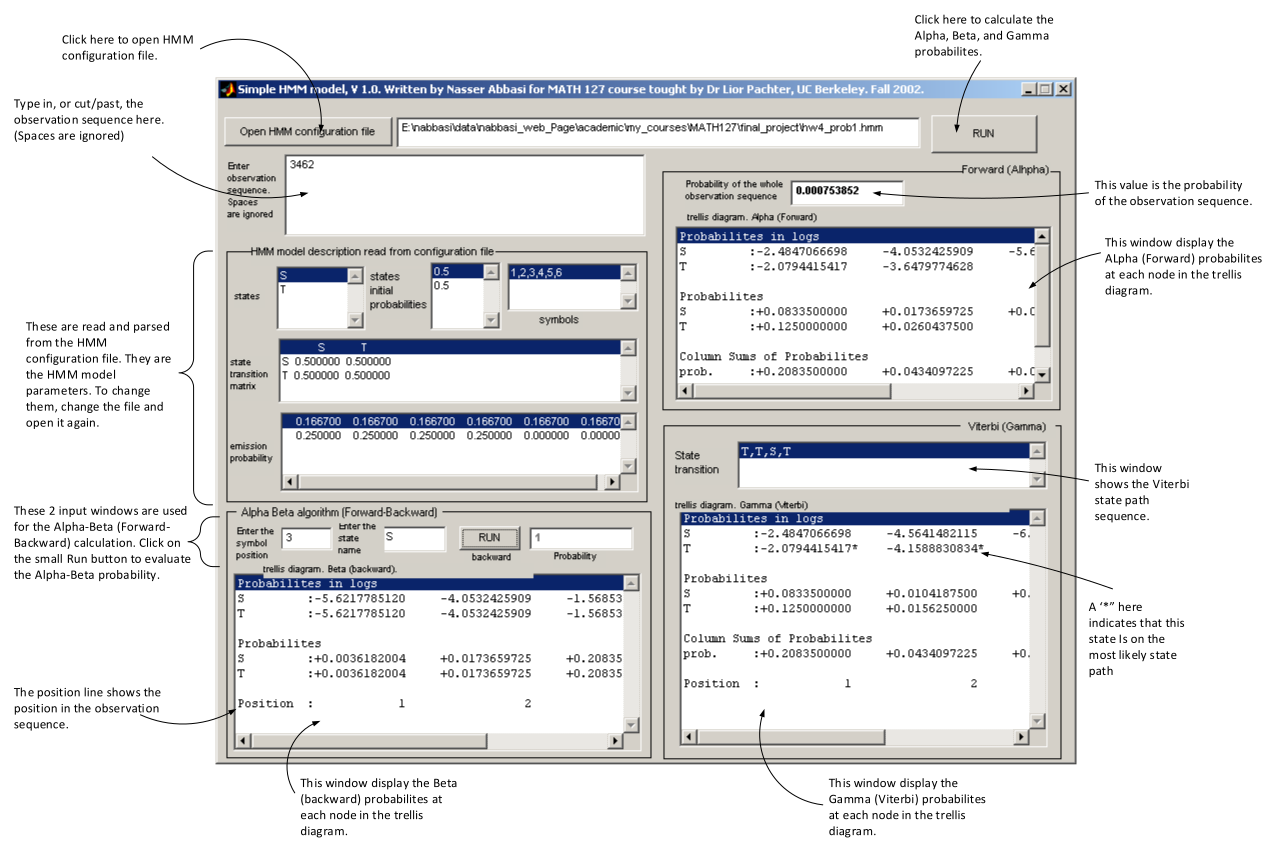
This is screen shot of the final Matlab program written for the implmenetation.
Description and download information on the above program as in the appendix.
This report is part of my final term project for the course MATH 127, Mathematics department, Berkeley, CA, USA
I have taken this course as an extension student in the fall of 2002 to learn about computational methods in biology. The course is titled Mathematical and Computational Methods in Molecular Biology and given by Dr. Lior Pachter.
This report contains a detailed description of the three main HMM algorithms. An implementation (in MATLAB) was completed. See page 47 for detailed description of the implementation, including a user guide.
HMM are probabilitsic based methods for the analysis of signals and data. In the area of computational biology, HMMs are used in the following areas:
To explain HMM, a simple example is used.
Assume we have a sequence. This could be a sequence of letters, such as DNA or protein sequence, or a sequence of numerical values (a general form of a signal) or a sequence of symbols of any other type. This sequence is called the observation sequence.
Now, we examine the system that generated this sequence. Each symbol in the observation sequence is generated when the system was in some specific state. The system will continuously flip-flop between all the different states it can be in, and each time it makes a state change, a new symbol in the sequence is emitted.
In most instances, we are more interested in analyzing the system states sequence that generated the observation sequence. To be able to do this, we model the system as a stochastic model which when run, would have generated this sequence. One such model is the hidden Markov model. To put this in genomic perspective, if we are given a DNA sequence, we would be interested in knowing the structure of the sequence in terms of the location of the genes, the location of the splice sites, and the location of the exons and intron among others.
What we know about this system is what states it can be in, the probability of changing from one state to another, and the probability of generating a specific type of element from each state. Hence, associated with each symbol in the observation sequence is the state the system was in when it generated the symbol.
When looking a sequence of letter (a string) such as “ACGT ”, we do not know which state the system was in when it generated, say the letter ‘C’. If the system have \(n\) states that it can be in, then the letter ‘C’ could have been generated from any one of those \(n\) states.
From the above brief description of the system, we see that there are two stochastic processes in progress at the same time. One stochastic process selects which state the system will switch to each time, and another stochastic process selects which type of element to be emitted when the system is in some specific state.
We can imagine a multi-faced coin being flipped to determine which state to switch to, and yet another such coin being flipped to determine which symbol to emit each time we are in a state.
In this report, the type of HMM that will be considered will be time-invariant. This means that the probabilities that describe the system do not change with time: When an HMM is in some state, say \(k\), and there is a probability \(p\) to generate the symbol \(x\) from this state, then this probability do not change with time (or equivalent, the probability do not change with the length of the observation sequence).
In addition, we will only consider first-order HMM.1
An HMM is formally defined2 as a five-tuple:
Set of states \(\{k,l,\cdots ,q\}\). These are the finite number of states the system can be in at any one time.
It is possible for the system to be in what is referred to as silent states in which no symbol is generated. Other than the special start and the end silent states (called the \(0\) states), all the system states will be active states (meaning the system will generate a symbol each time it is in one of these states).
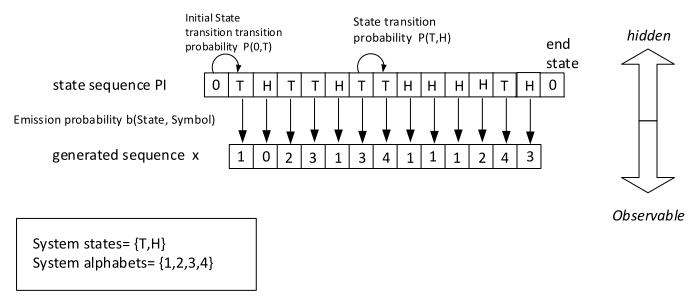
When we want to refer to the state the system was in when it generated the element at position \(i\) in the observation sequence \(x\), we write \(\pi _{i}\). The initial state, which is the silent state the system was in initially, is written as \(\pi _{0}\). When we want to refer to the name of the state the system was in when it generated the symbol at position \(i\) we write \(\pi _{i} = k\).
\(P_{kl}\) is the probability of the system changing from state \(k\) to state \(l\).
For a system with \(n\) number of states, there will be a transition matrix of size \(n\times n\) which gives the state transition probability \(P_{kl}\) between any 2 states.
\(b_{k}(i)\) is the emission probability. It is the probability of emitting the symbol seen at position \(i\) in the observation sequence \(x\) when the system was in state \(k\).
As an example of the emission probability, assume that the observed sequence is \(x=ATATTCGTC\) and assume that the system can be in any one of two states \(\{k,l\}\). Then we write the probability of emitting the first symbol \(A\) when the system is in state \(k\) as \(b_{k}(1)\).
We could also write the above as \(b_{k}(A)\), since the symbol \(A\) is located at the first position of the sequence. In the above observation sequence, since the letter \(A\) occurred in the first and third positions, then \(b_{k}(1)\) will have the same value as \(b_{k}(3)\), since in both cases, the same type of letter is being emitted, which is the symbol \(A\).
Set of initial probabilities \(P_{0k}\) for all states \(k\). We imagine a special silent start state \(0\) from which the initial active state is selected according to the probability \(P_{0k}\). see figure 2.1 on page 9 for illustration.
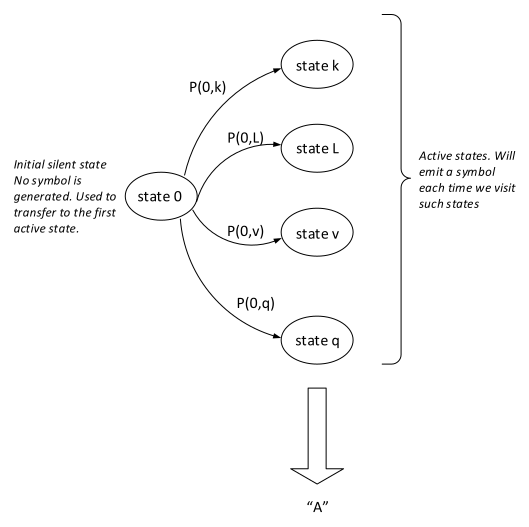
For a system with \(n\) number of states, there will be \(n\) such \(P_{0,k}\) probabilities. So for some state, say \(q\), the probability of this state being the first state the system starts in is given by \(P_{0q}\). Notice that another notation for the initial probability \(P_{0k}\) is \(\pi _{k}\), and this is used in [1] and other publication.
So, to summarize how this model generates an observation sequence: The system starts in state \(0\). Then based the probability distribution \(P_{0k}\) called the initial state probability, a state \(k\) is selected. Then based on the emission probability distribution \(b_{k}(i)\) for this state, the symbol at position \(i\) is selected and generated. Then a new state \(l\) is selected based on the transition probability distribution \(P_{kl}\) and the process repeats again as above. This process is continued until the last symbol is generated.
The sequence generated by the system is called the observation sequence \(x\). The symbol at position \(i\) in the sequence is called \(x[i]\) or \(x_{i}\). We write \(x[i]=A\) to mean that the symbol at position \(i\) is \(A\).
In the implementation of HMM for this project, the length of each output symbol is limited to one character.
For a system with \(n\) states, and an observation sequence of length \(m\), the number of possible state sequences that could have generated this observation sequence is \(n^{m}\). Each one of these possible state sequences \(\pi _{1\cdots m}\) is of length \(m\) since the system will generate one symbol for each state transition as we are considering that there will not be any silent states other than the start and end states.
As an example, given a system with \(n=2\) with states \(\{k,l\}\), and an observation sequence of ‘GCT’ of length \(m=3\), then there are \(n^{m}=2^{3}\) or \(8\) possible state sequences. They are \[ kkk,kkl,klk,kll,lkk,lkl,llk,lll \]
One of these 8 state sequences is the most likely one to have occurred.3
To summarize the above discussion, imagine we have a system with states \(\{T,H\}\), and that the possible symbols or alphabets of the system it can generate are \(1,2,3,4\). Figure 2.2 on page 12 shows one such possible state sequence \(\pi \) and the associated observation sequence \(x\).
The questions one could ask about the above HMM system are:
Given a sequence of symbols \(x\) that represents the output of the system (the observations), determine the probability that some specific symbol in the observation sequence was generated when the system was in some specific state.
This is solved using the forward-backward algorithm (\(\alpha \beta \)). As an example, we can ask about the probability that some DNA nucleotide from a large DNA sequence was part of an exon, where an exon is one of the possible system states.
Given a sequence of symbols \(x\) of length \(L\) that represents the output of the system (the observation sequence), determine the most likely state transition sequence the system would have undergone in order to generate this observation sequence.
This is solved using the Viterbi algorithm \(\gamma \). Note again that the sequence of states \(\pi _{i\cdots j}\) will have the same length as the observation sequence \(x_{i\cdots j}\).
The above problems are considered HMM analysis problems. There is another problem, which is the training or identification problem whose goal is to estimate the HMM parameters (the set of probabilities) we discussed on page 8 given some set of observation sequences taken from the type of data we wish to use the HMM to analyze. As an example, to train the HMM for gene finding for the mouse genome, we would train the HMM on a set of sequences taken from this genome.
One standard algorithm used for HMM parameter estimation (or HMM training) is called Baum-Welch, and is a specialized algorithm of the more general algorithm called EM (for expectation maximization). In the current MATLAB implementation, this algorithm is not implemented, but could be easily added later if time permits.
A small observation: In these notations, and in the algorithms described below, I use the value \(1\) as the first position (or index) of any sequence instead of the more common \(0\) used in languages such as C, C++ or Java. This is only for ease of implementation as I will be using MATLAB for the implementation of these algorithms, and MATLAB uses \(1\) and not \(0\) as the starting index of an array. This made translating the algorithms into MATALAB code much easier.
There are two main methods to graphically represent an HMM.
One method shows the time axis (or the position in the observation sequence) and the symbols emitted at each time instance (called the trellis diagram). The other method is a more concise way of representing the HMM, but does not show which symbol is emitted at what time instance.
To describe each representation, I will use an example, and show how the example can be represented graphically in both methods.
Throughout this report, the following HMM example is used for illustration. The HMM configuration file for the example that can be used with the current implementation is shown. Each different HMM state description (HMM parameters) is written in a plain text configuration file and read by the HMM implementation. The format of the HMM configuration file is described on page 47.
Assume the observed sequence is \(ATACC\). This means that \(A\) was the first symbol emitted, seen at time \(t=1\), and \(T\) is the second symbol seen at time \(t=2\), and so forth. Notice that we imagine that the system will write out each symbol to the end of the current observation sequence.
Next, Assume the system can be in any one of two internal states \(\{S,T\}\).
Assume the state transition matrix \(P_{kl}\) to be as follows \begin {align*} P_{ST}=0.3 & \ \ P_{SS}=0.7\\ P_{TS}=0.4 & \ \ P_{TT}=0.6 \end {align*}
And for the initial probabilities \(P_{0k}\), assume the following \begin {align*} \pi _{S}=0.4\\ \pi _{T}=0.6 \end {align*}
And finally for the emission probabilities \(b_{k}(i)\), there are \(3\) unique symbols that are generated in this example (the alphabets of the language of the observation sequence), and they are \(A,T,C\). So there will be \(6\) emission probabilities, \(3\) symbols for each state, and given we have \(2\) states, then we will have a total of \(6\) emission probabilities. Assume they are given by the following emission matrix: \begin {align*} b_{S}(A)=0.4 \ \ \ b_{S}(C)=0.4 \ \ \ b_{S}(T)=0.2\\ b_{T}(A)=0.25 \ \ \ b_{T}(C)=0.55 \ \ \ b_{T}(T)=0.2 \end {align*}
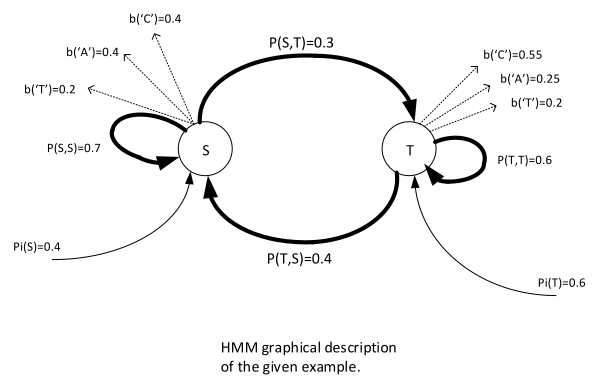
The first (non-time dependent) graphical representation of the above example is shown in figure 3.1 on page 17
In this representation, each state is shown as a circle (node). State transitions are represented by a directed edge between the states. Emission of a symbol is shown as an edge leaving the state with the symbol at the end of the edge.
Initial probability \(\pi _{0,k}\) are shown as edges entering into the state from state \(0\) (not shown). We imagine that there is a silent start state \(0\) which all states originate from. The system cannot transition to state \(0\), it can only transition out of it.
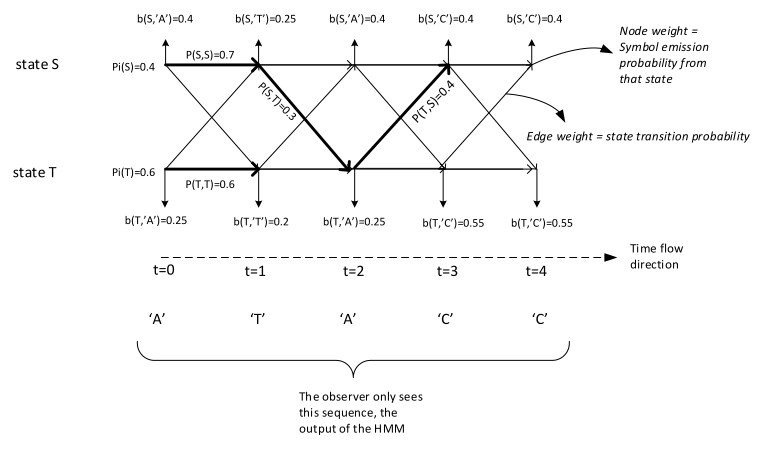
The second graphical representation is a more useful way to represent an HMM for the description of the algorithms. This is called the trellis diagram.
Draw a grid, where time flows from left to right. On top of the grid show the symbols being emitted at each time instance. Each horizontal line in this grid represents one state, with state transitions shown as sloping edges between the nodes in the grid.
See figure 3.2 on page 20 for the graphical representation for the same example above using the trellis representation.
On each line segment in the grid, we draw an arrow from position \(i\) to \(i+1\) and label this arrow by the state transition probability from the state where the start of the arrow was to the state where the end of the arrow is. The weight of the edge is the state transition probability.
Notice that the edge can only be horizontal or slopped in direction. We can not have vertical edges, since we must advance by one time step to cause a state transition to occur. This means there will be as many internal states transitions as the number of time steps, or equivalently, as the number of symbols observed or the length of the observation sequence.
To use the above example in SHMM, we need to write down the state description. The format of writing down the state description is given on page 47. This below is the SHMM configuration file for the above example.
<states>
S
T
<init_prob>
0.4
0.6
<symbols>
A,C,T
<emit_prob>
#emit probability from S state
0.4,0.4,0.2
#emit probability from T state
0.25,0.55,0.2

<tran_prob>
0.7,   0.3
0.4,   0.6
Given the above notations and definitions, we are ready to describe the HMM algorithms.
Here we wish to find the probability \(p\) that some observation sequence \(x\) of length \(m\) was generated by the system which has \(n\) states. We want to find the probability of the sequence up to and including \(x[m]\), in other words, the probability of the sequence \(x[1]\cdots x[m]\).
The most direct an obvious method to find this probability, is to enumerate all the possible state transition sequences \(q=\pi _{1\cdots m}\) the system could have gone through. Recall that for an observation sequence of length \(m\) there will be \(n^{m}\) possible state transition sequences.
For each one of these state transition sequences \(q_{i}\) (that is, we fix the state transition sequence), we then find the probability of generating the observation sequence \(x[1]\cdots x[m]\) for this one state transition sequence.
After finding the probability of generating the observation sequence for each possible state transition sequence, we sum all the resulting probabilities to obtain the probability of the observation sequence being generated by the system.
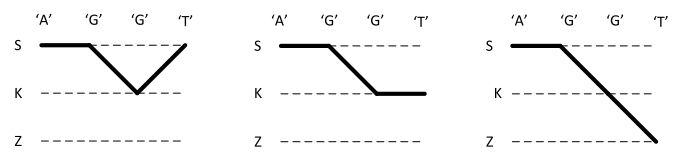
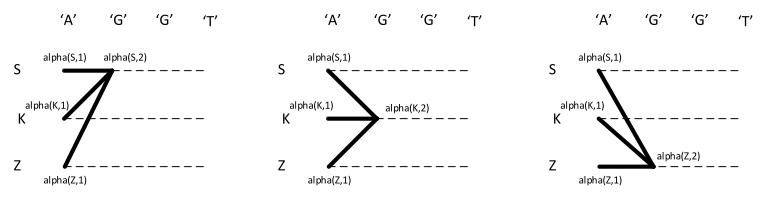
As an example, for a system with states \(\{S,K,Z\}\) and observation sequence \(AGGT\) a partial list of the possible state sequences we need to consider is shown in figure 4.1 on page 25.
We can perform the above algorithm as follows:
Find the probability of the system emitting the symbol \(x[1]\) from \(\pi _{1}\). This is equal to the probability of emitting the symbol \(x[1]\) from state \(\pi _{1}\) multiplied by the probability of being in state \(\pi _{1}\).
Next, find the probability of generating the sequence \(x[1]\cdots x[2]\). This is equal to the probability of emitting the sequence \(x[1]\) (which we found from above), multiplied by the probability of moving from state \(\pi _{1}\) to state \(\pi _{2}\), multiplied by the probability of emitting the symbol \(x[2]\) from state \(\pi _{2}\).
Next, find the probability of generating the sequence \(x[1]\cdots x[3]\). This is equal to the probability of emitting the sequence \(x[1]\cdots x[2]\) (which we found from above), multiplied by the probability of moving from state \(\pi _{2}\) to state \(\pi _{3}\), multiplied by the probability of emitting the symbol \(x[3]\) from state \(\pi _{3}\).
We continue until we find the probability of emitting the full sequence \(x[1]\cdots x[m]\)
Obviously the above algorithm is not efficient. There are \(n^{m}\) possible state sequences, and for each one we have to perform \(O(2m)\) multiplications, resulting in \(O(m\ n^{m})\) multiplications in total.
For an observation sequence of length \(m=500\) and a system with \(n=10\) states, we have to wait a very long time for this computation to complete.
A much improved method is the \(\alpha \) algorithm. The idea of the \(\alpha \) algorithm, is that instead of finding the probability for each different state sequence separately and then summing the resulting probabilities, we scan the sequence \(x[1]\cdots x[i]\) from left to right, one position at a time, but for each position we calculate the probability of generating the sequence up to this position for all the possible states.
Let us call the probability of emitting the sequence \(x[1]\cdots x[i]\) as \(\alpha (i)\). And we call the probability of emitting \(x[1]\cdots x[i]\) when the system was in state \(k\) when emitting \(x[i]\) as \(\alpha _{k}(i)\).
So, the probability of emitting the sequence \(x[1]\cdots x[i]\) will be equal to the probability of emitting the same sequence but with \(x[i]\) being emitted from one state say \(k\), this is called \(\alpha _{k}(i)\), plus the probability of emitting the same sequence but with \(x[i]\) being emitted from another state, say \(l\), this is called \(\alpha _{l}(i)\), and so forth until we have covered all the possible states. In other words \(\alpha (i)\) is the \(\sum _{k} \alpha _{k}(i)\) for all states \(k\).
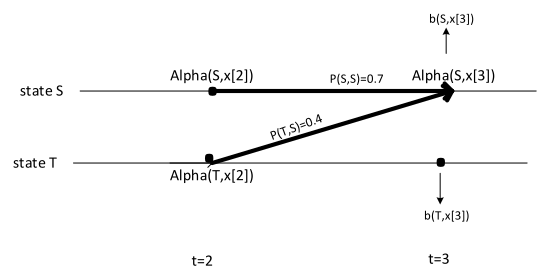
Each \(\alpha _{k}(i)\) is found by multiplying the \(\alpha (i-1)\) for each of the states, by the probability of moving from each of those states to state \(k\), multiplied by the probability of emitting \(x[i]\) from state \(k\). This step is illustrated in figure 4.2 on page 28.
Each time we calculate \(\alpha _{k}(i)\) for some state k, we store this value, and use it when calculating \(\alpha (i+1)\). Hence We only need to store the \(\alpha ^{\prime }s\) for one position earlier since we are working with a first-order HMM here. This means we need space requirements for two columns each of length of the number of states \(n\).
From above, we see that we have reduced the running time \(O(m n^{m})\) of the direct method, to \(O(mn)\) with the \(\alpha \) method.
The following is a more formal description of the algorithm to find \(\alpha \) for one state, say state \(k\).
Initialization step: \[ \alpha _{k}(1)=p_{0k} b_{k}(1) \]
What the above says is that \(\alpha \), initially (at position \(i=1\)) and for state \(k\) , is equal to the probability of the HMM starting initially in state \(k\) multiplied by the probability of emitting the symbol found at \(x[1]\) from state \(k\).
Iterative step: \[ j=2\cdots i\ \ \ \ \ \ \ \ \alpha _{k}(j) = b_{k}(j) \sum _{l} \alpha _{l}(j-1) P_{lk} \]
What the above says, is that \(\alpha \) at position \(i=j\) when in state \(k\), is the sum of all the \(\alpha ^{\prime }s\) from one observation earlier collected from all the states, multiplied by the probability of transition from each of those states to the state \(k\), multiplied by the probability of emitting the symbol \(x_{j}\) when in state \(k\).
I will illustrate this iterative step for one time step, using the same example from above, and using the grid representation of an HMM to find \(\alpha (3)\). Since there are 2 states \(\{S,T\}\) in this example, we need to calculate the iterative step for each state.
When the system is in state \(S\) at \(j=3\) we obtain the diagram shown in figure 4.3 on page 31.
In the above example, to find \(\alpha _{S}(3)\), we obtain \[ \alpha _{S}(3) = b_{S}(3) [\alpha _{S}(2) P_{SS} + \alpha _{T}(2) P_{TS} ] \]
\(\alpha _{T}(3)\) is found similarly, and is shown in figure 4.4 on page 34.
In the above example, for \(\alpha _{T}(3)\) we obtain \[ \alpha _{T}(3) = b_{T}(3) [\alpha _{T}(2) P_{TT} + \alpha _{S}(2) P_{ST} ] \]
Hence, to find the probability of the sequence up to and including \(x_{3}\), the final answer would be
\begin {align*} \alpha (x_{3}) & = \alpha _{T}(3) + \alpha _{S}(3)\\ & = b_{S}(3) [\alpha _{S}(2) P_{SS} + \alpha _{T}(2) P_{TS}] + b_{T}(3) [\alpha _{T}(2) P_{TT} + \alpha _{S}(2) P_{ST}] \end {align*}
Due to numerical issues (underflow) which will occur when multiplying probabilities (values less than 1.0) repeatedly as we calculate the \(\alpha \) in the forward direction, the log of the probabilities will be used instead, and multiplications become summations. Any logarithm for a base greater than \(1\) can be used. In the MATLAB implementation, I used the natural logarithms \(e\).
Initially, all the probabilities \(P\) (this includes the initial state probabilities \(\pi _{(0,k)}\), the state transition probabilities matrix \(P_{xy}\), and the emission probabilities matrix \(b_{S}(i)\) ) are converted to \(log(P)\) and stored in cache for later access, this speeds the implementation by not having to call the log function each time the program is run for different observation sequence but for the same HMM.
Assume the system has states \(\{A,B,C,\ldots ,Z\}\), and we wish to find the \(\alpha \) for the observation sequence up to and including \(x[i]\) when the state at \(i\) was \(T\). We obtain \[ \alpha _{T}(i) = b_{T}(i) [ \alpha _{A}(i-1) P_{AT} + \alpha _{B}(i-1) P_{BT} + \cdots + \alpha _{Z}(i-1) P_{ZT}] \]
Taking the log of the above results in \begin {align*} log(\alpha _{T}(i)) = log(b_{T}(i)) + log [ \alpha _{A}(i-1) P_{AT} + \alpha _{B}(i-1) P_{BT} + \cdots + \alpha _{Z}(i-1) P_{ZT}]\\ \end {align*}
Now, looking at the term \(log [ \alpha _{A}(i-1) P_{AT} + \cdots + \alpha _{Z}(i-1) P_{ZT}]\), this is the same as \(log(x+y+\cdots +z)\). Here, we know the values of \(log(x),log(y),\cdots ,log(z)\), and not \(x,y,\cdots ,z\) (recall that we have converted all the probabilities to log initially for performance purposes). So we need to find \(log(x+y)\) given \(log(x)\) and \(log(y)\).
This is done using the following transformation
\begin {align*} log(x+y) & = log(x (1+\frac {y}{x}))\\ & = log(x (1+e^{log(\frac {y}{x})})\\ & = log(x) + log(1+e^{log(y)-log(x)}) \end {align*}
Applying the above transformation to many terms being summed, and not just two, is straightforward. Take \(x\) as the first term, and let \(y\) be the rest of the terms (the tail of the expression), we then apply the above transformation recursively to the tail to compute the log of the sum of the probabilities as long as the tail is of length greater than one element. As shown below.
\[ log(a+b+c+\cdots +y+z) = log(a+H) = log(a) + log(1+e^{log(H)-log(a)}) \] Where \[ H=(b+c+\cdots +y+z) \] Now repeat the above process to find \(log(b+c+\cdots +y+z)\). \[ log(b+c+\cdots +y+z) = log(b+H) = log(b) + log(1+e^{log(H)-log(b)}) \] Where now \(H=(c+\cdots +y+z)\).
Continue the above recursive process, until the expression \(H\) contains one term to obtain \[ log(y+z) = log(y) + log(1+e^{log(z)-log(y)}) \]
This is a sketch of a function which accomplishes the above.
function Log_Of_Sums(A: array 1..n of probabilities) returns double IS
   begin
     IF (length(A)>2) THEN
         return( log(A[1]) + log( 1 + exp( Log_of_Sums(A[2..n])) - log( A[1] )));
     ELSE
          return( log(A[1] + log( 1 + exp( A[2] - log( A[1] )));
    END
end log_Of_Sums
The number of states is usually much less than the number of observations, so there is no problems (such as stack overflow issues) with using recursion in this case.
Here we are interested in finding the probability that some part of the sequence was generated when the system was in some specific state.
For example, we might want to find, looking at a DNA sequence \(x\), the probability that some nucleotide at some position, say \(x[i]\) was generated from an exon, where an exon is one of the possible states the system can be in.
Let such state be \(S\). Let the length of the sequence be \(L\), then we need to obtain \(P(\pi _{i}=S|x_{i\ldots L})\). In the following, when \(x\) is written without subscripts, it is understood to stand for the whole sequence \(x_{1}\cdots x_{L}\). Also \(x_{i}\) is the same as \(x[i]\).
Using Baye’s probability rule we get\[ P(\pi _{i}=S | x) = \frac {P(\pi _{i}=S,x)} {P(x)} \] But the joint probability \(P(\pi _{i}=S,x)\) can be found from \[ P(\pi _{i}=S,x) = P(x_{1} \cdots x_{i} ,\pi _{i}=S) P(x_{i+1} \cdots x_{L}| \pi _{i}=S) \] Looking at the equation above, we see that \(P(x_{1}\ldots x_{i},\pi _{i}=S)\) is nothing but \(\alpha _{S}(i)\), which is defined as the probability of the sequence \(x_{1}\cdots x_{i}\) with \(x[i]\) being generated from state \(S\).
The second quantity \(P(x_{i+1} \cdots x_{L} | \pi _{i}=S)\) is found using the backward \(\beta \) algorithm as described below.
Initialization step:
For each state \(k\), let \(\beta _{k}(L)=1\)
recursive step: \[ i=(L-1)\cdots 1\ \ \ \ \ \ \ \ \beta _{k}(i)=\sum _{l} P_{kl} b_{l}(i+1) \beta _{l}(i+1) \] Where the sum above is done over all states. Hence\[ P(\pi _{i}=S|x) = \frac {\alpha _{S}(i) \beta _{S}(i)} { P(x) } \] Where \(P(x)\) is found by running the forward algorithm to the end of the observed sequence \(x\), so \(P(x)=\alpha (L)\). Hence we obtain \[ P(\pi _{i}=S|x) = \frac {\alpha _{S}(i) \beta _{S}(i)} { \alpha (L) } \]
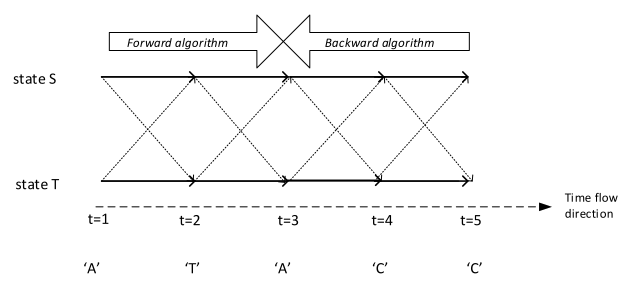
To illustrate this algorithm, Using the grid HMM diagram, I will use the example on page 15, to answer the question of what is the probability of the observation at position \(3\) (which is the letter ’A’) coming from state S, given the observation ATACC.
In the above, we will run the forward \(\alpha \) algorithm from position 1 to position 3, then run the backward algorithm from the end of the sequence back to position 3. (In practice, the forward \(\alpha ^{\prime }s\) and backward \(\beta ^{\prime }s\) are calculated once for all the states and all the positions (that is, for all the nodes in the trellis diagram) and stored for later lookup). See figure 4.5 on page 40 for an illustration.
Initialization step: \begin {align*} \beta _{S}(5)=1\\ \beta _{T}(5)=1 \end {align*}
recursive step: \(t=(5-1)\cdots 1\).
At time \(t=4\), we get \begin {align*} \beta _{S}(4) = P_{ST} b_{T}(5) \beta _{T}(5)+ P_{SS} b_{S}(5) \beta _{S}(5)\\ \beta _{T}(4) = P_{TT} b_{T}(5) \beta _{T}(5)+ P_{TS} b_{S}(5) \beta _{S}(5) \end {align*}
The above quantities are calculated using the parameters in this example, resulting in\begin {align*} \beta _{S}(4)= 0.3 \times 0.55 \times 1 + 0.7 \times 0.4 \times 1 = 0.445\\ \beta _{T}(4)= 0.6 \times 0.55 \times 1 + 0.4 \times 0.4 \times 1 = 0.49 \end {align*}
at time \(t=3\) we get\begin {align*} \beta _{S}(3) = P_{ST} b_{T}(4) \beta _{T}(4) + P_{SS} b_{S}(4) \beta _{S}(4)\\ \beta _{T}(3) = P_{TT} b_{T}(4) \beta _{T}(4) + P_{TS} b_{S}(4) \beta _{S}(4) \end {align*}
The above quantities are calculated using the parameters in this example, resulting in\begin {align*} \beta _{S}(3)= 0.3 \times 0.55 \times 0.49 + 0.7 \times 0.4 \times 0.445 = 0.2054\\ \beta _{T}(3)= 0.6 \times 0.55 \times 0.49 + 0.4 \times 0.4 \times 0.445 = 0.2329 \end {align*}
And so forth, until we reach \(t=1\)\begin {align*} \beta _{S}(1) = P_{ST} b_{T}(2) \beta _{T}(2) + P_{SS} b_{S}(2) \beta _{S}(2)\\ \beta _{T}(1) = P_{TT} b_{T}(2) \beta _{T}(2) + P_{TS} b_{S}(2) \beta _{S}(t) \end {align*}
This completes the iterative step of the backward algorithm. From the above we see that \(\beta _{S}(3)=0.205449\) Now, apply the forward algorithm from position 1 to position 5, and find \(\alpha _{S}(3)\).
I will not show this step here, since the forward algorithm is already described above. But if we calculate it, we will get \(\alpha (S,t=3)=0.012488\)
So\[ P(\pi _{3}=S | ATACC)= \frac {\alpha _{S}(3)\beta _{S}(3)}{P(x)} = \frac {0.012488\times 0.205449}{P(x)} = \frac {0.0025656}{P(x) } \] Where \(P(x)\) is the same as \(\alpha (L)\), that is, the forward algorithm found at the end of the sequence \(x\). \(\alpha (L)\) can be found to be \(0.0046025920\), so \[ P(\pi _{3}=S | ATACC)=\frac {0.0025656}{ 0.0046025920 }=0.557438 \]
The Viterbi algorithm is used to find the most likely state transition sequence \(q=\pi _{1} \cdots \pi _{i}\) associated with some observation sequence \(x=x_{i}\cdots x_{i}\).
Since one symbol is generated each time the system switches to a new state, the state sequence \(q\) will be of the same length as that of the observation sequence \(x\).
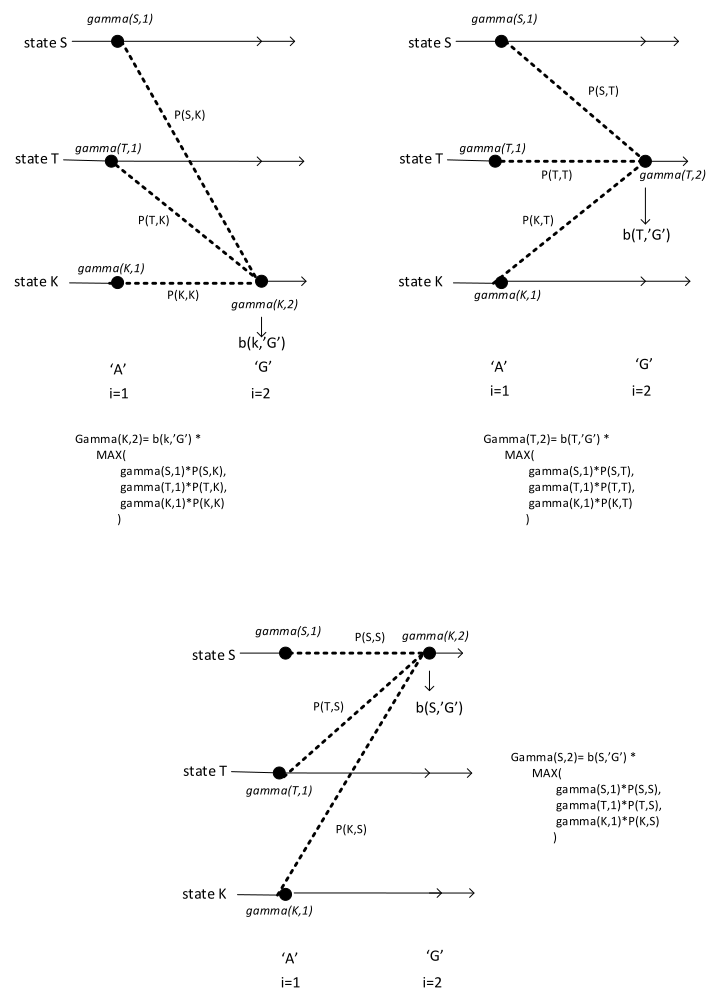
In this algorithm, we need to calculate \(\gamma \) for each position, where \(\gamma _{k}(i)\) means the probability of the most likely state path ending in state \(k\) when generating the symbol at position \(i\) in the observation sequence.
If we know \(\gamma _{k}(i)\) for each state \(k\), then we can easily find \(\gamma _{l}(i+1)\) for each state \(l\), since we just need to find the most probable state transition from each state \(k\) to each state \(l\).
The following algorithm finds \(\gamma _{k}(i)\) at position \(i\) for state \(k\).
Initialization step:
Find \(\gamma \) at position \(i=1\) for all states. Assume we have \(n\) states, \(a,b,c,\ldots ,z\), then\begin {align*} \gamma _{a}(1) & = P_{0a} \, b_{a}(1)\\ \gamma _{b}(1) & = P_{0b} \, b_{b}(1)\\ & \vdots \\ \gamma _{z}(1) & = P_{0z} \, b_{z}(1) \end {align*}
Now we need to calculate \(\gamma \) for the rest of the sequence.
Assume we have states \(a,b,m,c,\ldots ,z\), then to find \(\gamma \) for each of these states at each time step we do the following: (this below shows finding \(\gamma \) for some state \(m\))
iterative step: \(j=2\ldots i\)
\[ \gamma _{m}(j) = b_{m}(j) \ \ max \left \{ \begin {array} [c]{c}P_{am} \, \gamma _{a}(j-1)\\ P_{bm} \, \gamma _{b}(j-1)\\ P_{mm} \, \gamma _{m}(j-1)\\ \vdots \\ P_{zm} \, \gamma _{z}(j-1) \end {array} \right . \]
The above is illustrated in figure 4.6 on page 44.
Now that we have found \(\gamma \) for each state at each position \(1\cdots i\), we can find the most likely state sequence up to any position \(j<=i\) by finding which state had the largest \(\gamma \) at each position.
To help understand HMMs more, I have implemented, in MATLAB, a basic HMM with a GUI user interface for ease of use. This tool accepts an HMM description (model parameters) from a plain text configuration file. The tool (called SHMM, for simple HMM) implements the forward, backward, and Viterbi algorithms. This implementation is for a first order HMM model.
Due to lack of time to implement an HMM for an order greater than a first order, which is needed to enable this tool to be used for such problems as gene finding (to detect splice sites, start of exon, etc…). This implementation therefor is restricted to one character look-ahead on the observation sequence. However, even with this limitation, this tool can be useful for learning how HMM’s work.
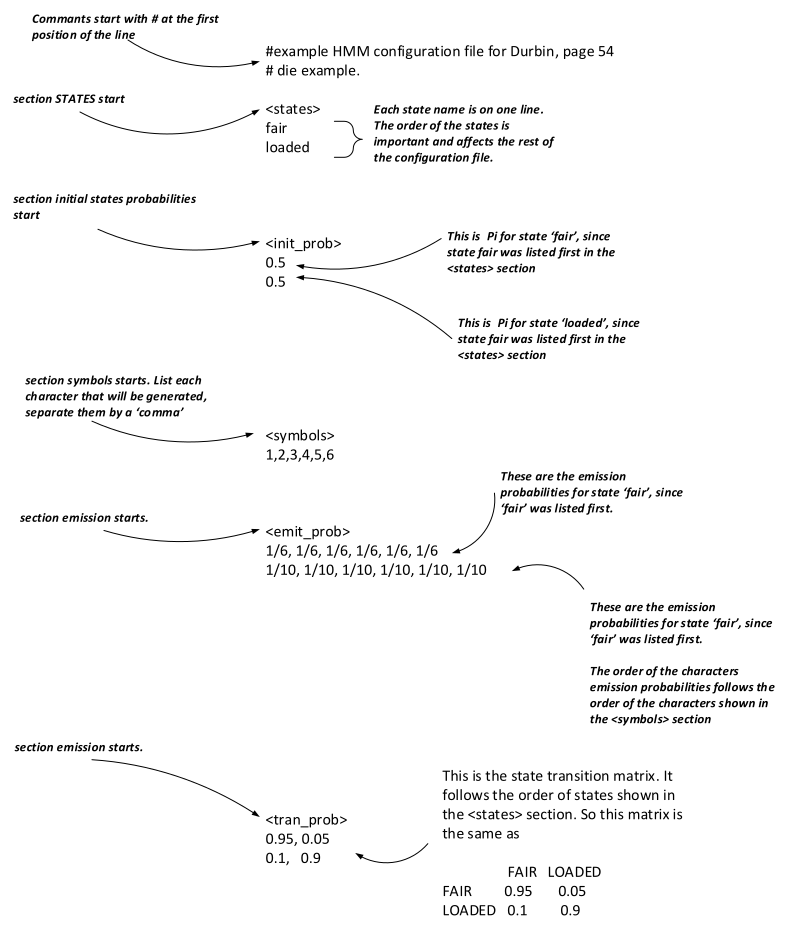
SHMM takes as input a plain text configuration file (default .hmm extension), which contains the description of the HMM (states, initial probabilities, emission probabilities, symbols and transition probabilities). And the user is asked to type in the observation sequence in a separate window for analysis.
The configuration file is broken into 5 sections. The order of the sections must be as shown below. All 5 sections must exist. Each section starts with the name of the section, contained inside a left \(<\) and a right \(>\) brackets. No space is allowed after \(<\) or before \(>\). The entries in the file are case sensitive. So a state called ’sunny’ will be taken as different from a state called ’SUNNY’. The same applies to the characters allowed in the observation sequence: the letter ’g’ is taken as different from ’G’.
The sections, and the order in which they appear in the configuration file, must be as this, from top to bottom:
In the <states> sections, the names of the states are listed. One name per line. Names must not contain a space.
In the <init_prob> section, the initial probabilities of being in each state are listed. One per line. One number per line. The order of the states is assumed the same as the order in the <states> section. This means the initial probability of being in the first state listed in the <states> section will be assumed to be the first number in the <init_prob> section.
In the <symbols> section, the observation symbols are listed. Each symbol must be one character long, separated by a comma. Can use as many lines as needed to list all the symbols. The symbol must be an alphanumeric character.
In the <emit_prob> section, we list the probability of emitting each symbol from each state. The order of the states is assumed to be the same order of the states as in the <states> section.
The emission probability for each symbol is read. The order of the symbols is taken as the same order shown in the symbols section. The emission probabilities are separated by a comma. One line per state. See examples below.
In the <tran_prob>, we list the transition probability matrix. This is the probability of changing state from each state to another. One line represent one row in the matrix. Entries are separated by a comma. One row must occupy one line only. The order of the rows is the same as the order of the states shown in the <states> section.
For example, if we have 2 states S1,S2, then the first line will be the row that represents S1->S1, and S1->S2 transition probabilities. Where S1->S1 is in position 1,1 of matrix, and S1->S2 will be in position 1,2 in the matrix. See example below for illustration.
Comments in the configuration file are supported. A comment can start with the symbol #. Any line that starts with a # is ignored and not parsed. The comment symbol # must be in the first position of the line.
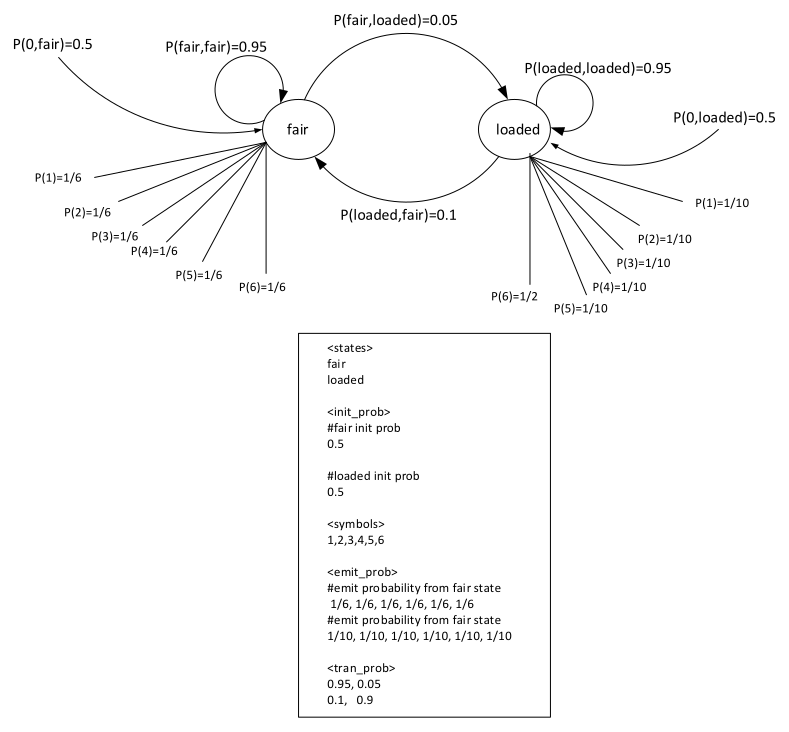
To help illustrate the format of the HMM configuration file, I will show an annotated configuration file for the casino example shown in the book ’Biological sequence analysis’ by Durbin et. all[1], page 54. In this example, we have 2 dies, one is a fair die, and one is a loaded die. The following is the HMM configuration file.
# example HMM configuration file for Durbin, page 54
# die example.

<states>
fair
loaded

<init_prob>
#fair init prob
0.5

#loaded init prob
0.5

<symbols>
1,2,3,4,5,6

<emit_prob>
#emit probability from fair state
1/6, 1/6, 1/6, 1/6, 1/6, 1/6
#emit probability from fair state
1/10, 1/10, 1/10, 1/10, 1/10, 1/10

<tran_prob>
0.95, 0.05
0.1,   0.9
See figure 5.1 on page 52 for description of each field in the HMM configuration file.
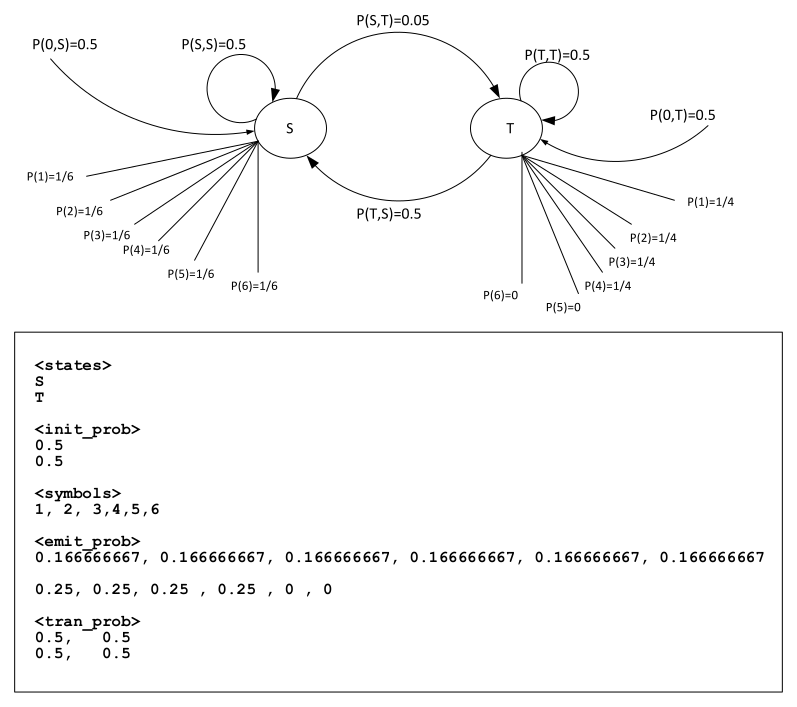
To help better understand the format of the HMM configuration file, I will show below a number of HMM states and with the configuration file for each.
This example is taken from page 54, Durbin et. all book [1]. See figure 5.2 on page 55
This example is taken from Math 127 course, homework problem 4.1, Fall 2002.
Figure 5.4 on page 61 shows the SHMM GUI. To start using SHMM, the first thing to do is to load the HMM configuration file which contains the HMM parameters. SHMM will parse the file and will display those parameters. Next, type into the observation sequence window the observation sequence itself. This sequence could be cut and pasted into the window as well. Spaces and new lines are ignored.
Next, hit the top right RUN button. This will cause SHMM to evaluate the \(\alpha \), \(\beta \) and \(\gamma \) for each node in the trellis diagram, and will display all these values. For the \(\gamma \) calculations, the nodes in the trellis diagram which are on the Viterbi path have a ‘*’ next to them.
To invoke the \((\alpha ,\beta )\) algorithm, enter the position in the observation and the state name and hit the small RUN button inside the window titled Alpha Beta.
To modify the HMM parameters and run SHMM again, simply use an outside editor to do the changes in the HMM configuration file, then load the file again into SHMM using the ‘Open’ button.
The following is a list of all the MATLAB files that make up SHMM, with a brief description of each file. At the end of this report is the source code listing.
Included on the CDROM are 2 files: setup.exe and unix.tar. The file setup.exe is the installer for windows. On windows, simply double click the file setup.exe and follow the instructions. When installation is completed, an icon will be created on the desktop called MATH127. Double click on this icon to open. Then 2 icons will appear. One of them is titled HMM. Double click on that to start SHMM. A GUI will appear.
On Unix (Linux or Solaris), no installer is supplied. Simply untar the file math127.zip. This will create the same tree that the installer would create on windows. The tree contains a folder called src, which contains the source code needed to run SHMM from inside matlab. To run SHMM on Unix, cd to the folder where you untarred the file math127.tar, which will be called MATH127 by default, and navigate to the src folder for the HMM project. Then run the file nma_hmm_main from inside MATLAB console to start SHMM.
This report is in PDF format.
Example HMM configuration files for use with SHMM are included in the conf folder.
This contains information how to download the windows executable and install it on your PC.
These instructions show how to install the HMM application on windows.
Double click on the HMM icon as per the above instruction.
Now the main screen will come up
Now click the Open HMM configuration file to open the HMM file that describes the
system being modeled. I include few files with this installation. Navigate as follows to find
the files Open->src->SHMM_project->conf and select the file report_example.
Now enter the observation sequence in the window (i.e. type the sequence). The sequence
must contain symbols that belong to the allowed set of symbols as shown in the symbols
window. For the report_example, these are "A" and "C" and "T" only. So you can type in
ACCCCTTT for an example.
Now hit the RUN botton on the upper right hand corner. This is the result
The following is the listing
function  nma_hmm_main()

%main line for SHMM. MATH 127
%Nasser Abbasi


h0= hgload('nma_hmmGUI');

nma_hmm_callbacks('init',h0);
function line=nma_trim(line)
%function line=nma_trim(line)
%
%removes leading and trailing spaces from the line
%
%Nasser Abbasi. Math 127.

N=length(line);
if(N==0)
   return;
end

i=1;
while(i<=N & (line(i)==' '|line(i)=='\t'))
   i=i+1;
end

if(i>N)
   line='';
   return;
end

line=line(i:end);

i=length(line);
while(i>=1 & (line(i)==' '|line(i)=='\t'))
   i=i-1;
end

line=line(1:i);
function [symbols, initProb, states, tranProb, emitProb, err]=nma_readHMM(fileName) %function [symbols, initProb, states, tranProb, emissionProb]=nma_readHMM(fileName) % % This function read the HMM configuration file for my final project % for MATH 127, UC Berkeley. Fall 2002. % % INPUT: % fileName: the full path of the configuration file. % % OUTPUT: % symbols: a CELL array of characters. The allowed observation symbols. % % initProb: an array of numbers, there will be as many number as there % are states % % states: a cell array of strings. The names of the states. % % tranProb: a matrix, nxn, where n is the number of states. the order % of states is that indicated by the states array. % % emissionProb: The probability of emission of a symbol from each state. % an nxm matrix, where n is the number of states, and m % is the number of symbols. The order of the states is as % indicated by the states array, and the order of the % % symbols is as indicated by the symbols array. % err: a string, if empty, indicates no error in parsing the file, else % the string shows the parsing error. % % by Nasser Abbasi err=''; symbols={''}; initProb=[]; states={''}; tranProb=[]; emitProb=[]; [fid,err]=fopen(fileName,'rt'); if(fid==-1) return; end TRUE=1; FALSE=0; INITIAL=0; STATES=1; statesFound=FALSE; INIT_PROB=2; initProbFound=FALSE; SYMBOLS=3; symbolsFound=FALSE; EMIT_PROB=4; emitProbFound=FALSE; TRAN_PROB=5; tranProbFound=FALSE; DONE=6; nState=0; nInitProb=0; nSym=0; nEmitProbStates=0; nTranProbLines=0; currentState=INITIAL; while(currentState ~=DONE) switch(currentState) case DONE if(fid ~= -1) fclose(fid); end return; case INITIAL %fprintf('initial state\n'); err=findToken('<states>',fid); if(isempty(err)) currentState=STATES; else err=['failed to find states section' err]; currentState=DONE; end case STATES % looking for list of names, one per line %fprintf('states state\n'); line=fgetl(fid); while(line ~= -1) if(length(line)==0) line=fgetl(fid) else break; end end if(line==-1) err='Invalid HMM file. incomplete states section'; currentState=DONE; else line=nma_trim(line); if(length(line)>0) if(line(1) ~='#') if(isequal(line,'<init_prob>')) if(nState==0) err='No states found in the states section.'; currentState=DONE; else currentState=INIT_PROB; statesFound=TRUE; end else nState=nState+1; states(nState)={line}; end end end end case INIT_PROB %looking for name=value, one per line. each name must be %allready found in the STATES. %fprintf('init_prob state\n'); line=fgetl(fid); while(line ~= -1) if(length(line)==0) line=fgetl(fid) else break; end end if(line==-1) err='Invalid HMM file. incomplete init_prob section'; currentState=DONE; else line=nma_trim(line); if(length(line)>0) if(line(1) ~='#') if(isequal(line,'<symbols>')) if(nInitProb==0) err='No init_prob entries found in the init_prob section.'; if(fid ~= -1) fclose(fid); end return; end if(nInitProb ~= nState) err='Number of init_prob entries must equal number of states.'; if(fid ~= -1) fclose(fid); end return; end currentState=SYMBOLS; initProbFound=TRUE; else %parse value from line. allready trimmed. i=0; thisValue=0; thisValue=str2double(line); if(thisValue==NaN) err=sprintf('invalid numeric value for probability in init_prob section. Found %s',line); if(fid ~= -1) fclose(fid); end return; end nInitProb=nInitProb+1; if(nInitProb>nState) err='Too many entries in init_prob. should equal to number of states'; if(fid ~= -1) fclose(fid); end return; end initProb(nInitProb)=thisValue; end end end end case SYMBOLS %parse line with this a,b,c,d format %fprintf('symbols state\n'); line=fgetl(fid); while(line ~= -1) if(length(line)==0) line=fgetl(fid) else break; end end if(line==-1) err='Invalid HMM file. incomplete symbols section'; return; end line=nma_trim(line); if(length(line)>0) if(line(1) ~='#') if(isequal(line,'<emit_prob>')) if(nSym==0) err='No symbols found in the emit_prob section.'; if(fid ~= -1) fclose(fid); end return; end currentState=EMIT_PROB; else lookForComma=FALSE; %parse values from line. allready trimmed. if(length(line)==1) nSym=nSym+1; symbols(nSym)={line}; else i=0; while(1) i=i+1; if(i>length(line)) break; end while(i<=length(line) & (line(i)==' ' | line(i)=='\t' )) i=i+1; end if(i>length(line)) break; end if(lookForComma) if(line(i)~=',') err='expected a comma in symbols section, did not find it'; if(fid ~= -1) fclose(fid); end return; else lookForComma=FALSE; end end if(line(i) ~=',') nSym=nSym+1; symbols(nSym)={line(i)}; lookForComma=TRUE; end end end end end end case EMIT_PROB %parse value,value,value %fprintf('emission_prob state\n'); line=fgetl(fid); while(line ~= -1) if(length(line)==0) line=fgetl(fid) else break; end end if(line==-1) err='Invalid HMM file. incomplete emit_prob section'; if(fid ~= -1) fclose(fid); end return; end line=nma_trim(line); if(length(line)>0) if(line(1) ~='#') if(isequal(line,'<tran_prob>')) if(nEmitProbStates==0) err='No emit_prob entries found in the emit_prob section.'; if(fid ~= -1) fclose(fid); end return; end if(nEmitProbStates ~= nState) err='number of lines in emit_prob section must equal to number of states'; return; end currentState=TRAN_PROB; else %parse values from line. allready trimmed. lookForComma=FALSE; nValuesFoundOnThisLine=0; values=[]; i=1; while(1) if(line(i)~=',' & (line(i)==' ' | line(i)=='\t')) i=i+1; if(i>length(line)) break; end end if(lookForComma) if(line(i)~=',') err='expected a comma in emit_prob section'; if(fid ~= -1) fclose(fid); end return; else lookForComma=FALSE; i=i+1; end end if(i>length(line)) break; end while(line(i)==' ' | line(i)=='\t') i=i+1; if(i>length(line)) break; end end startPos=i; while(i<length(line) & line(i)~=' ' &line(i)~='\t' &line(i)~=',') i=i+1; end if(i==startPos) endPos=i; else if(line(i)==' ' | line(i)=='\t' | line(i)==',') endPos=i-1; else endPos=i; end end value=line(startPos:endPos); value=str2double(value); if(value==NaN) err='Invalid numeric value for emit_prob found'; if(fid ~= -1) fclose(fid); end return; end nValuesFoundOnThisLine=nValuesFoundOnThisLine+1; if(nValuesFoundOnThisLine>nSym) err='emit probability line contains too many entries, more than number of symbols'; if(fid ~= -1) fclose(fid); end return; end values(nValuesFoundOnThisLine)=value; if(i==length(line)) if(nValuesFoundOnThisLine ~= nSym) err='emit_prob section, missing emit_probability for some symbols'; if(fid ~= -1) fclose(fid); end return; end nEmitProbStates=nEmitProbStates+1; if(nEmitProbStates>nState) err='number of lines in emit_prob section can not be more than the number of states'; if(fid ~= -1) fclose(fid); end return; end emitProb(nEmitProbStates,1:nSym)=values(1:end); break; else lookForComma=TRUE; end end end end end case TRAN_PROB %parse matrix v11,v12 % v21,v22 %there will be n number of lines, where n is the number of %states %fprintf('tran_prob state\n'); line=fgetl(fid); while(line ~= -1) if(length(line)==0) line=fgetl(fid) else break; end end if(line==-1) if(nTranProbLines < nState) err='Invalid HMM file. incomplete tran_prob section'; end if(fid ~= -1) fclose(fid); end return; end line=nma_trim(line); if(length(line)>0) if(line(1) ~='#') if(nTranProbLines==nState) err='Too many lines in tran_prob section. can only have same lines as number of states'; if(fid ~= -1) fclose(fid); end return; end lookForComma=FALSE; nValuesFoundOnThisLine=0; values=[]; i=1; while(1) if(line(i)~=',' & (line(i)==' ' | line(i)=='\t')) i=i+1; if(i>length(line)) break; end end if(lookForComma) if(line(i)~=',') err='expected a comma in tran_prob section'; if(fid ~= -1) fclose(fid); end return; else lookForComma=FALSE; i=i+1; end end if(i>length(line)) break; end while(line(i)==' ' | line(i)=='\t') i=i+1; if(i>length(line)) break; end end startPos=i; while(i<length(line) & line(i)~=' ' &line(i)~='\t' &line(i)~=',') i=i+1; end if(i==startPos) endPos=i; else if(line(i)==' ' | line(i)=='\t' | line(i)==',') endPos=i-1; else endPos=i; end end value=line(startPos:endPos); value=str2double(value); if(value==NaN) err='Invalid numeric value for tran_prob found'; if(fid ~= -1) fclose(fid); end return; end nValuesFoundOnThisLine=nValuesFoundOnThisLine+1; if(nValuesFoundOnThisLine>nState) err='tran probability line contains too many entries, more than number of states'; if(fid ~= -1) fclose(fid); end return; end values(nValuesFoundOnThisLine)=value; if(i==length(line)) if(nValuesFoundOnThisLine ~= nState) err='tran_prob section, missing tran_probability for some states'; if(fid ~= -1) fclose(fid); end return; end nTranProbLines=nTranProbLines+1; if(nTranProbLines>nState) err='number of lines in tran_prob section can not be more than the number of states'; if(fid ~= -1) fclose(fid); end return; end tranProb(nTranProbLines,1:nState)=values(1:end); break; else lookForComma=TRUE; end end end end end end %%%%%%%%%%%%%%% % % %%%%%%%%%%%%%%%%%%%% function err=findToken(token,fid) err=''; found=0; while(~found) line=fgetl(fid); while(line ~= -1) if(length(line)==0) line=fgetl(fid) else break; end end if(line==-1) err='Invalid HMM file. Expected <states> section, did not find it'; return; end line=nma_trim(line); if(length(line)>0) if(line(1) ~='#') if(isequal(line,token)) %fprintf('found %s\n',token); found=1; else err='Failed to find <states> section where it is expected'; end end end end
function sum=nma_logOfSumsBeta(beta,tranProb,emitProb)
%function sum=logOfSumsBeta(alpha,tranProb,emit)
%
%INPUT:
%  beta: This is an array of the beta values (backward
%         algorithm)
%  tranProb: This is an array of transition probability
%         from all the states to the state we are calculating
%         beta at.
%  emitProb: the emission probability
%  x: the observation sequence

%By Nasser Abbasi
%Dec 2, 2002
%
% Final project , Math 127, computational biology.


x= emitProb(1) + tranProb(1) + beta(1);

if(length(tranProb)>2)
   y   = nma_logOfSumsBeta( beta(2:end), tranProb(2:end), emitProb(2:end) );
else
   y   = emitProb(2) + tranProb(2) + beta(2);
end

sum = x + log( 1 + exp(y - x ));
function sum=nma_logOfSums(alpha,tranProb)
%function sum=logOfSums(alpha,tranProb)
%
%INPUT:
%  alpha: This is an array of the alpha values (forward
%         algorithm) at t=i-1
%  tranProb: This is an array of transition probability
%         from all the states to the state we are calculating
%         alpha at.

%By Nasser Abbasi
%Dec 2, 2002
%
% Final project , Math 127, computational biology.

x = tranProb(1) + alpha(1);

if(length(tranProb)>2)
   y   = nma_logOfSums(alpha(2:end),tranProb(2:end));
else
   y  = tranProb(2) + alpha(2);
end

sum = x + log( 1 + exp( y - x ));
function [alpha,err]=nma_hmmForward(observation,symbols,initProb,emitProb,tranProb)
%function prob=nma_hmmForward(observation,h.symbols,h.initProb,h.emitProb,h.tranProb)
%
%calculate the HMM forward algorithm
%
%INPUT
%  observation: a char array of the observation sequence
%
%  symbols:     a char array. represents the alphabets allowed
%               in the observation. It is assumed the observation
%               sequence allready contains only valid alphabets
%
%  initProb:    An array of doubles. represents the LOG_e initial probability
%               of the states.
%
%  emitProb:    A matrix nxm. There are n rows for n states, and m columns for
%               m alphabets. The order of the alphabets is taken from the
%               symbols array. The emission probability, in Log_e
%
% tranProb:    The state transition probability matrix. In Log_e
%
% OUTPUT
%   alpha:     Alpha matrix. nxm
%   err:       empty if no errors.
%

err='';

nStates=size(emitProb,1);
alpha=zeros(nStates,length(observation));

for(state=1:nStates)
   [p,err]=nma_hmmEmitProb(state,observation(1),emitProb,symbols);
   if(~isempty(err))
      return;
   end

   alpha(state,1) = initProb(state) + p;
end

for(time=2:length(observation))
   x=observation(time);

   for(currentState=1:nStates)
      [emitProbAtCurrentState,err] = nma_hmmEmitProb(currentState,x,emitProb,symbols);
      if(~isempty(err))
         return;
      end

      sum=nma_logOfSums(alpha(:,time-1),tranProb(currentState,:));

      alpha(currentState,time)=sum + emitProbAtCurrentState;

   end
end
function [emit,err]=nma_hmmEmitProb(state,c,emitProb,symbols)
%function [emit,err]=nma_hmmEmitProb(state,c,emitProb,symbols)
%returns the emit probability of c from state.
%

%Nasser Abbasi, MATH 127.

err='';
emit=0;
nSyms=length(symbols);

for(i=1:nSyms)
   if(c==char(symbols(i)))
      emit=emitProb(state,i);
      return;
   end
end

err=sprintf('observation char %c not found in emit probability matrix.',c);
function [beta,err]=nma_hmmBackward(observation, symbols, initProb, emitProb, tranProb)
%
%calculate the HMM backward algorithm
%
%INPUT
%  observation: a char array of the observation sequence
%
%  symbols:     a char array. represents the alphabets allowed
%               in the observation. It is assumed the observation
%               sequence allready contains only valid alphabets
%
%  initProb:    An array of doubles. represents the initial probability
%               of the states.
%
%  emitProb:    A matrix nxm. There are n rows for n states, and m columns for
%               m alphabets. The order of the alphabets is taken from the
%               symbols array.
%
% tranProb:    The state transition probability matrix.
%
% OUTPUT
%   beta:      beta matrix. nxm
%   err:       empty if no errors.
%

err='';
beta=[];
nSeq=length(observation);

nStates=size(emitProb,1);
beta=zeros(nStates,nSeq);

for(state=1:nStates)
   beta(state,end) = log(1);
end

for(time=nSeq-1:-1:1)
   x=observation(time+1);
   currentEmitProb=[];
   for(k=1:length(symbols))
      if(x==char(symbols(k)))
         currentEmitProb=emitProb(:,k);
         break;
      end
   end

   for(currentState=1:nStates)
       beta(currentState,time)=nma_logOfSumsBeta(beta(:,time+1),tranProb(currentState,:),currentEmitProb);
   end
end
function [statePath,stateSeq,gamma]=nma_hmm_veterbi(observation,symbols,initProb,emitProb,tranProb)
%function gamma=nma_hmm_veterbi(observation,initProb,emitProb,tranProb)
%
%
%Find Viterbi Gamma values.
%
% INPUT
%    observation: the observation sequence. a Vector of characters.
%    symbols:     the allowed alphabets of the language, or observation
%    initProb:    a vector of the initial probabilities for each state
%                 in logs.
%    emitProb:    a matrix that represents the emission probability of each
%                 symbol from each state
%    tanProb:     a matrix that represents the state transition
%                 probability.
%
% OUTPUT
%   gamma:        the gamma for each state and each position. a matrix.
%   stateSeq:     the state sequence vector of most likely states.

%by Nasser Abbasi


nState=size(tranProb,1);
statePath=zeros(nState,length(observation));
gamma=zeros(nState,length(observation));

c=observation(1);
theMax=-Inf;

%initial
for(state=1:nState)
   [emit,err]=nma_hmmEmitProb(state,c,emitProb,symbols);
   if(~isempty(err))
      return;
   end

   gamma(state,1)= initProb(state) + emit;

   if(gamma(state,1)>theMax)
      theMax=gamma(state,1);
   end
end

for(time=2:length(observation))
   c=observation(time);

   for(currentState=1:nState)

      [emit,err]=nma_hmmEmitProb(currentState,c,emitProb,symbols);
      if(~isempty(err))
         return;
      end

      theMax=-Inf;

      for(k=1:nState)
         t= tranProb(k,currentState) + gamma(k,time-1);

         if(t>theMax)
            theMax=t;
         end
      end

      %gamma(currentState,time)=theMax*emit;
      gamma(currentState,time)=theMax+ emit;
   end
end


for(time=2:length(observation))
   for(to=1:nState)
      theMax=-Inf;
      for(from=1:nState)
         t= tranProb(from,to) +gamma(from,time-1);

         if(t>theMax)
            theMax=t;
            statePath(to,time)=from;
         end
      end
   end
end

stateSeq=zeros(length(observation),1);
[V,I]=max(gamma(:,end));
stateSeq(end)=I;
for(i=length(observation)-1:-1:1)
   stateSeq(i)=statePath(stateSeq(i+1),i+1);
end
function nma_hmm_callbacks(arg,h0)
%function nma_hmm_callbacks(arg,h0)
%

%
% Final project
% course MATH 127, UC Berkeley, FALL 2002 tought by Dr Lior Pachter.
%

%change history
%nabbasi-112802 started
%nabbasi-0201402 all algorithms implemented OK. Need more GUI work.

switch arg
   case 'init'
      % called by nma_alignment_main just after loading the GUI

      warning on;

      h = struct( ...
         'isHMMLoaded',0,...
         'fullHMMFileName','',...
         'hmmLastFolder','',...
         'fullLogFileName','',...
         'hmmFileName_tag',0,...
         'logFileName_tag',0,...
         'seq_tag',0,...
         'hmmFID',0,...
         'modelSeq_tag',0,...
         'modelStates_tag',0,...
         'modelStateTranMatrix_tag',0,...
         'modelEmitProbMatrix_tag',0,...
         'modelInitialProb_tag',0,...
         'forward_tag',0,...
         'forward_log_tag',0,...
         'veterbi_tag',0,...
         'grid_tag',0,...
         'forward_grid_tag',0,...
         'backwardPos_tag',0,...
         'backwardState_tag',0,...
         'backwardProb_tag',0,...
         'backwardGrid_tag',0,...
         'symbols',{''},...
         'emitProb',[],...
         'Log_Emit_Prob',[],...
         'states',{''},...
         'tranProb',[],...
         'Log_Tran_Prob',[],...
         'initProb',[],...
         'Log_Init_Prob',[],...
         'beta',[],...
         'alpha',[],...
         'gamma',[],...
         'observation','');

      zoom(h0,'on');

      %
      %  set version number to display and program name and update build date
      %
      set(h0,'Name','Simple HMM model, V 1.0. Written by Nasser Abbasi for MATH 127 course tought by Dr Lior Pachter, UC Berkeley. Fall 2002.');
      set(h0,'NumberTitle','off');

      %
      % store all GUI handles in userData for quick access in the callbacks
      %
      h.hmmFileName_tag       = findobj(h0,'Tag','hmmFileName_tag');
      h.logFileName_tag       = findobj(h0,'Tag','logFileName_tag');
      h.seq_tag               = findobj(h0,'Tag','seq_tag');
      h.modelSeq_tag          = findobj(h0,'Tag','modelSeq_tag');
      h.modelStates_tag       = findobj(h0,'Tag','modelStates_tag');
      h.modelStateTranMatrix_tag = findobj(h0,'Tag','modelStateTranMatrix_tag');
      h.modelEmitProbMatrix_tag  = findobj(h0,'Tag','modelEmitProbMatrix_tag');
      h.modelInitialProb_tag     = findobj(h0,'Tag','modelInitialProb_tag');
      h.forward_tag            = findobj(h0,'Tag','forward_tag');
      h.forward_log_tag        = findobj(h0,'Tag','forward_log_tag');
      h.veterbi_tag            = findobj(h0,'Tag','veterbi_tag');
      h.grid_tag               = findobj(h0,'Tag','grid_tag');
      h.forward_grid_tag       = findobj(h0,'Tag','forward_grid_tag');

      h.backwardPos_tag      = findobj(h0,'Tag','backwardPos_tag');
      h.backwardState_tag    = findobj(h0,'Tag','backwardState_tag');
      h.backwardProb_tag     = findobj(h0,'Tag','backwardProb_tag');
      h.backwardGrid_tag     = findobj(h0,'Tag','backwardGrid_tag');


      set(h0,'UserData',h);

   case 'backward_callback'

      [o,FF]=gcbo;
      h=get(FF,'UserData');

      if(~h.isHMMLoaded)
         uiwait(errordlg(sprintf('Error. No HMM model loaded. Please load an HMM model first')));
         return;
      end

      observation= get(h.seq_tag,'String');
      observation=cleanSeq(observation);
      if(length(observation)==0)
         uiwait(errordlg(sprintf('Error. No observation sequence available. Please type in a sequence.')));
         return;
      end

      theTime = get(h.backwardPos_tag,'String');
      theTime   = str2double(theTime);
      if( isnan(theTime))
         uiwait(errordlg(sprintf('Error in backward algorithm input. Invalid numeric value for symbol position. [%s]',theTime)));
         return;
      end

      if(theTime<1 | theTime>length(observation))
         if(theTime<1)
            uiwait(errordlg(sprintf('Error in backward algorithm input. can not have a negative value for symbol position.')));
         else
            uiwait(errordlg(sprintf('Error in backward algorithm input. position given exceeds length of sequence')));
         end
         return;
      end

      inputState = nma_trim(get(h.backwardState_tag,'String'));
      if(isempty(inputState))
         uiwait(errordlg(sprintf('Error in backward algorithm input. Empty state name.')));
         return;
      end

      found=0;
      for(i=1:length(h.states))
         s=char(h.states(i));
         if(length(s)==length(inputState))
            if(s==inputState)
               found=1;
               break;
            end
         end
      end

      if(~found)
         uiwait(errordlg(sprintf('Error in backward algorithm input. Invalid state name. Unrecgnized. check spelling')));
         return;
      end

      statePos=getPosOfState(h.states,inputState);
      prob=exp(h.beta(statePos,theTime))*exp(h.alpha(statePos,theTime))/fullProb(h);
      set(h.backwardProb_tag,'String',prob);

   case 'run_callback'

      [o,FF]=gcbo;
      h=get(FF,'UserData');

      if(~h.isHMMLoaded)
         uiwait(errordlg(sprintf('Error. No HMM model loaded. Please load an HMM model first')));
         return;
      end

      observation= get(h.seq_tag,'String');
      observation=cleanSeq(observation);
      if(length(observation)==0)
         uiwait(errordlg(sprintf('Error. No observation sequence available. Please type in a sequence.')));
         return;
      end

      set(h.seq_tag,'String',observation);

      h.observation=observation;

      [h,err]=forward(h);
      if(~isempty(err))
         uiwait(errordlg(sprintf('%s',err)));
         return;
      end

      h=viterbi(h);

      [beta,err]=nma_hmmBackward(observation,h.symbols,h.Log_Init_Prob,h.Log_Emit_Prob,h.Log_Tran_Prob);
      if(~isempty(err))
         uiwait(errordlg(sprintf('%s',err)));
         return;
      end
      h.beta=beta;

      Formatted_String = Format_Probability_Grid( h.beta, h.states , []);
      Position_String  = Format_Position_String( h.alpha );
      Final_String     = Append_Cell_Array( Formatted_String, Position_String);

      set( h.backwardGrid_tag, 'String', Final_String);

      set(FF,'UserData',h);
      return;


   case 'openHMMFile_callback'

      [o,FF]=gcbo;
      h=get(FF,'UserData');

      if(~isempty(h.hmmLastFolder))
         cd( h.hmmLastFolder);
      end

      [fileName, pathName] = uigetfile(['*.hmm;*.txt'], 'Select HMM configuration file to open');
      if(pathName==0)
         return;
      end

      fullFileName=[pathName fileName];

      %         [fid,err] = fopen(fullFileName,'rt');
      %         if(~isempty(err))
      %             uiwait(errordlg(sprintf('Error opening HMM file[%s]. error=%s.',fullFileName,err)));
      %             h.hmmFID = 0;
      %             set(FF,'UserData',h);
      %             return;
      %         end
      %
      %         fclose(fid);
      %
      h.hmmLastFolder=pathName;
      h.fullHMMFileName=fullFileName;

      set(h.hmmFileName_tag,'String',fullFileName);

      [symbols, initProb, states, tranProb, emitProb, err]=nma_readHMM(h.fullHMMFileName);
      if(~isempty(err))
         uiwait(errordlg(sprintf('Error parsing HMM configuration file[%s]. error=%s.',fileName,err)));
         return;
      end

      DELTA=0.00001;
      LOW_THRESHOLD=1-DELTA;
      HIGH_THRESHOLD=1+DELTA;

      T=sum(initProb);
      if(T<LOW_THRESHOLD | T>HIGH_THRESHOLD)
         uiwait(errordlg(sprintf('Initial probability sum is found to be %f. It must equal 1.0. Correct the configuration file',T)));
         return;
      end

      Number_Of_States = size(tranProb,1);
      for(row=1:Number_Of_States)
         T=sum(tranProb(row,:));
         if(T<LOW_THRESHOLD | T>HIGH_THRESHOLD)
            uiwait(errordlg(sprintf('Probability transition matrix, row %d,  the sum must equal 1.0, found %f Correct the configuration file',row,T)));
            return;
         end
      end

      for(row=1:Number_Of_States)
         T=sum(emitProb(row,:));
         if(T<LOW_THRESHOLD | T>HIGH_THRESHOLD)
            uiwait(errordlg(sprintf('emit probability matrix, row %d,  the sum must equal 1.0, found %f Correct the configuration file',row,T)));
            return;
         end
      end

      h.isHMMLoaded=1;

      h.symbols=symbols;
      h.initProb=initProb;
      h.emitProb=emitProb;
      h.states=states;
      h.tranProb=tranProb;

      % convert prob to log now for speed, so we do not have
      % to do this every time.
      Number_Of_States  = length(states);
      Number_Of_Symbols = length(symbols);

      for(i=1:Number_Of_States)
         if(initProb(i) == 0 )
            h.Log_Init_Prob(i) = -inf;
         else
            h.Log_Init_Prob(i) = log(initProb(i));
         end

         for(j=1:Number_Of_Symbols)
            if(emitProb(i,j)==0)
               h.Log_Emit_Prob(i,j) = -inf;
            else
               h.Log_Emit_Prob(i,j) = log(emitProb(i,j));
            end
         end

         for(j=1:Number_Of_States)
            if(tranProb(i,j)==0)
               h.Log_Tran_Prob(i,j) = -inf;
            else
               h.Log_Tran_Prob(i,j) = log(tranProb(i,j));
            end
         end
      end

      T='';
      symbolsAsString=char(symbols);
      for(i=1:length(symbols))
         if(i==length(symbols))
            T=[T sprintf('%c',symbolsAsString(i))];
         else
            T=[T sprintf('%c,',symbolsAsString(i))];
         end
      end

      set(h.modelSeq_tag,'String',{T});

      set(h.modelStates_tag,'String',states);

      theText={''};
      nLine=0;
      T='';
      statesAsString=char(states);
      for(j=1:size(tranProb,2))
         T=[T sprintf('%10c  %s',' ',statesAsString(j,:))];
      end
      nLine=nLine+1;
      theText(nLine)={T};

      for(i=1:size(tranProb,1))
         T=sprintf('%s  ',statesAsString(i,:));
         for(j=1:size(tranProb,2))
            T=[T sprintf('%6.6f  ',tranProb(i,j))];
         end
         nLine=nLine+1;
         theText(nLine)={T};
      end

      set(h.modelStateTranMatrix_tag,'String',theText);

      theText={''};
      nLine=0;
      T='';
      for(i=1:size(emitProb,1))
         T='';
         for(j=1:size(emitProb,2))
            T=[T '    ' sprintf('%6.6f',emitProb(i,j))];
         end
         nLine=nLine+1;
         theText(nLine)={T};
      end

      set(h.modelEmitProbMatrix_tag,'String',theText);
      set(h.modelInitialProb_tag,'String',initProb);

      set(FF,'UserData',h);
      return;


   case 'openLogFile_callback'

      [o,FF]=gcbo;
      h=get(FF,'UserData');

      if(~isempty(h.hmmLastFolder))
         cd( h.hmmLastFolder);
      end

      [fileName, pathName] = uigetfile(['*.txt'], 'Select log file to open');
      if(pathName==0)
         return;
      end

      fullFileName=[pathName fileName];

      [fid,err] = fopen(fullFileName,'at');
      if(~isempty(err))
         uiwait(errordlg(sprintf('Error opening log file[%s]. error=%s.',fullFileName,err)));
         h.hmmFID = 0;
         set(FF,'UserData',h);
         return;
      end

      fclose(fid);

      h.hmmLastFolder=pathName;
      h.fullLogFileName=fullFileName;

      set(h.logFileName_tag,'String',fullFileName);

      set(FF,'UserData',h);
      return;
end

%%%%%%%%%%%%%%%%%%%%%%%%%
%
%
%%%%%%%%%%%%%%%%%%%%%%%%%%
function sum=fullProb(h)
sum=0;
for(i=1:size(h.alpha,1))
   sum=sum+exp(h.alpha(i,end));
end

%%%%%%%%%%%%%%%%%%%%%%%%%
%
% removes spaces
%%%%%%%%%%%%%%%%%%%%%%%%%%%%%
function Output_Sequence=cleanSeq(seq)

Number_Of_Lines = size(seq,1);
Length_Of_Line  = size(seq,2);

Output_Sequence = zeros(Number_Of_Lines * Length_Of_Line , 1);

k=0;

for(i=1:Number_Of_Lines)
   for(j=1:Length_Of_Line)
      if(seq(i,j)==' ' |seq(i,j)=='\t')
         ;
      else
         k=k+1;
         Output_Sequence(k)=seq(i,j);
      end
   end
end

Output_Sequence = char(Output_Sequence(1:k))';
Output_Sequence = nma_trim(Output_Sequence);

%%%%%%%%%%%%%%%%%%%%%%%%%%%
%check if char in observation sequence is valid
%
%%%%%%%%%%%%%%%%%%%%%%%%%%%
function valid=validSymbol(c,allowed)

valid=0;

for(i=1:length(allowed))
   if(c == char(allowed(i)))
      valid=1;
      return;
   end
end


%%%%%%%%%%%%%%%%%%%%%%%
%
%
%%%%%%%%%%%%%%%%%%%%%%%%
function [h,err]=forward(h)

err='';

for(i=1:length(h.observation))
   if(~validSymbol(h.observation(i),h.symbols))
      err=sprintf('Error. observation sequence contains an invalid character ''%c''',h.observation(i));
      return;
   end
end

[alpha,err]=nma_hmmForward(h.observation,h.symbols,h.Log_Init_Prob,h.Log_Emit_Prob,h.Log_Tran_Prob);
if(~isempty(err))
   err=sprintf('Error. Failed in forward algorithm. err=%s',err);
   return;
end

h.alpha=alpha;
prob=0;
for(state=1:size(alpha,1))
   prob=prob+exp(alpha(state,end));
end

set(h.forward_tag,'String',sprintf('%g',prob));

Formatted_String = Format_Probability_Grid( h.alpha, h.states, [] );
Sum_Of_Probability_String = Format_Sum_Of_Probability_String(h.alpha);
Position_String  = Format_Position_String(h.alpha);

Final_String = Append_Cell_Array( Formatted_String , Sum_Of_Probability_String);
Final_String = Append_Cell_Array( Final_String , Position_String);

set(h.forward_grid_tag,'String',Final_String);

%%%%%%%%%%%%%%%%%%%%%
%
%
%%%%%%%%%%%%%%%%%%%%%%
function h=viterbi(h)

[statePath,stateSeq,gamma]=nma_hmm_veterbi(h.observation,h.symbols,h.Log_Init_Prob,h.Log_Emit_Prob,h.Log_Tran_Prob);
h.gamma=gamma;

final={''};
k=0;
for(i=1:length(stateSeq))
   if(i==1)
      T=char(h.states(stateSeq(i)));
   else
      T=[T ',' char(h.states(stateSeq(i)))];
   end
   if(0==mod(i,20))
      k=k+1;
      final(k)={T};
      T='';
   end
end
k=k+1;
final(k)={T};

set(h.veterbi_tag,'String',final);

Formatted_String = Format_Probability_Grid(h.gamma, h.states, stateSeq);
Sum_Of_Probability_String = Format_Sum_Of_Probability_String(h.alpha);
Position_String  = Format_Position_String(h.alpha);

Final_String = Append_Cell_Array( Formatted_String , Sum_Of_Probability_String);
Final_String = Append_Cell_Array( Final_String , Position_String);

set(h.grid_tag,'String',Final_String);

%%%%%%%%%%%%%%%%%%%%%%%%%%
%
%
%%%%%%%%%%%%%%%%%%%%%%%%%%%
function Formatted_String = Format_Probability_Grid(Data_Matrix, HMM_States,Viterbi_State_Seq)

n=0;
Formatted_String={''};
T='Probabilites in logs';
n=n+1;
Formatted_String(n)={T};

for(state=1:size(Data_Matrix,1))
   name=char(HMM_States(state));
   L=length(name);
   T='';

   for(m=1:10)
      if(m>L)
         c=' ';
      else
         c=name(m);
      end
      T=[T c];
   end

   T=[T ':'];

   for(time=1:size(Data_Matrix,2))
      c=' ';
      if( (~isempty(Viterbi_State_Seq)) &  (Viterbi_State_Seq(time)==state) )
         c='*';
      end

      if(Data_Matrix(state,time)==-Inf)
         Z=sprintf('    -Inf     ');
      else
         Z=sprintf('%10.10f',Data_Matrix(state,time));
      end

      if(time==size(Data_Matrix,2))
         T=sprintf('%s%s%c',T,Z,c);
      else
         T=sprintf('%s%s%c    ',T,Z,c);
      end
   end

   n=n+1;
   Formatted_String(n)={T};
end

T=' ';
n=n+1;
Formatted_String(n)={T};

T='Probabilites';
n=n+1;
Formatted_String(n)={T};

for(state=1:size(Data_Matrix,1))
   name=char(HMM_States(state));
   L=length(name);
   T='';
   for(m=1:10)
      if(m>L)
         c=' ';
      else
         c=name(m);
      end
      T=[T c];
   end
   T=[T ':'];
   for(time=1:size(Data_Matrix,2))
      if(Data_Matrix(state,time)==-Inf)
         Z=sprintf('    0        ');
      else
         Z=sprintf('+%3.10f',exp(Data_Matrix(state,time)));
      end

      if(time==size(Data_Matrix,2))
         T=sprintf('%s%s%c',T,Z,' ');
      else
         T=sprintf('%s%s%c    ',T,Z,' ');
      end
   end
   n=n+1;
   Formatted_String(n)={T};
end


%%%%%%%%%%%%%%%%%%%%%%%%%%%%%%%%%%%%%%%%%%%%%%%%%%%%%%
%
%
%
%%%%%%%%%%%%%%%%%%%%%%%%%%%%%%%%%%%%%%%%%%%%%%%%%%%%%%%%%
function Sum_Of_Probability_String =  Format_Sum_Of_Probability_String(Data_Matrix)

Line_Number     = 0;

Line=' ';
Line_Number  = Line_Number + 1;
Sum_Of_Probability_String(Line_Number) = {Line};


Line='Column Sums of Probabilites';
Line_Number  = Line_Number + 1;
Sum_Of_Probability_String(Line_Number) = {Line};


%Now also display the probability of partial sequences.
Line='prob.     :';
for(time=1:size(Data_Matrix,2))
   prob=0;
   for(state=1:size(Data_Matrix,1))
      prob=prob+exp(Data_Matrix(state,time));
   end

   Line=sprintf('%s+%10.10f     ',Line,prob);
end

Line_Number  = Line_Number + 1;
Sum_Of_Probability_String(Line_Number)={Line};


%%%%%%%%%%%%%%%%%%%%%%%%%%%%%%%%%%%%%%%%%
%
%
%%%%%%%%%%%%%%%%%%%%%%%%%%%%%%%%%%%%%%%%%%
function Position_String = Format_Position_String(Data_Matrix)

Line_Number = 0;

Line=' ';
Line_Number  = Line_Number + 1;
Position_String(Line_Number) = {Line};

Line='Position  :';

for(time=1:size(Data_Matrix,2))
   Z=sprintf(' %12d',time);
   Line=sprintf('%s%s%c    ',Line,Z,' ');
end

Line_Number  = Line_Number + 1;
Position_String(Line_Number) = {Line};


%%%%%%%%%%%%%%%%%%%%%%%%%%%%%%%%%%%%%%5
%
%
%%%%%%%%%%%%%%%%%%%%%%%%%%%%%%%%%%%%%%
function   S=Append_Cell_Array(S1,S2)

S=S1;
N=length(S);
for(i=1:length(S2))
   S(N+i)=S2(i);
end
function pos=getPosOfState(stateArray,stateName)
%function pos=getPosOfState(stateArray,stateName)
% returns the position of state name from state Array
%
% Nasser Abbasi
pos=-1;

stateName=nma_trim(stateName);
N=length(stateName);
for(i=1:length(stateArray))
     s=char(stateArray(i));
     M=length(s);
     if(N==M)
        if(s==stateName)
           pos=i;
           return;
        end
     end
end
[1] R.Durbin,S.Eddy,A.Krogh,G.Mitchison. Biological Sequence Analysis.
[2] Dr Lior Pachter lecture notes. Math 127. Fall 2002. UC Berkeley.
[3] Identification of genes in human genomic DNA. By Christopher Burge, Stanford University, 1997.
1first-order HMM means that the current state of the system is dependent only on the previous state and not by any earlier states the system was in.
2In this report, I used the notations for describing the HMM algorithms as those used by Dr Lior Pachter, and not the notations used by the text book Durbin et all[1]
3One of the HMM algorithms, called Viterbi, is used to find which one of these sequences is the most likely one.